

TL; DR:
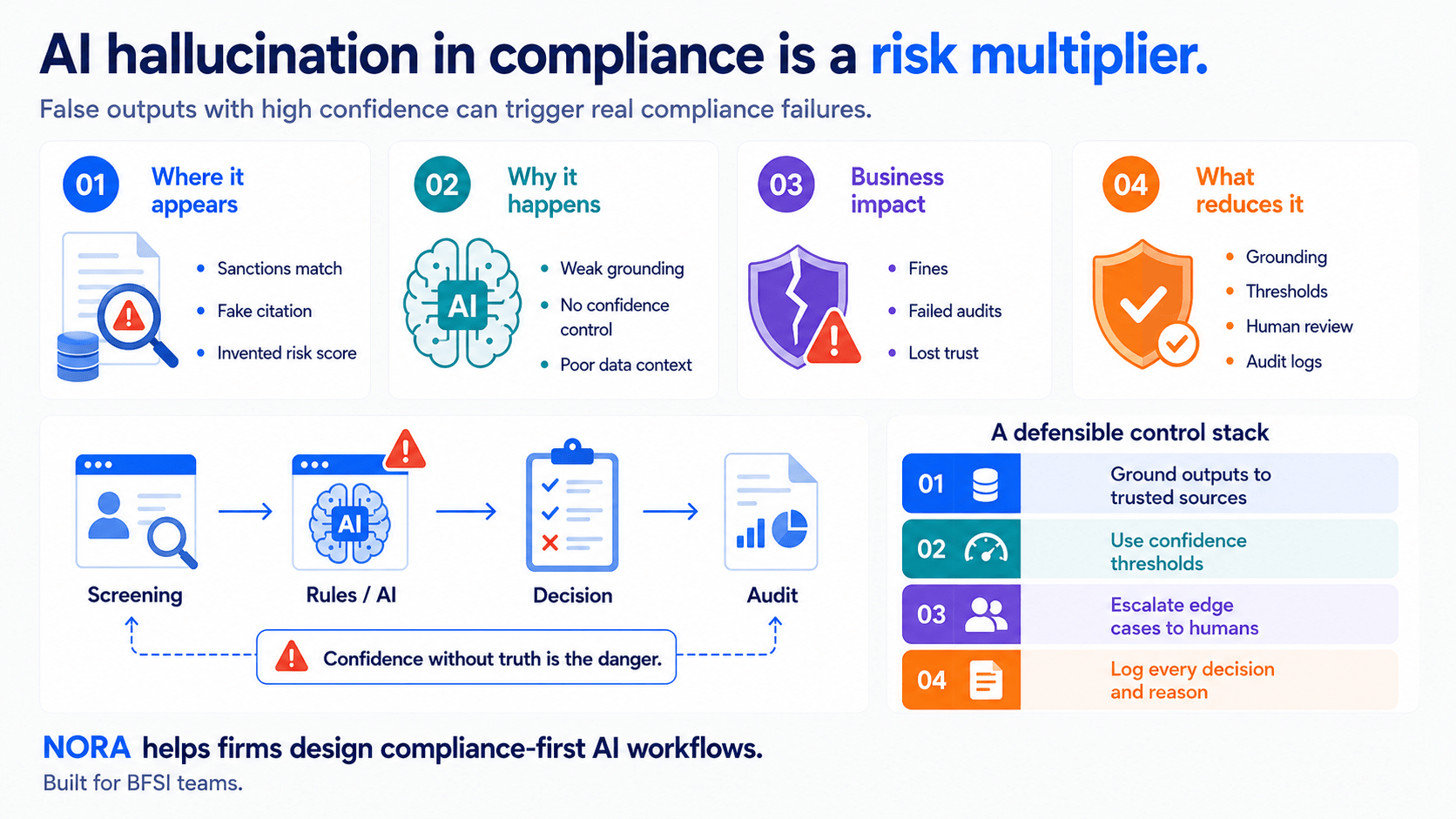
- Intelligent Document Processing (IDP) reads documents and converts them into structured data. Some platforms also offer basic validation, human review queues, and simple connectors. However, deeper orchestration – cross-system routing, business-rule enforcement, and escalation logic – is where a dedicated workflow automation layer adds the most value.
- AI workflow automation sits on top of IDP. It routes exceptions, applies business rules, and pushes clean records into ERP, TMS, or claims systems.
- The global IDP market reached roughly $3.0 billion in 2025 and is projected to climb toward $29.7 billion by 2033, a 33.8% CAGR, per Grand View Research.
- Teams that stop at extraction typically still employ someone to key data into the next system by hand, which caps the ROI of IDP alone.
- SmartDev’s NORA layer combines document intake, classification, extraction, validation, and system push in one pipeline, reaching 95–98% extraction accuracy on standard documents with an average ROI in 8.2 months.
- Bottom line: pick up the document type with the highest volume and lowest structural variation first, then build the orchestration layer around it before automating everything else.
Introduction: Two Layers, One Confusing Category
Vendors sell “document automation” as a single product category, but the underlying capabilities usually split into two distinct jobs. Reading a document and extracting fields from it is one job. Deciding what happens to that extracted data next – routing it, validating it against business rules, pushing it into the right system – is a different job. Intelligent Document Processing (IDP) is built primarily to solve the first. Workflow orchestration, whether bundled into an IDP platform or run as a separate layer, is what solves the second.
The gap between the two shows up in a common pattern that industry analysts have documented repeatedly: a team pilots extraction, is impressed by accuracy numbers, and only later realizes the manual work has shifted rather than disappeared. For example, Gartner’s Critical Capabilities research for IDP solutions, published September 2025, evaluates vendors across ten capability areas. Raw OCR accuracy is notably not one of them, since the analyst firm treats accurate reading as table stakes rather than the differentiator. Instead, the capabilities that separate mature platforms include orchestration and automation, data review workflows, and system integration. In other words, what a platform does after it reads a document tends to matter more than how well it reads one in the first place.
This article maps that split for readers evaluating a document automation investment: what IDP delivers well, where a platform’s built-in features typically stop, what a dedicated workflow automation layer adds, and how to decide which combination a given operation need. It also walks through SmartDev’s NORA as one working example of a pipeline that connects both layers, since abstract architecture diagrams only go so far without a concrete reference point.
What Is the Document Processing Stack?
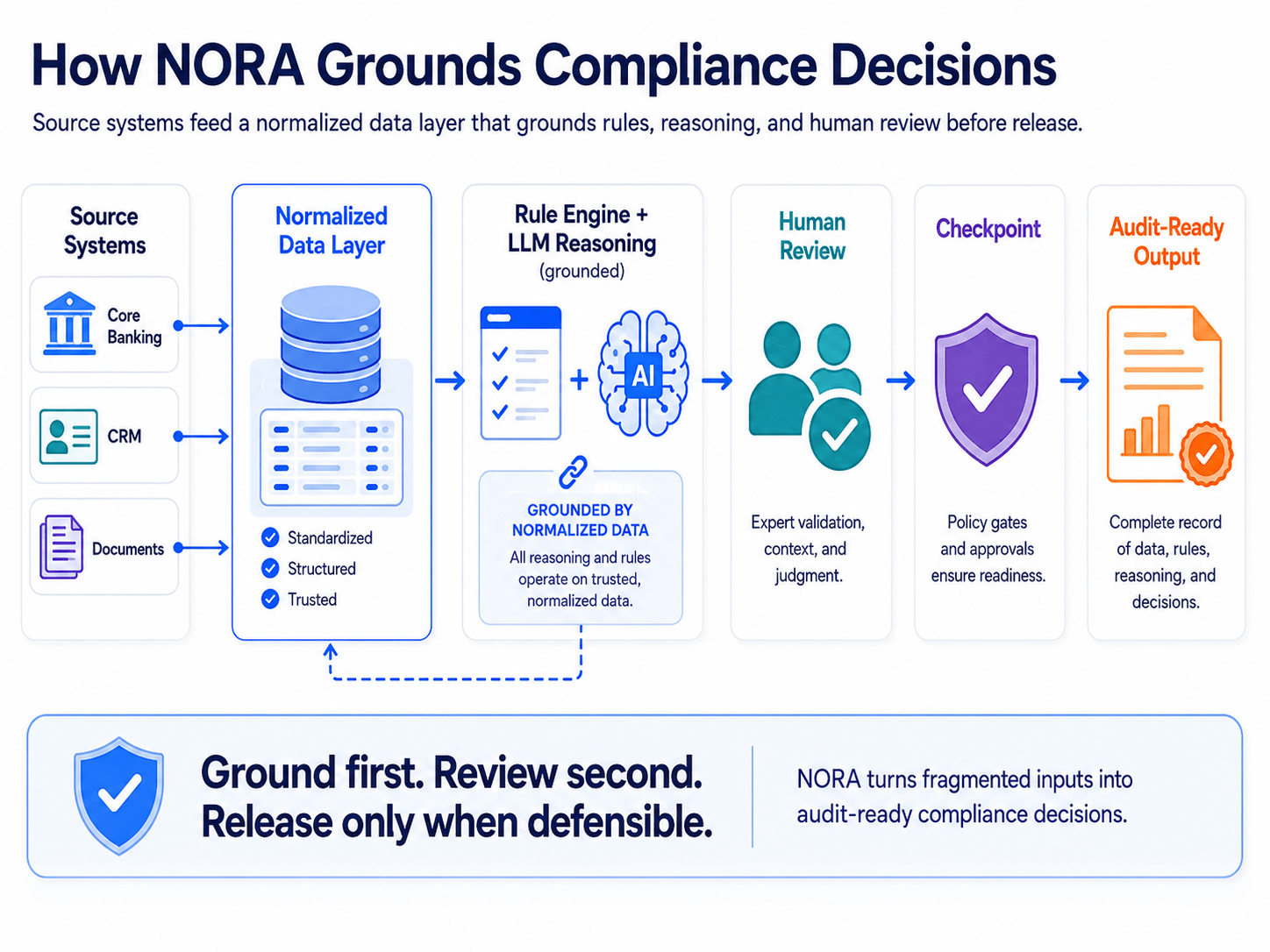
Think of the document processing stack as four layers stacked on top of each other, each handling a distinct job. A document arrives, gets read, gets judged, and finally gets acted on. Skipping any layer just moves the manual work somewhere else in the chain rather than removing it.
Layer 1: Document Intake
This layer captures the document itself, regardless of the source or format. Email attachments, scanned paper, portal uploads, and API feeds all need a common entry point before anything downstream can process them consistently. Weak intake design is a common, underrated failure point: teams that skip standardizing intake often end up rebuilding extraction logic per channel later.
Layer 2: Intelligent Document Processing (IDP)
IDP classifies the document type and extracts structured fields from it – vendor name, invoice total, policy number, diagnosis code – using a mix of optical character recognition (OCR), intelligent character recognition (ICR) for handwriting, natural language processing, and machine learning models. This is the layer most vendors market loudest, and it is genuinely valuable. It is also, on its own, incomplete.
Layer 3: AI Workflow Automation
This layer takes the structured output from IDP and decides what happens to it. It applies business rules, routes low-confidence extractions to a human reviewer, triggers approval chains, and orchestrates the sequence of steps a document needs to move through before it is considered “done.” Workflow automation is where most of the actual labor savings live, because it is the layer that removes the manual handoff, not just the manual reading.
Layer 4: System of Record Integration
The final layer pushes validated data into the systems that run the business – an ERP, a transportation management system (TMS), a claims platform, or an EHR – through an API or a pre-built connector. Without a reliable integration layer, even perfectly extracted and validated data still needs someone to copy and paste it into the next screen.
Takeaway: The stack has four layers, but only two get most of the marketing attention – intake and IDP. The layers that remove manual labor, workflow automation and system integration, are the ones companies underinvest in.
Where IDP Fits: The Extraction Layer
IDP earns its place in the stack because reading unstructured documents at scale is a genuinely hard problem, and it has gotten dramatically better in the last few years. Understanding exactly what it delivers – and where its usefulness stops – helps teams avoid overbuying or underbuying this layer.
What IDP Actually Does Well
Modern IDP combines OCR for printed text, ICR for handwriting, and machine learning classifiers that identify document type without manual sorting. Accuracy still varies by document quality and format, but for clean, digital-born documents with consistent layouts, field-level extraction accuracy commonly lands in the high 90s, while messier scans or handwriting-heavy forms can run meaningfully lower, per DigiParser’s 2026 OCR accuracy benchmark across major extraction engines. A similar pattern shows up in invoice-specific benchmarking: most 2026-era tools extract header fields like vendor name, invoice number, and total amount above 97% accuracy, though line-item extraction across multi-row tables remains harder and more variable, according to ChatFin’s 2026 enterprise benchmark comparison.
In practice, this means IDP can meaningfully reduce, though rarely fully eliminate, one of the most tedious tasks in document-heavy operations: manually retyping data from a PDF or scan into a spreadsheet or system field. How much of that task disappears depends heavily on document quality, format consistency, and how well the validation layer around IDP is configured — a well-formatted digital invoice behaves very differently from a faxed, handwritten form, even when both pass through the same platform.
The Technology Underneath IDP
Most modern IDP platforms layer several technologies together rather than relying on one. OCR handles machine-printed text, ICR handles handwriting, computer vision handles layout and table structure, and large language models increasingly handle semantic understanding – distinguishing a “bill to” field from a “ship to” field even when the layout varies. This combination is why 2026-era IDP performs so differently from the template-matching OCR tools of a decade ago.
Market Growth Signals Real Demand
The numbers back up the shift. Grand View Research valued the global IDP market at approximately $3.0 billion in 2025. The firm projects growth to $3.9 billion in 2026. By 2033, it expects the market to reach roughly $29.7 billion – a 33.8% compound annual growth rate. Formal analyst coverage backs up that growth curve too.
Gartner published its inaugural Magic Quadrant for Intelligent Document Processing Solutions in September 2025. IDC ran a parallel vendor assessment the same season, evaluating more than 20 IDP providers across structured, unstructured, and semi-structured document capabilities, per IDC’s report. Two major analyst firms publishing dedicated IDP coverage in the same window is a reasonable signal that the category has matured past early-adopter status.
Where IDP Hits Its Ceiling
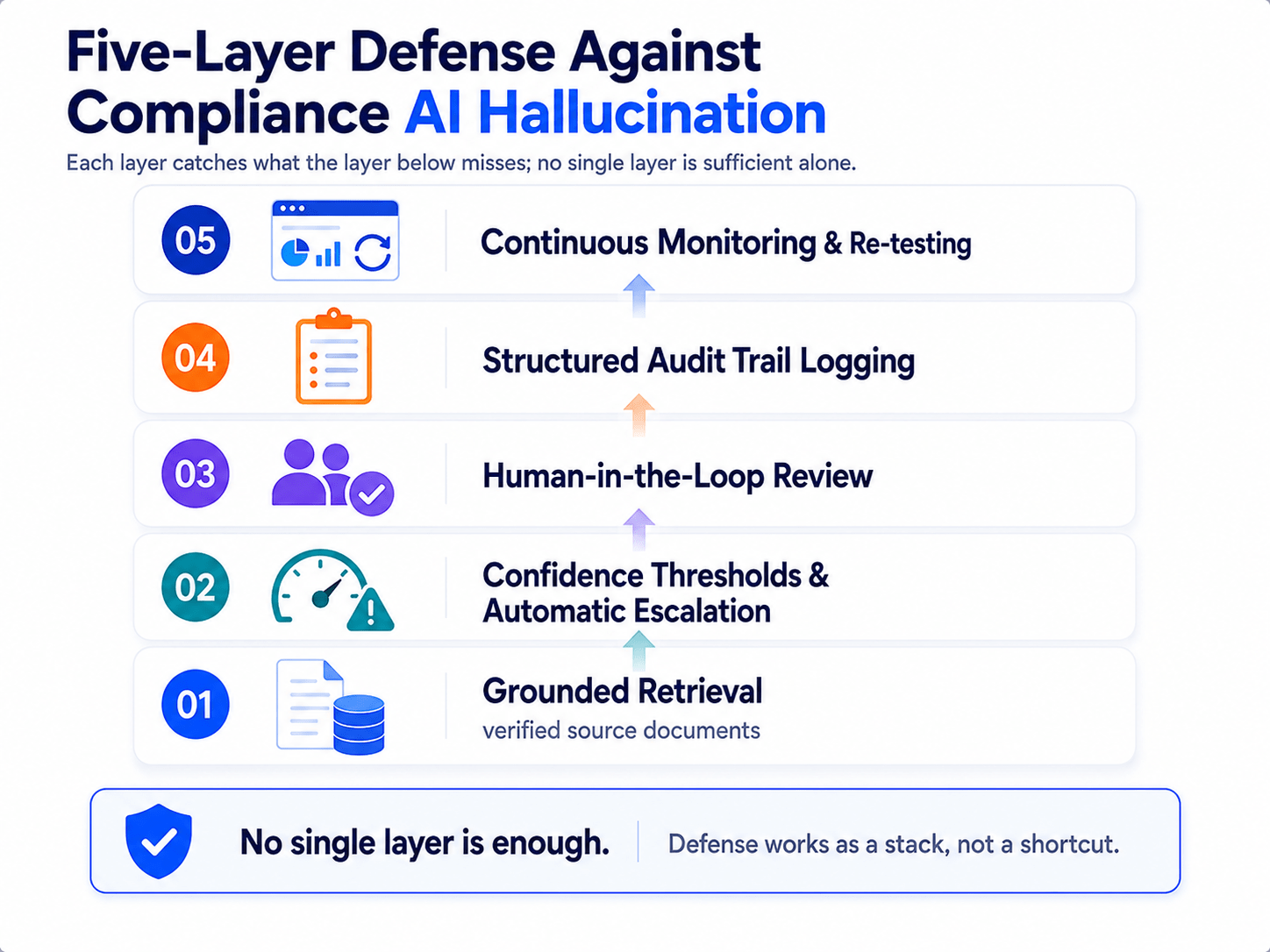
IDP has a well-defined boundary and knowing it prevents wasted budget. It extracts data; it does not decide what to do with that data. It cannot independently determine whether an extracted invoice total should trigger a payment, whether a flagged discrepancy needs a manager’s sign-off, or which ERP field a given value belongs in. Those decisions belong to the workflow automation layer, and companies that buy IDP expecting it to also handle routing and system updates are buying the wrong layer for the problem they actually have.
A Real-World Illustration
SmartDev’s own AI-powered invoice processing case study shows this boundary clearly. The extraction and validation layer reached 93% invoice validation accuracy, but the value came from what happened after extraction: 90% straight-through processing, a 40% reduction in manual review time, and a 60% increase in processing capacity. None of those numbers come from extraction accuracy alone; they come from the workflow layer that decides what to do with each extracted field.
Takeaway: IDP is the reading layer, not the deciding layer. Buy it to eliminate manual data entry, but budget separately – in planning and in tooling – for the orchestration layer that turns extracted fields into finished work.
Where AI Workflow Automation Wins: The Decision Layer
If IDP answers “what does this document say,” AI workflow automation answers “what should happen next.” This is the layer that actually removes headcount pressure from operations teams, because it eliminates the manual handoff between extraction and action, not just the manual reading.
Validation and Confidence Routing
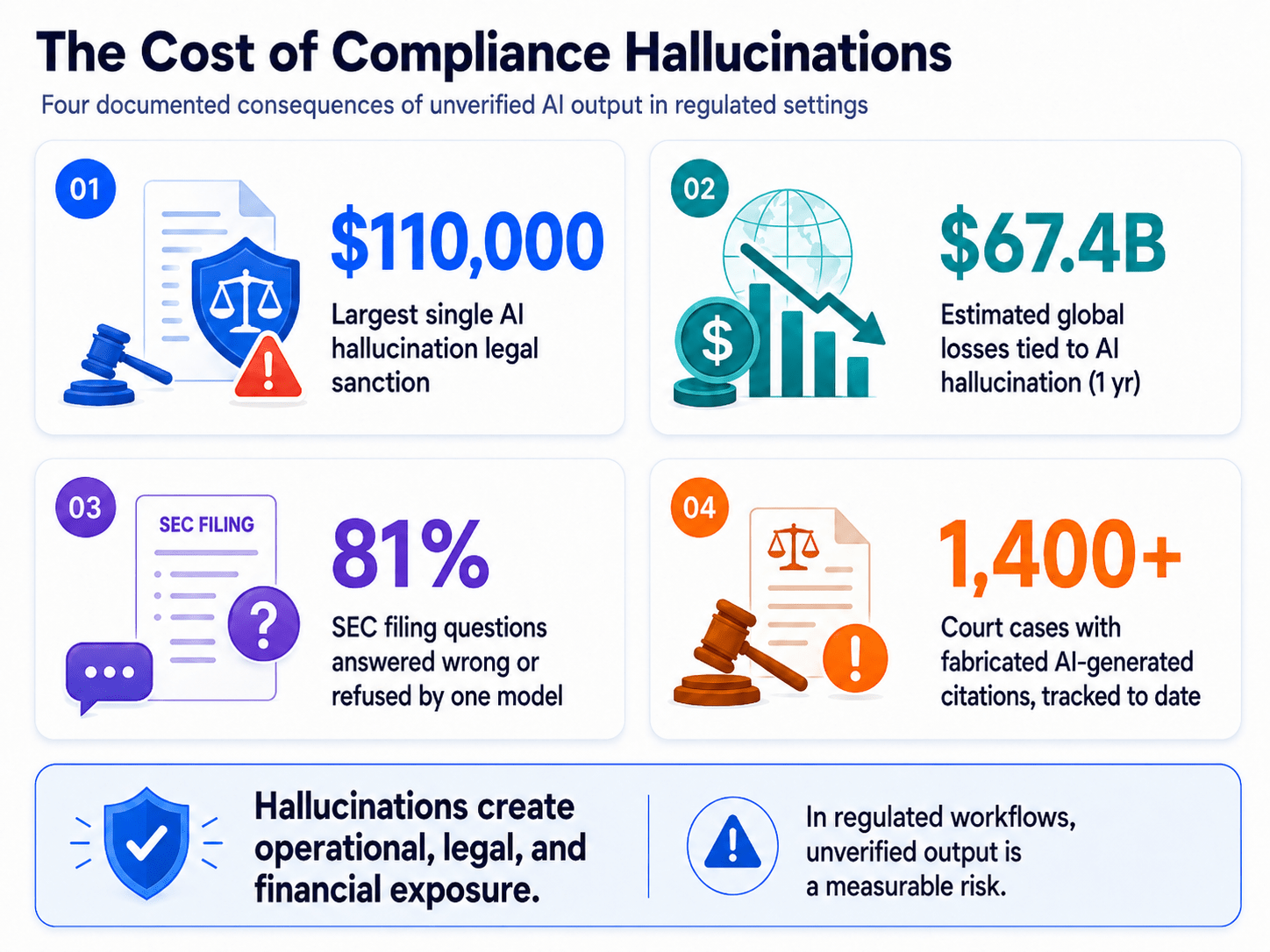
Every extraction comes with a confidence score. High-confidence fields flow straight through to the next system. Low-confidence fields route automatically to a human reviewer, so people only look at the fraction of documents that genuinely need judgment. This single mechanism is often responsible for most of the labor savings in a document automation project, since it removes the default behavior of manually checking every record regardless of how confident the extraction was.
Business Rule Enforcement
Workflow automation applies the specific rules a business runs on: three-way matching between a purchase order, a goods receipt, and an invoice; arithmetic checks on line-item totals; policy-number format validation. These rules encode institutional knowledge that used to live only in a senior employee’s head, which also solves a quieter problem, the risk of losing that knowledge when the employee leaves.
Orchestration Across Systems
Real documents rarely touch just one system. An insurance claim might need to check a policy database, flag a fraud model, notify an adjuster, and update a claims platform, all before it counts as “processed.” Workflow automation coordinates that sequence, retrying failed steps, escalating stuck cases, and keeping a full audit trail of what happened and when, the same auditability requirement SmartDev’s compliance automation guide covers in more depth for regulated industries. In healthcare specifically, this orchestration layer often needs to speak the interoperability standards a hospital or payer already runs on, such as HL7’s Fast Healthcare Interoperability Resources (FHIR), so extracted data lands in a format the EHR can consume rather than a proprietary format that needs another translation step.
The Market Is Scaling Around This Layer, Not Just IDP
Analysts increasingly frame this orchestration layer under the broader “hyperautomation” umbrella. Gartner defines hyperautomation as the combined use of AI, machine learning, RPA, process mining, and intelligent document processing to identify and automate as many business processes as possible, explicitly treating IDP as one input into a larger orchestration strategy rather than the whole solution. Coworker AI’s 2026 statistics roundup cites Mordor Intelligence data projecting the hyperautomation market to grow from $18.64 billion in 2026 to $45.17 billion by 2031, and separately notes that 66% of organizations have now adopted automation in at least one business function, up from 57% a year earlier.
That adoption curve matters for budget conversations. Forrester’s Total Economic Impact research, cited in Quixy’s 2026 workflow automation statistics roundup, documented a 248% three-year ROI for a composite enterprise deploying workflow automation – one of the stronger documented ROI figures in enterprise software. Numbers like that explain why operations leaders increasingly ask vendors “what happens after extraction,” not just “how accurate is your OCR.”
Takeaway: Workflow automation is where the biggest labor savings materialize through confidence-based routing, rule enforcement, and cross-system orchestration. Treat workflow automation as the primary investment, with IDP providing the clean data it needs to operate effectively.
IDP vs. AI Workflow Automation: Choosing the Right Layer for Your Use Case
Neither layer is universally “better.” The right starting point depends on document volume, structural complexity, and how many systems a document needs to touch before it counts as processed. The table below gives a practical way to reason for the choice.
When IDP Alone Might Be Enough
Low-volume, single-destination document flows sometimes don’t justify a full workflow layer yet. A small team processing under 200 documents a month, feeding one downstream system, with a person who has spare capacity to review every extraction, can reasonably start with IDP alone and add orchestration later once volume grows.
When You Need the Full Stack
Higher volume changes math quickly. At roughly 200 or more documents per month with a 10-minute manual processing time per document, per SmartDev’s AI Automation: Document & Data Processing playbook, the case for adding a workflow layer becomes straightforward math rather than a judgment call. Multi-system flows – claims that touch a policy database and a fraud model, invoices that touch a PO system and an AP ledger – need orchestration regardless of volume, because a human is otherwise stuck being the integration layer between systems that don’t talk to each other.
Industry Patterns Worth Knowing
BFSI and fintech document flows involving KYC, AML, and sanctions screening lean heavily toward full-stack automation because of both volume and compliance auditability requirements – a pattern SmartDev’s BFSI/Fintech practice sees consistently.
Healthcare document flows follow a similar pattern for different reasons: HIPAA-driven auditability needs, not just volume, push most healthcare operations toward the full stack, as detailed in SmartDev’s Healthcare & Medical Services solutions. Manufacturing and logistics document flows, from bills of lading to customs paperwork, tend to sit between – high volume but often simpler decision logic than regulated finance or healthcare, a profile common across SmartDev’s manufacturing engagements.
| Signal | Lean toward IDP only | Lean toward full stack |
| Monthly document volume | Under ~200 documents | 200+ documents |
| Destination systems | One system | Two or more systems |
| Review capacity | Spare human capacity to review everything | No spare capacity; reviewers already stretched |
| Compliance requirements | Low; minimal audit trail need | High; needs full auditability |
| Decision complexity | Simple, single-rule checks | Multi-rule, multi-system decision logic |
Takeaway: Volume alone does not determine the right solution. System complexity and compliance requirements matter just as much, so multi-system, regulated workflows often need the full stack regardless of volume.
Building the Full Stack: How NORA Connects Both Layers
SmartDev built NORA specifically to close the gap this article has been describing – the gap between “we extracted the data” and “the work is actually done.” Rather than treating IDP and workflow automation as separate purchases, NORA runs them as one connected pipeline.
The Five-Stage NORA Pipeline
NORA processes a document through five stages, and understanding each one clarifies exactly where extraction ends, and decision-making begins. Document intake accepts input from email, scans, portal uploads, or API feeds without requiring a specific format. Classification identifies the document type automatically – invoice, Bill of Lading, purchase order – without manual pre-sorting. Extraction pulls structured fields such as vendor, amounts, dates, and line items, attaching a confidence score to each one. Validation routes high-confidence fields through automatically while sending low-confidence fields to a human reviewer. System push then lands the clean, validated data directly into the client’s ERP, TMS, or AP system through an API or a pre-built connector.
NORA: 5-Stage Document Pipeline
NORA’s document pipeline moves information from raw documents to validated, system-ready data, while limiting human intervention to fields that need to be reviewed.
- Document Intake: NORA collects documents from email, scanned files, portals, or API feeds, creating a single-entry point for incoming information.
- Classification: The system identifies each document type, such as invoices, Bills of Lading, or purchase orders, so it can apply the appropriate extraction logic.
- Extraction: NORA extracts structured fields including vendor names, amounts, dates, and line items. Each extracted field receives a confidence score, allowing the system to distinguish reliable information from uncertain results.
- Validation: This stage acts as the key control point. High-confidence fields move forward automatically, while low-confidence fields are routed to human reviewers for verification or correction.
- System Push: Once validated, NORA sends clean data into systems such as ERP, TMS, or AP platforms through APIs or pre-built connectors. This removes the need for manual re-entry and completes the automation loop.
The result is a human-in-the-loop workflow, where people focus only on uncertain fields rather than reviewing every document from start to finish.
Benchmark Numbers Worth Knowing
Real benchmarks matter more than generic “99% accurate” marketing claims. Across NORA deployments, standard documents reach 95–98% extraction accuracy, improving 3–5% further in the first 90 days as the system learns from corrections. Bills of Lading, which involve more handwriting and layout variation, run somewhat lower at 92–96%. Clients typically see a 70–85% cost reduction on standard invoice processing and an average ROI of 8.2 months, drawn from deployments across 300+ global clients in logistics, BFSI, and professional services.
The earlier invoice processing example – SmartDev’s engagement with Finexis, a Singapore-based financial advisory firm affiliated with a global investment firm, is one instance of this same pipeline in production. Finexis needed faster, more consistent insurance KYC document checks after previously relying on slow, experience-dependent manual reviews by advisers and administrators. SmartDev deployed an LLM-based validation system with product-specific compliance rules built in, reaching 93% document validation accuracy and 90% support effectiveness without escalation. Manual review time dropped 40%, processing capacity rose 60%, and human checking errors fell 70%. Concrete numbers that sit inside the benchmark range above, not a best-case demo figure.
Deployment Timeline and Ownership
A scoped pilot typically runs 6 to 8 weeks from the first call to a working assistant in the client’s environment, with minimal IT involvement required beyond API access. NORA integrates with an existing ERP rather than replacing it, a distinction that matters to operations leaders who just invested in their current systems and have no appetite for a rip-and-replace project. SmartDev’s 3-Week AI Discovery Program maps document types and validation rules upfront, and the 10-Week AI Product Factory then builds and deploys the working pipeline.
Industries Where NORA Is Already Running
NORA shows up across compliance, fintech, and insurance document flows because those industries combine high volume with strict auditability requirements. SmartDev’s insurance document case study and the compliance ROI calculator both walk through how the same core pipeline adapts to different document types and regulatory contexts without a ground-up rebuild each time.
Takeaway: NORA goes beyond IDP by adding the orchestration layer around extraction, validation, routing, and system integration. This combination turns extracted data into reliable, actionable workflow automation rather than simply better document processing.
From Pilot to Production: A Practical AI Rollout Roadmap
Regardless of which layer a team starts with, the sequence below reduces the risk of building the wrong thing first. Skipping steps rarely save time; it usually just moves the rework later in the project when it costs more to fix.
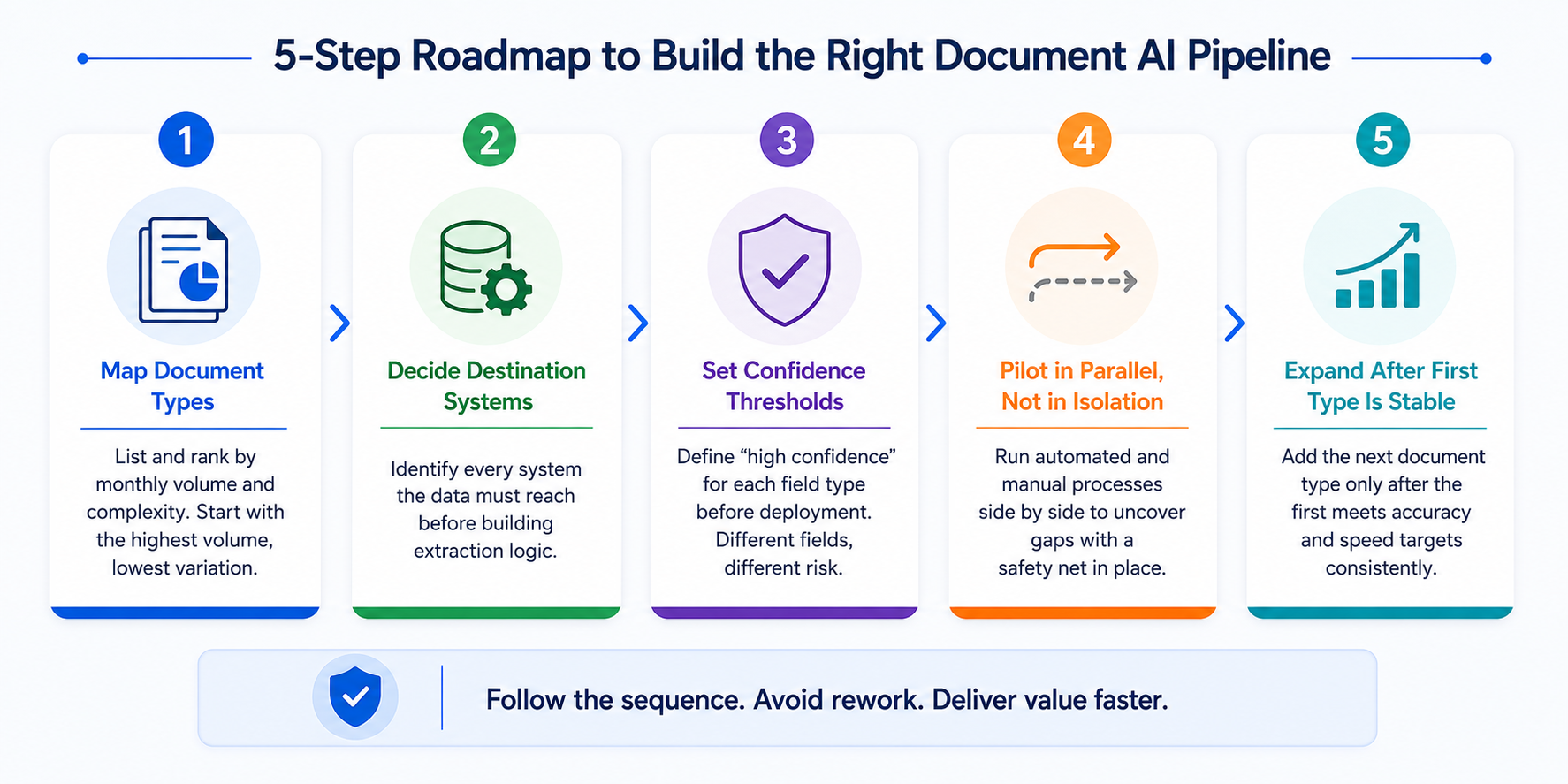
Step 1: Map Document Types by Volume and Complexity
Start by listing every document type that enters the operation, then rank each one by monthly volume and structural variation. A vendor invoice with a consistent layout behaves very differently from a handwritten intake form or a scanned Bill of Lading, and the extraction difficulty scales with that variation, not with document length or importance. Teams frequently misjudge this step by picking up the document type that feels most urgent rather than the one that is actually easiest to automate well.
The document with the highest volume and lowest structural variation is almost always the right starting point, because it delivers the fastest, most visible win and gives the team a reference implementation to point to internally. That early win matters for reasons beyond ROI math, it builds the internal credibility needed to get budget and IT support for the second and third document types, which are usually messier than the first.
Step 2: Decide the Destination Systems Upfront
Identify every system where the extracted data needs to be reached before writing a single line of extraction logic. An invoice that only needs to land in an AP ledger is a much simpler integration problem than a claim that needs to touch a policy database, a fraud model, and a claims platform in sequence. Mapping this out early, including which fields each destination system expects and in what format, prevents a common and expensive mistake: building extraction logic around a schema that turns out not to match what the downstream system needs.
This step is also where compliance and IT stakeholders should get involved, not after the pilot is built. Access controls, audit logging requirements, and data residency rules vary by destination system, and retrofitting them into a pipeline that was designed without them in mind is far more expensive than designing them from the start.
Step 3: Set Confidence Thresholds Deliberately
Define what “high confidence” means for each field type before deployment, not after the first batch of extraction errors surfaced in production. A diagnosis code, a shipping date, and a customer’s mailing address all carry different risk profiles if extracted incorrectly and treating them with the same confidence threshold either creates unnecessary manual review load or lets risky errors through unchecked.
Set these thresholds with the people who will deal with the consequences of a wrong extraction, a compliance officer for regulated fields, an ops lead for financial fields – rather than leaving the decision entirely to the engineering team building the pipeline. Thresholds set purely on statistical confidence, without input from the people managing downstream risk, tend to need painful re-tuning a few months into production.
Step 4: Pilot in Parallel, Not in Isolation
Run the automated pipeline alongside the existing manual process for a defined period before fully switching over, rather than cutting over all at once. Parallel running lets the team compare automated output against what a human reviewer would have produced, which surfaces gaps in validation logic while the manual process still exists as a safety net.
This step also builds trust with the people whose workflow is changing. Staff who see the automated system’s outputs checked against their own judgment for several weeks, rather than replacing their judgment overnight, tend to adopt the new system with far less resistance than staff handed a fully automated process with no transition period.
Step 5: Expand Only After the First Type Is Stable
Add the next document type only once the first one hits its target accuracy and processing time consistently, ideally across a full reporting cycle rather than just a few good weeks. Expanding too early spreads engineering and review attention thin across multiple unstable workflows at once, which tends to delay every workstream rather than accelerating any of them.
A stable first deployment also becomes the template for the next one, the confidence thresholds, review workflows, and integration patterns rarely need to be rebuilt from scratch for the second document type. This is where the earlier investment in structured discovery pays off: teams that mapped their document types and destination systems properly in Step 1 and Step 2 usually find the second rollout takes a fraction of the time the first one did.
Takeaway: Sequencing matters more than tooling. A well-planned rollout with modest tools can outperform a poorly sequenced implementation built on best-in-class technology.
Frequently Asked Questions
Is IDP the same thing as AI workflow automation?
No. IDP reads a document and extracts structured fields from it. AI workflow automation takes that extracted data and decides what happens next, which system it updates, who reviews it, and which downstream action it triggers. IDP is one input layer inside a larger automation stack, not a replacement for it.
Can a company use IDP without workflow automation?
Yes, and many do. A standalone IDP tool can extract fields from invoices or forms and hand them to a human for manual entry into the next system. This works for low volume or early-stage pilots, but it caps the ROI because the manual handoff after extraction remains on the bottleneck.
How long does it take to deploy an AI workflow automation layer on top of existing IDP tools?
A scoped pilot around one document type typically takes 6 to 8 weeks from first call to a working assistant in a client’s environment, based on SmartDev’s NORA deployments. Full rollout across multiple document types and systems usually extends over several months as validation rules and integrations mature.
What accuracy should we expect from document extraction?
Standard structured documents like invoices typically reach 95 to 98 percent extraction accuracy with a mature IDP and validation layer, improving further in the first 90 days as the system learns from corrections. Complex or handwritten documents such as Bills of Lading tend to land lower, in the low-to-mid 90s, until volume and tuning close the gap.
Which document types should a company automate first?
Start with the document type that combines high volume, low structural variation, and a clear downstream system to push data into, such as vendor invoices or purchase orders. This combination delivers the fastest payback and gives teams a reference implementation before they tackle messier, lower-volume document types.
Conclusion
The document processing stack has two distinct layers that vendors routinely blur together in their marketing. IDP reads documents and extracts structured data with genuinely impressive accuracy in 2026. Technology has earned its market growth. But extraction alone leaves the actual bottleneck untouched: the decision about what happens to that data next, and the manual handoff into the next system.
AI workflow automation is the layer that removes that bottleneck. It validates extracted fields, routes exceptions to the right person, enforces business rules, and pushes clean data into the systems that run the business. Teams that invest in this layer alongside IDP, rather than treating extraction as the finish line, see the labor savings and ROI numbers that document automation vendors promise in their pitch decks.
The right starting point depends on volume, system complexity, and compliance requirements, not on which vendor has the flashiest extraction demo. Map the document types, rank them by volume and complexity, and build the orchestration layer around the highest-value one first. That sequencing – more than any single tool – determines whether a document automation project actually reduces headcount pressure or just adds another dashboard nobody checks.
If you’re scoping this kind of project, SmartDev combines AI development, custom software engineering, and machine learning development under one roof, backed by ISO/IEC 27001 and SOC 2 Type II certifications. Reach out through SmartDev’s contact page to talk through your specific document workflow – extraction, orchestration, or both.