

TL;DR
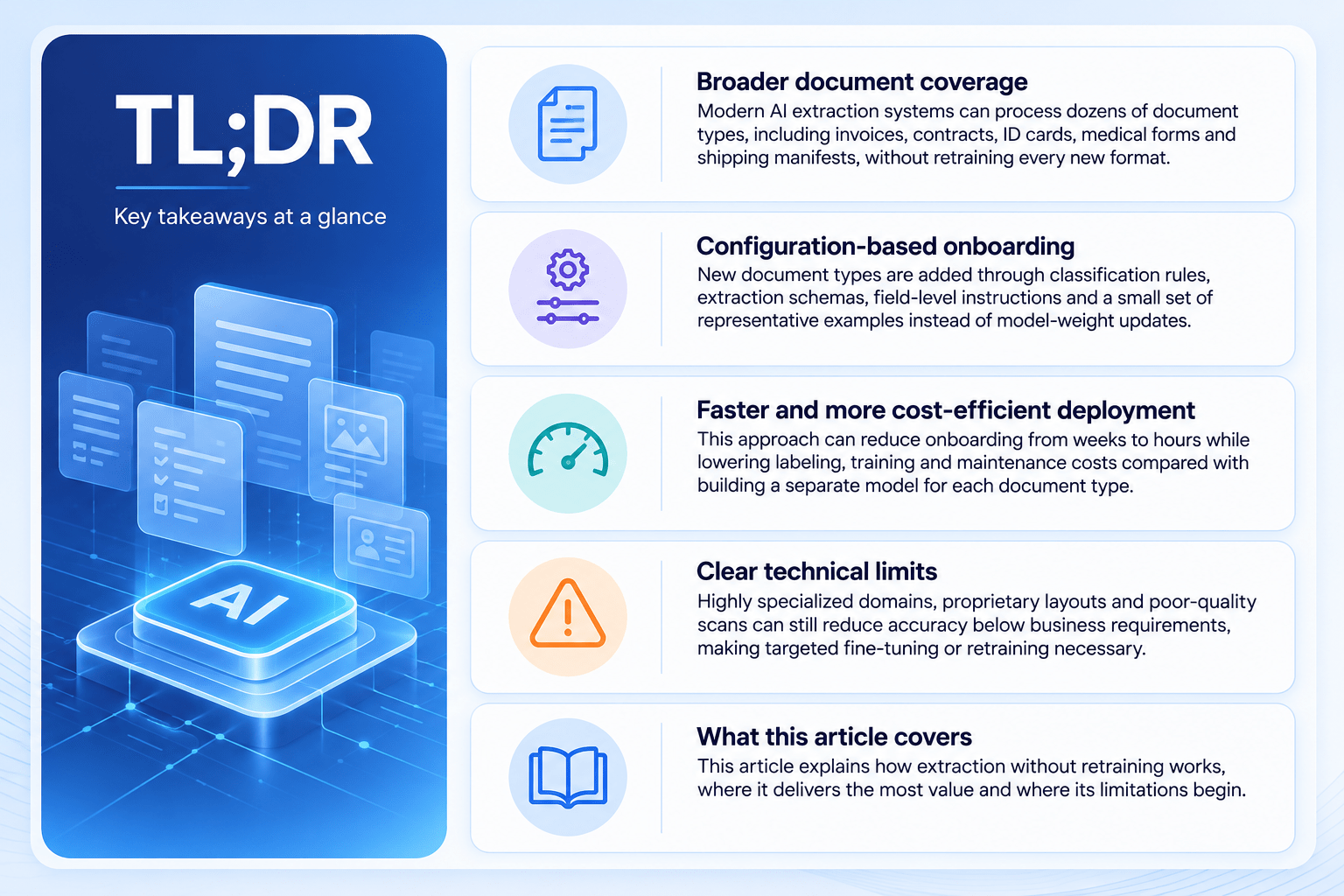
- Broader document coverage: Modern AI extraction systems can process dozens of document types, including invoices, contracts, ID cards, medical forms, and shipping manifests, without retraining every new format.
- Configuration-based onboarding: New document types are added through classification rules, extraction schemas, field-level instructions, and a small set of representative examples instead of model-weight updates.
- Faster and more cost-efficient deployment: This approach can reduce onboarding from weeks to hours while lowering labeling, training, and maintenance costs compared with building a separate model for each document type.
- Clear technical limits: Highly specialized domains, proprietary layouts, and poor-quality scans can still reduce accuracy below business requirements, making targeted fine-tuning or retraining necessary.
- What this article covers: This article explains how extraction without retraining works, where it delivers the most value, and where its limitations begin.
Introduction: Why Document Variety Traditionally Leads to Retraining
Every organization running data extraction on incoming documents eventually hits the same wall. A new document type shows up – a new vendor’s invoice format, a new government form, a new insurance claim layout. The extraction system that worked yesterday suddenly starts making mistakes.
In classical machine learning pipelines, the fix for this kind of document extraction failure was almost always the same. Collect a new labeled dataset for that document type. Retrain or fine-tune the model, validate it, then redeploy. Multiply this across 50, 100, or 200 document types, and the retraining burden becomes enormous. Data teams end up managing dozens of narrow extraction models. Each one is brittle, and each needs its own retraining cycle whenever a template changes.
Large language models with strong document understanding capabilities have changed this equation. Instead of training a separate model per document type, a single general-purpose model can be configured, not retrained, to handle new formats. It can extract data reliably from each one without a fresh retraining cycle. Understanding exactly what that means for document data extraction and retraining workflows – and what it doesn’t mean – is the focus of this article.
What Is AI Data Extraction?
AI data extraction is the process of automatically identifying and pulling structured information – names, dates, amounts, line items, identifiers – out of unstructured or semi-structured documents such as PDFs, scanned images, and photographs. It typically combines several capabilities:
- Layout and text understanding – reading text regardless of position, font, or table structure, including via OCR for scanned or photographed documents (see how OCR and IDP fit together in the broader document stack).
- Field identification – recognizing which piece of text corresponds to which concept (e.g., “Invoice Total” vs. “Subtotal”).
- Structuring – converting recognized fields into clean, structured output such as JSON, ready to feed into downstream systems like ERPs, CRMs, or databases.
The goal is to replace manual data entry with a system that can read a document the way a trained employee would, but at machine speed and scale.
What Does “Without Retraining” Mean?
This phrase gets used loosely in the market, so it’s worth being precise about what it actually covers.
Retraining means changing model weights. Retraining or fine-tuning a model involves updating its internal parameters using new labeled examples, which requires a training pipeline, compute resources, evaluation cycles, and redeployment (for a deeper look at that process, see our guide to AI model training). This is a heavyweight process, typically measured in days or weeks.
What can change without retraining
A general-purpose document-understanding model can adapt to a new document type through configuration alone: defining an extraction schema (what fields to pull), writing field-level instructions (how to interpret ambiguous fields), and supplying a handful of representative example s for in-context guidance. None of this touches the model’s weights – it changes what the model is asked to do, not the model itself.
No retraining does not mean no setup
Adding a 51st document type still requires work: someone needs to define the schema, write clear field descriptions, gather a few sample documents, and validate the output. The difference is that this work is configuration and testing, not data labeling at scale and model training. It is measured in hours, not weeks, and it doesn’t require machine learning expertise to execute.
Traditional AI Data Extraction vs Extraction Without Retraining
| Aspect | Traditional Approach (Model per Document Type) | Without-Retraining Approach (Configured General Model) |
| Onboarding a new document type | Collect and label a new dataset, retrain a model, validate, deploy | Define schema, write instructions, add a few examples, test |
| Time to onboard | Days to weeks | Hours to a few days |
| Required expertise | ML engineers, data labelers | Business/domain analysts, light technical review |
| Handling layout changes | Often requires retraining or a new model version | Usually absorbed by the model’s general reasoning, with schema tweaks if needed |
| Infrastructure | Separate trained model artifacts per document type | Shared underlying model, multiple lightweight configurations |
| Maintenance burden | Grows linearly with the number of document types | Grows much more slowly, concentrated in schema upkeep |
| Best suited for | Narrow, highly specialized, high-volume single document types | Broad document variety, evolving formats, moderate-to-high volume per type |
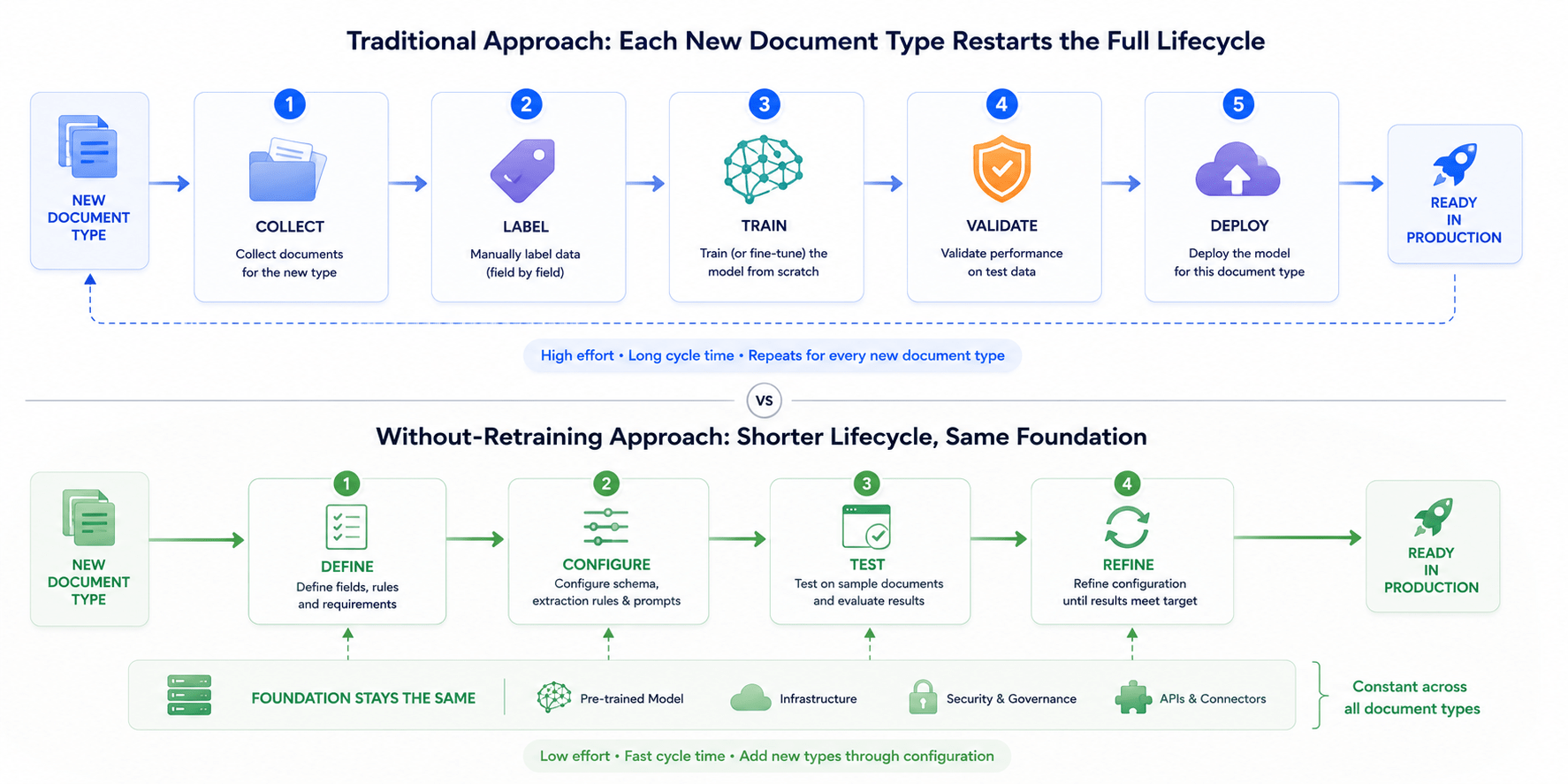
Thinking of this as a lifecycle comparison helps too: In the traditional approach, each new document type restarts the full “collect → label → train → validate → deploy” lifecycle.
In the without-retraining approach, each new document type enters a much shorter “define → configure → test → refine” lifecycle, while the underlying model and infrastructure stay constant.
 This shift is closely related to how AI workflow automation differs from legacy IDP more broadly – legacy IDP tends to lock in rigid, per-template logic, while modern workflow automation is built around flexible, reusable configuration.
How AI Adds a New Document Type Without Retraining
When a new document type appears, a well-built extraction pipeline typically works through these steps:
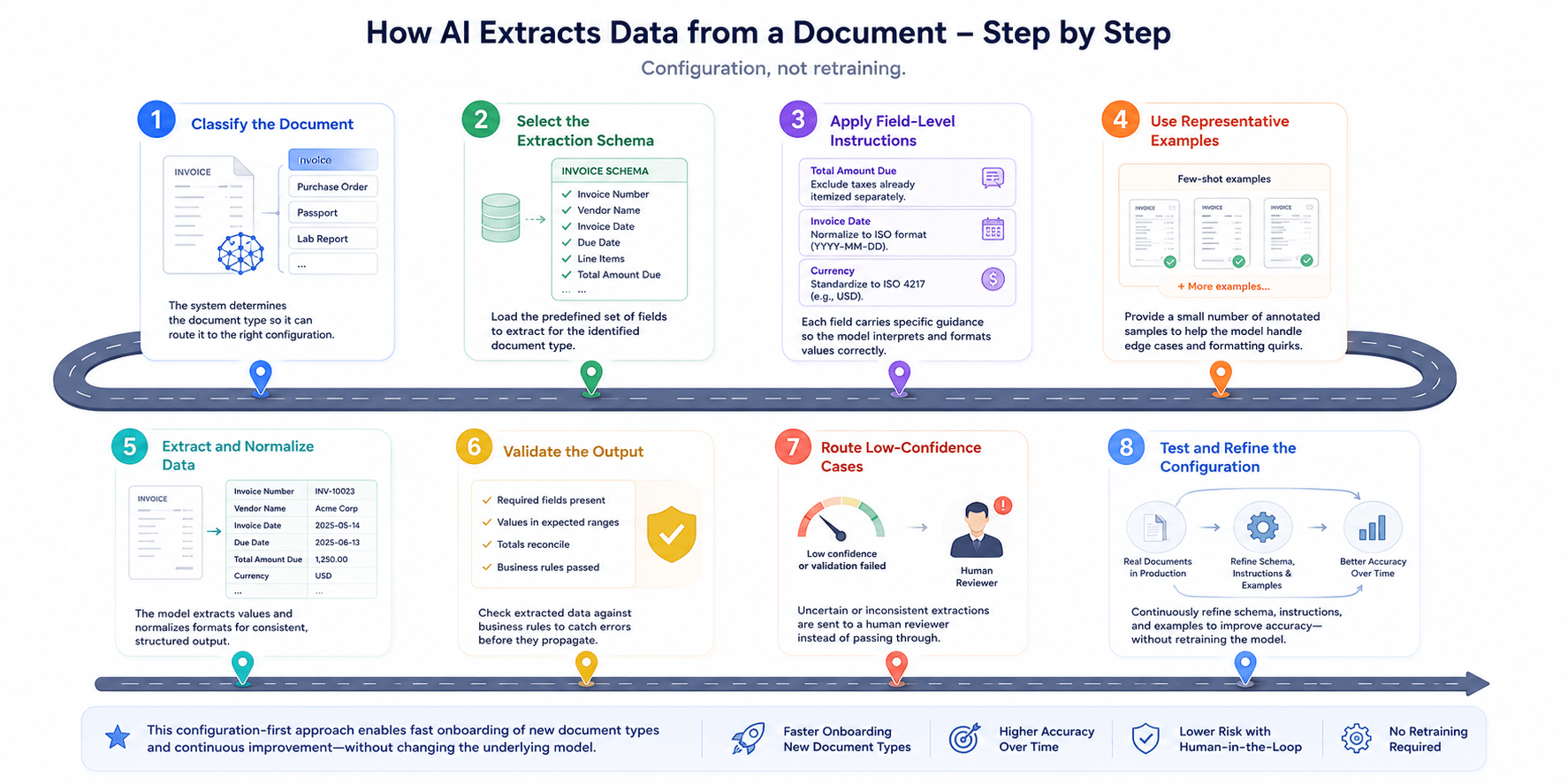 Step 1: Classify the document
The system first identifies the document type, such as an invoice, purchase order, passport, or lab report. It then routes the document to the correct configuration for further processing.
Step 2: Select the extraction schema
Based on the classification, the system loads a predefined set of fields for that specific document type. These fields may include invoice numbers, vendor names, due dates, and line items.
Step 3: Apply field-level instructions
Each field can include specific guidance to help the model interpret and format the extracted information correctly. For example, instructions may exclude separately itemized taxes from the total amount due. They can also require dates to follow ISO format, regardless of their appearance in the source document.
Step 4: Use representative examples
The system receives a small set of annotated documents as few-shot examples for reference. These examples help the model understand edge cases and formatting variations without updating its underlying weights.
Step 5: Extract and normalize data
The model reads the document and converts its content into structured data. During this process, it standardizes currencies, dates, units, and naming conventions. As a result, downstream systems receive consistent and usable information.
Step 6: Validate the output
The system checks extracted values against predefined business rules before passing them downstream. It verifies required fields, expected value ranges, and whether totals match individual line items. This validation logic helps teams complete KYC document reviews in minutes instead of days.
Step 7: Route low-confidence cases
When the model is uncertain or detects an inconsistency, it routes the document to a human reviewer. This prevents potentially incorrect data from passing silently through the workflow.
Step 8: Test and refine the configuration
As more documents are processed, teams can refine the schema, instructions, and examples. They may clarify field definitions or add examples for cases the model previously handled incorrectly. This process improves accuracy over time without retraining the underlying model.
Benefits of a Without-Retraining Approach
Faster document onboarding
New document types can go live in hours or days rather than weeks, since onboarding is a configuration task, not a machine learning project – the same speed advantage behind cases like AI-powered document processing cutting SOC 2 audit prep time by 50%.
Lower labeling requirements
Instead of hundreds or thousands of labeled examples needed to train a reliable model, a handful of representative samples is often enough to configure accurate extraction – a big part of why manual KYC review is so costly to maintain compared to AI-assisted workflows.
Less model maintenance
With one shared underlying model serving many document types, teams avoid managing dozens of separate model artifacts, each with its own versioning, monitoring, and retraining schedule.
Better adaptation to layout changes
When a vendor tweaks their invoice template or a form gets a new field, a general-purpose model with strong document understanding often adapts on its own, or with a small schema adjustment – rather than requiring a full retraining cycle.
Shared pipeline across document categories
Classification, validation, normalization, and human-review routing can all be built once and reused across every document type, rather than rebuilt for each new model.
Limitations and When Retraining May Still Be Required
The “without retraining” approach is powerful, but the claim needs realistic boundaries. There are situations where configuration alone won’t get accuracy where it needs to be, and targeted fine-tuning or retraining is still the right call:
Highly specialized terminology – deep domain jargon (certain areas of medicine, law, or scientific research) that a general-purpose model hasn’t seen enough of to interpret reliably.
Proprietary visual formats – unusual, non-standard layouts (custom-coded forms, dense technical schematics) that fall well outside typical document structures.
Poor handwriting or scan quality – degraded images, faint text, or difficult handwriting that push OCR and extraction accuracy down regardless of configuration.
Consistently low extraction accuracy – if a document type repeatedly underperforms even after schema and instruction refinement, that’s a signal the model may need domain-specific fine-tuning rather than more configuration. This is where a structured AI model testing framework becomes essential for spotting the pattern early.
Strict latency or deployment requirements – some environments (edge devices, air-gapped systems, ultra-low-latency use cases) may call for a smaller, purpose-trained model rather than a large general-purpose one.
In practice, most organizations end up with a hybrid: a configurable, general-purpose pipeline covering the majority of document types, with a small number of fine-tuned models reserved for the few cases where accuracy or infrastructure constraints demand it.
How to Evaluate a Multi-Document Extraction Solution
When assessing a vendor or an in-house approach for multi-document extraction, it’s worth asking:
- Onboarding time – How long does it actually take to onboard a genuinely new document type, and how much of that time is technical vs. business configuration?
- Layout-change resilience – What happens automatically when a document layout changes: does accuracy degrade silently, or is there monitoring and alerting in place?
- Human-in-the-loop review – How are low-confidence extractions handled? Is there a clear escalation path to a human reviewer?
- Business-user editability – Can the schema and field instructions be edited by business or operations staff, or does every change require engineering involvement?
- Accuracy benchmarking – What’s the accuracy benchmark per document type, and how is it tracked and reported over time?
- Escalation to fine-tuning – Is there a clear path to fine-tuning or a specialized model when a document type consistently underperforms?
- System integration – How well does the solution integrate with existing systems (ERP, CRM, RPA, data warehouses) once data is extracted?
- Governance and compliance – Are access controls, audit trails, and data-handling policies documented and appropriate for the sensitivity of the documents involved?
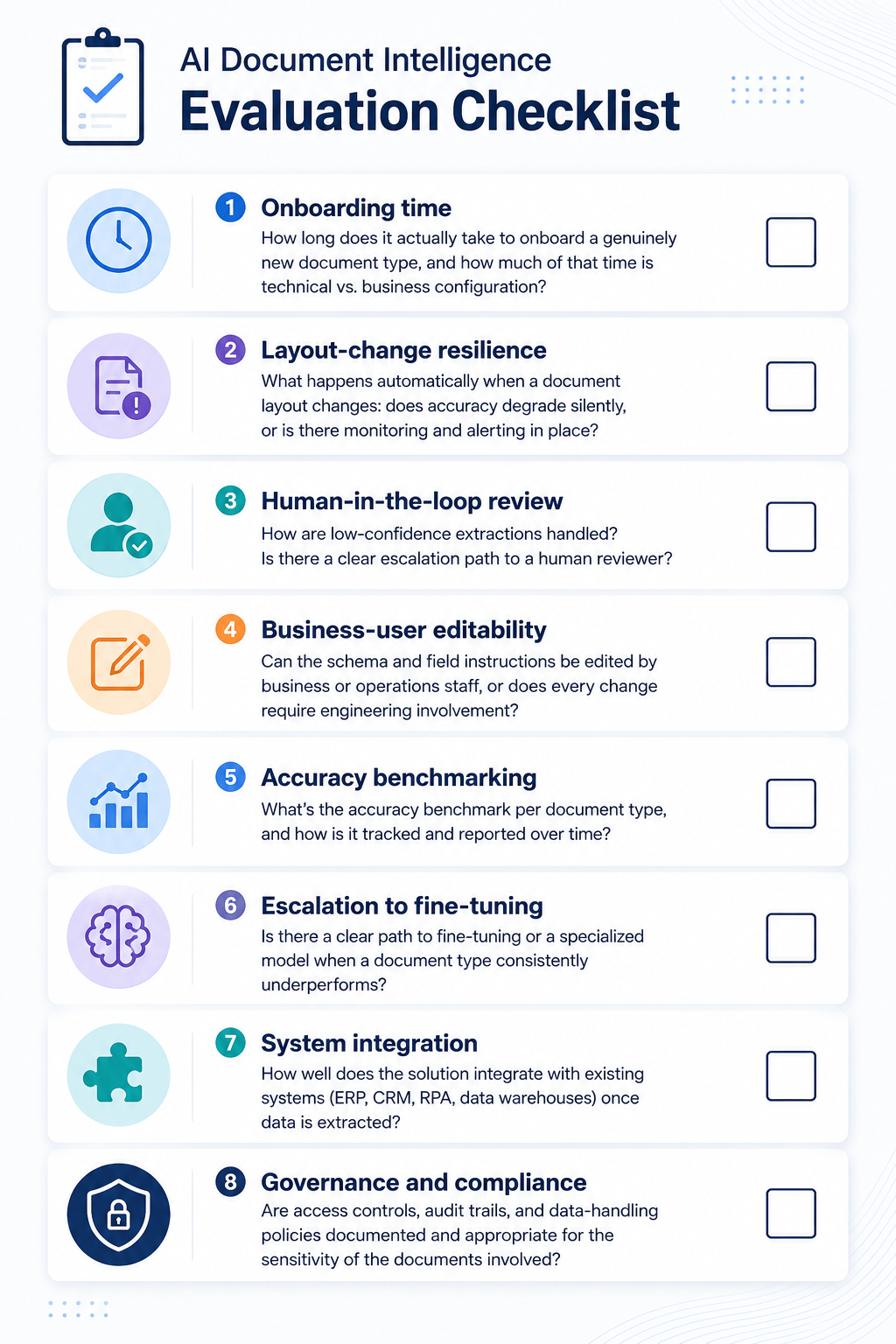 A solution that answers these questions clearly is far more likely to scale cleanly as document variety grows. If you’re still at the evaluation stage, our guide to running an AI proof of concept walks through how to structure that decision from business case to go/no-go.
Frequent Asked Questions
- Does “without retraining” mean the AI never improves?
No. Accuracy can still improve through refined schemas, clearer instructions, and additional representative examples. The difference is that improvements come from configuration changes rather than updates to the model’s underlying weights.
- Is this approach less accurate than a custom-trained model?
For common document types, a well-configured general-purpose model can perform similarly to a narrowly trained model. It can also reach production-ready accuracy faster because teams avoid lengthy training and data-labeling processes. However, fine-tuned models may still perform better for niche, unusual, or high-stakes document types.
There is no fixed technical limit, and many production systems support more than 50 document types. The practical limit is usually organizational rather than technical. Teams must maintain accurate schemas, instructions, and examples as the document library continues to grow.
- Do we still need OCR?
Yes, especially for scanned documents or image-based files. OCR, or built-in visual document understanding, remains essential for reading text from images. The “without retraining” approach applies to configuring extraction logic, not eliminating the initial document-reading process.
- Can this approach work with sensitive or regulated data?
Yes, but it requires the same governance controls as any system processing sensitive information. These controls include access management, audit trails, data residency policies, and validation rules. They must also reflect the specific regulatory requirements of industries such as healthcare and finance.
Conclusion
The old assumption that every new document type requires a separately trained model no longer applies to most business use cases. Instead, modern extraction systems separate what the model knows from what users ask it to do through configuration. As a result, they can support dozens of document types using classification, schemas, field instructions, examples, and human review for uncertain cases.
However, this approach does not completely remove the need for machine learning expertise. Specialized terminology, unusual formats, and poor document quality may still require targeted fine-tuning or additional technical work. Even so, for most business documents, avoiding retraining enables faster onboarding, lower maintenance, and easier scaling as business needs grow.
| Takeaway | Why it matters |
| “Without retraining” means configuration, not model-weight changes | Onboarding a new document type becomes a schema-and-instructions task rather than a machine learning project. |
| New document types can go live in hours or days | This is significantly faster than the weeks typically required for a traditional per-type trained model. |
| A handful of examples can replace large labeled datasets | This reduces the data-collection burden that often slows document onboarding. |
| One shared pipeline handles classification, validation, and routing | Organizations avoid rebuilding infrastructure for every new document type. |
| The approach still has real limits | Highly specialized domains, unusual formats, poor scan quality, or strict latency requirements may still require targeted fine-tuning. |
| Most organizations adopt a hybrid model | A configurable general-purpose pipeline handles most documents, while fine-tuned models are reserved for exceptions. |
If your team is evaluating how to bring AI-powered document extraction into your workflows – whether that’s a handful of document types or fifty – SmartDev can help you design a pipeline that balances speed, accuracy, and long-term maintainability.