

TL;DR
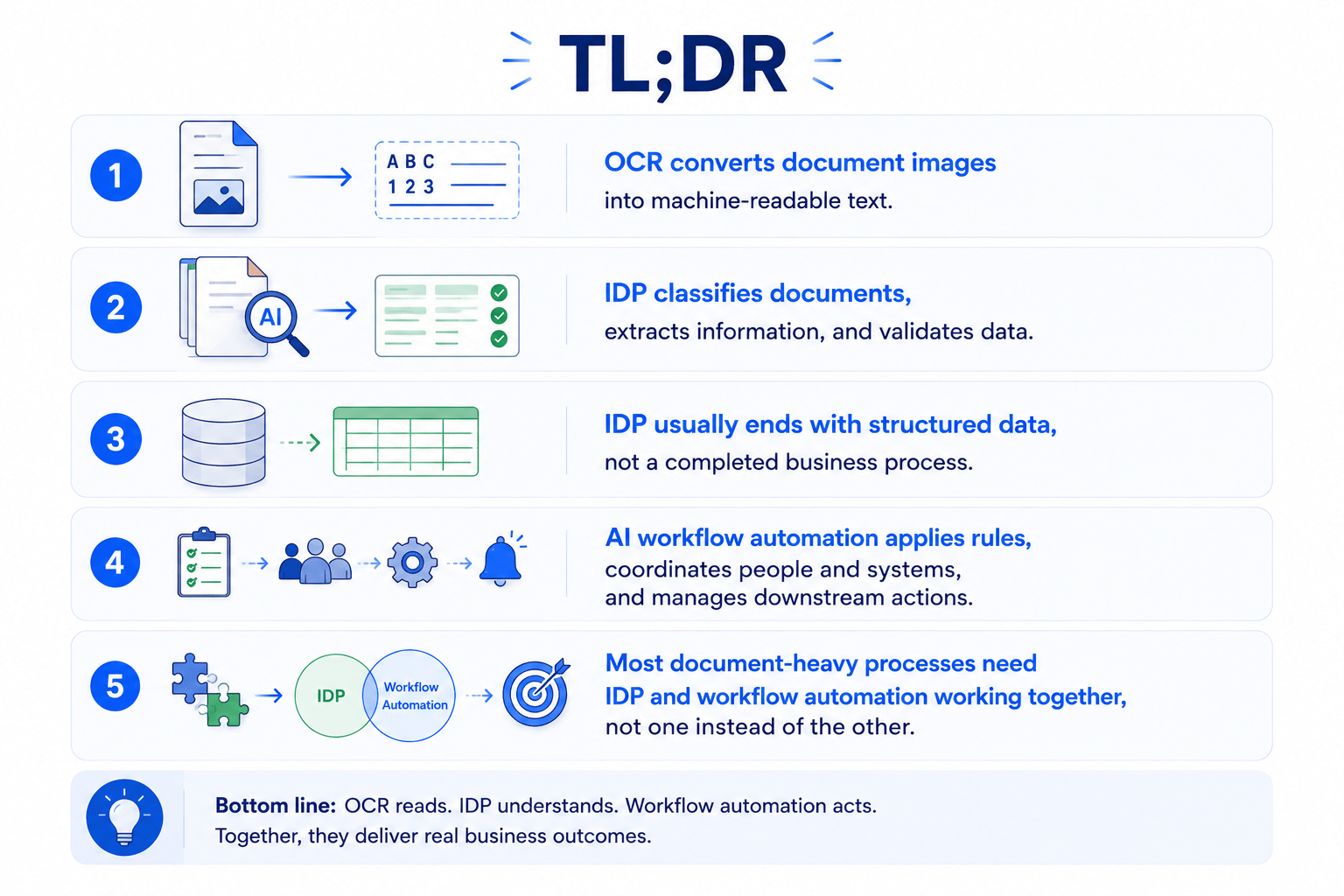
- OCR converts document images into machine-readable text.
- IDP classifies documents, extracts information, and validates data.
- IDP usually ends with structured data, not a completed business process.
- AI workflow automation applies rules, coordinates people and systems, and manages downstream actions.
- Most document-heavy processes need IDP and workflow automation working together, not one instead of the other.
Introduction: Extracting Data Is Not the Same as Automating Work
Plenty of companies have already deployed OCR or Intelligent Document Processing (IDP) somewhere in their operations. And yet, employees are still checking extracted data line by line, cross-referencing documents by hand, chasing approvals over email, resolving exceptions manually, and re-entering the same information into two or three different systems.
Indeed, the data behind this pattern is hard to ignore. Forrester’s 2024 research on document mining, text mining, and analytics platforms found that 58% of enterprise data is unstructured – the emails, contracts, invoices, and scanned forms that traditional systems were never built to read. That’s not a problem confined to the document team: Gartner’s 2025 Hype Cycle for Artificial Intelligence reports that 57% of organizations estimate their data is not AI-ready. The two figures aren’t drawn from the same study, but they point in the same direction: most enterprise data sits in unstructured documents, and most organizations don’t yet consider their data usable for AI.
On top of that, reading those documents accurately is genuinely hard. AIMultiple’s 2026 OCR accuracy benchmark of leading OCR engines and multimodal AI models found that while top performers reach 94 – 96% accuracy on clean, printed text, accuracy on handwriting ranges as low as 46%, and on visually complex documents – multi-column layouts, mixed fonts, low-resolution scans – the best score drops to 85%. Those are exactly the conditions real invoices, forms, and scanned contracts show up in. Consequently, it’s hard to make data AI-ready if a meaningful share of it was never reliably read in the first place.
That raises an obvious question: if IDP can already “understand” a document, why do document-heavy workflows still require so much manual work?
The short answer is that understanding a document and completing a business process are two different problems. IDP understands what is inside a document. AI workflow automation determines what should happen next. Confusing the two is one of the most common reasons document automation projects stall after the extraction stage – hard-earned structured data, sitting in a database, still waiting for a human to act on it.
What Is the Document Processing Stack?
In practice, document processing is not a single piece of technology – it’s a chain of capabilities, each responsible for a different part of the journey from a raw file to a completed outcome:
- Document capture and ingestion – receiving documents from email, portals, scanners, APIs, or cloud storage so they enter the processing pipeline in the first place.
- OCR and text recognition – converting scanned images and photos of documents into machine-readable text.
- Document classification – automatically identifying what type of document it is (invoice, contract, ID card, claim form, and so on) so it’s routed and processed correctly.
- Data extraction – pulling specific fields, entities, and tables out of the document (amounts, dates, names, line items) and turning them into structured data.
- Validation and enrichment – checking extracted data against formats, business rules, or external systems, and filling in missing context where needed.
- Business-rule execution – applying the logic that determines what the data means for the business (does it meet policy, does it match a PO, is it within approval limits).
- Human review and exception handling – routing low-confidence extractions or flagged anomalies to a person for verification or correction.
- Workflow orchestration – coordinating the sequence of steps, approvals, and handoffs between people and systems until the process is complete.
- System updates and downstream actions – writing validated, approved data into the systems that need it (ERP, CRM, claims system) and triggering the actions that follow, like a payment or a notification.
- Monitoring and auditability – tracking process performance and keeping a traceable record of what happened, when, and by whom, for compliance and continuous improvement.
IDP typically covers steps 1 through 5, plus parts of step 7. AI workflow automation picks up from step 6 onward, coordinating everything that has to happen after IDP has read and validated the data. Treating the whole stack as one product is where most of the confusion – and most of the unrealized ROI – comes from.
The Concept of Intelligent Document Processing
What Is Intelligent Document Processing?
According to Gartner’s definition, IDP solutions are specialized data integration tools built to automate data extraction from documents across multiple formats and layouts, feeding that extracted data into the applications and workflows that depend on it. In practice, IDP combines OCR, machine learning, natural language processing (NLP), and validation logic to process structured, semi-structured, and unstructured documents.
The typical output of an IDP system includes:
- Classified documents
- Extracted fields and entities
- Structured data
- Confidence scores
- Validation results
- Exceptions flagged for human review
Core Capabilities of an IDP System
While Section 2 maps the document lifecycle at the process level, this list zooms into the IDP box specifically – the technical modules that sit inside steps 1 – 5 (and part of step 7) of that stack. A modern IDP platform generally covers:
- Document ingestion – pulling raw files in from email, portals, scanners, APIs, or cloud storage.
- Image preprocessing – cleaning up scans and photos (deskewing, denoising, correcting orientation) so OCR can read them accurately.
- OCR – converting the preprocessed image into machine-readable text.
- Document classification – sorting incoming documents into types (invoice, ID, contract, claim form) so the right extraction model is applied.
- Field and entity extraction – pulling out specific data points like names, dates, amounts, and reference numbers.
- Table extraction – specifically identifying and extracting tabular data, such as invoice line items, which needs different handling than plain text fields.
- Data validation – checking extracted values against expected formats, ranges, or reference data.
- Confidence scoring – rating how reliable each extracted value is, so low-confidence results can be flagged rather than trusted blindly.
- Human-in-the-loop review – giving reviewers an interface to quickly verify or correct flagged extractions.
- Export through APIs or system connectors – sending the finished, structured data out to whatever system or workflow needs it next.
The Typical IDP Workflow
A standard IDP workflow runs through: document intake → preprocessing → OCR → classification → extraction → validation → confidence assessment → human review → structured output.
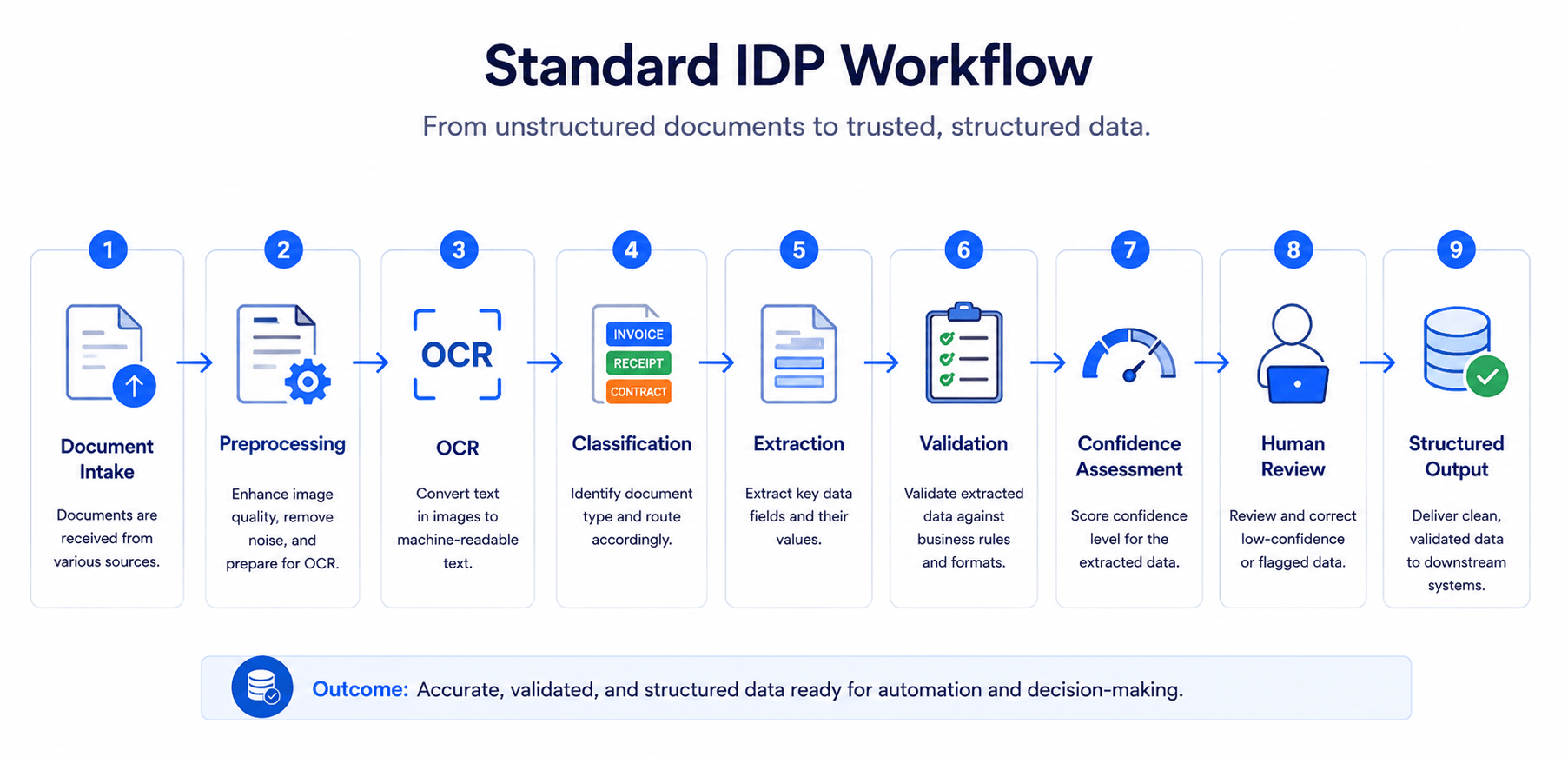
The important thing to remember is that structured output is not the same as a completed business process. IDP can extract every field from an invoice – amount, vendor, line items, due date – without ever answering the questions that actually determine whether anyone pays that invoice:
- Does it match the purchase order?
- Is it a duplicate payment?
- Who has the authority to approve it?
- Which approver should receive it, and in what order?
- Does anyone need to update the ERP system?
- When does someone actually trigger the payment?
Ultimately, none of that is a data-extraction problem. It’s a coordination problem, and it sits outside the scope of most IDP platforms – which is exactly where AI workflow automation picks up.
The Technology Stack Behind IDP
| Technology layer | Primary role |
|---|---|
| Document ingestion | Receives documents from email, portals, scanners, APIs, or cloud storage |
| Image preprocessing | Improves image quality, orientation, and readability |
| OCR | Converts images and scans into machine-readable text |
| Classification models | Identifies document types |
| Extraction models | Identifies fields, entities, tables, and relationships |
| NLP and language models | Interprets context and unstructured text |
| Validation engine | Checks formats, rules, and external data |
| Confidence scoring | Estimates the reliability of extracted results |
| Human review interface | Lets users verify low-confidence or exceptional cases |
| Integration layer | Sends structured data to downstream systems |
In short, this layer stack is purely about understanding documents. It doesn’t extend into the broader workflow-automation architecture – that comes next.
From OCR to IDP and AI Workflow Automation
To put it simply, it helps to think of document automation as three increasingly capable layers rather than three competing products:
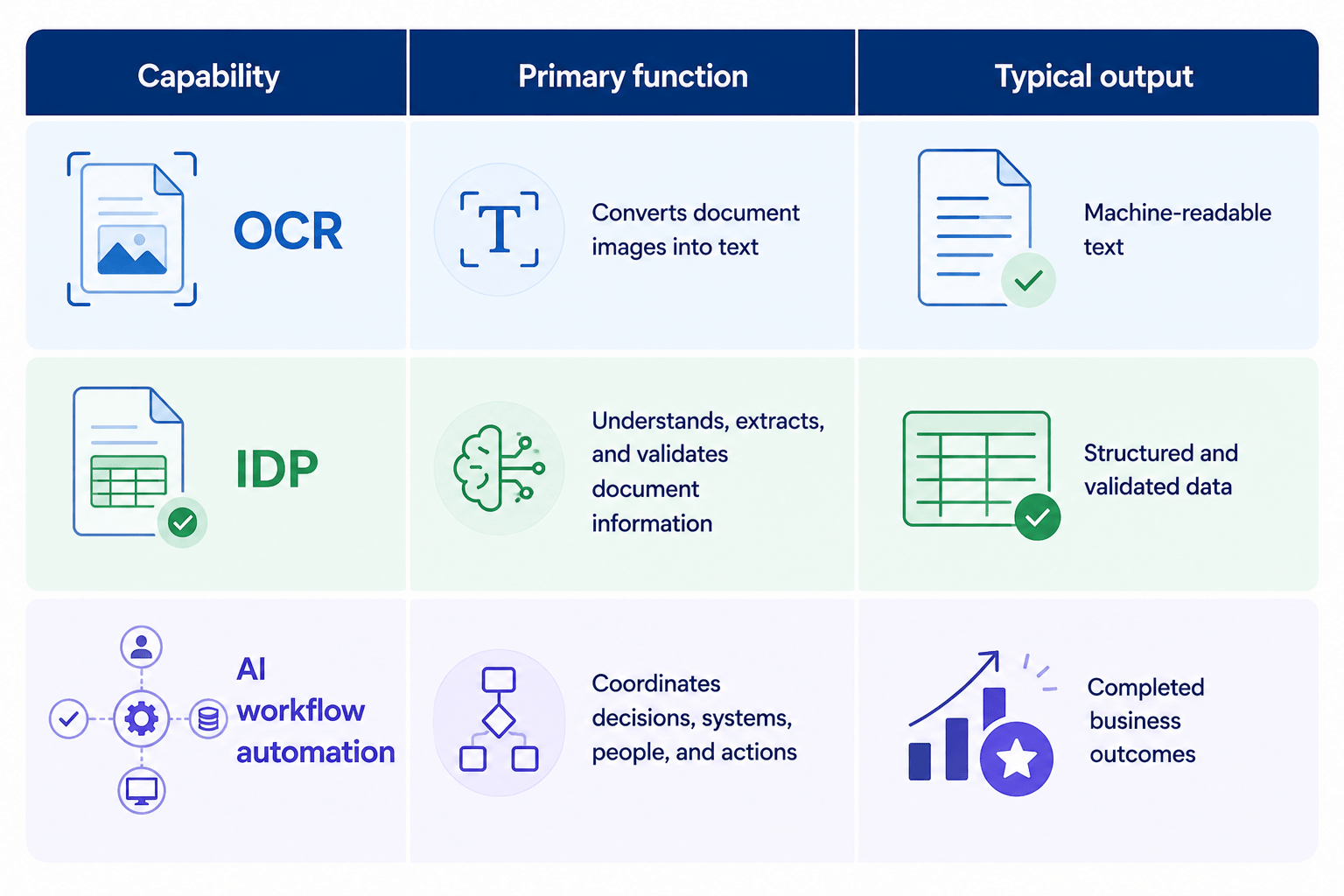
Each layer builds on the one before it, and each expands the scope of what “automated” actually means – from readable text, to trustworthy data, to a finished piece of work. And the gap between the three has narrowed considerably in the past year or two. Modern IDP platforms have moved well past template-based OCR: many now use multimodal AI, NLP, and large language models (LLMs) to extract data, validate it, and interpret context – reading a contract clause or a handwritten note with a level of nuance that rule-based extraction never handled well.
At the same time, the way IDP connects to everything around it has changed. Integration has shifted toward API-driven, cloud-native architectures, which makes it far easier to pass data cleanly between the IDP engine, a workflow orchestrator, and the business applications on the other end – CRM, ERP, or a core banking platform, for example. That shift is what makes it possible to chain IDP output directly into downstream AI services – contract analytics, automated approval routing, compliance checks – without a person manually re-keying or re-uploading anything in between.
As a result, the practical effect shows up in high-volume processes first: invoice matching, customer onboarding, and regulatory or compliance review are where organizations are reporting the sharpest drop in manual touchpoints, since these processes combine large document volumes with well-defined rules that are easy to automate once the data is trustworthy. Our guides on AI use cases in the BFSI sector and AI-powered invoice processing in healthcare go deeper into what that looks like in practice.
Where AI Workflow Automation Wins
AI workflow automation creates the most value after document data has been extracted. While IDP understands the content of individual documents, workflow automation connects that information across systems, rules, people, and business decisions.
It can reconcile data across multiple documents, such as matching an invoice with a purchase order and delivery receipt. It can then apply business rules, assess eligibility, identify compliance issues, or trigger risk checks based on the combined information. This allows the process to move beyond simple extraction toward an actual business decision.
Workflow automation is also stronger when a process involves multiple participants. It can route cases to the correct approver, assign tasks based on role or workload, and escalate high-risk or uncertain cases to a human reviewer. Exceptions no longer need to sit in an inbox waiting for someone to notice them; the system can identify, prioritize, and route them automatically.
Its integration capabilities are another major advantage. Workflow automation can update CRM, ERP, claims, banking, or other core systems, while also sending notifications and triggering follow-up actions. This removes the need for employees to copy extracted data between systems or manually coordinate the next step.
Finally, workflow automation provides visibility and control across the full process. It can monitor case status, processing time, bottlenecks, decisions, and human interventions. Detailed audit trails record what happened, which rules were applied, who approved the action, and why an exception was escalated.
This is where AI workflow automation wins: it does not simply turn documents into data. It turns that data into coordinated, traceable, and completed business outcomes.
Take claims processing as an example. IDP reads the claim form, the invoice, and the supporting evidence, and turns them into structured data. Workflow automation then checks policy coverage, reconciles the data across documents, applies eligibility and risk rules, routes the file to the right reviewer, and updates the claims system once a decision is made. Our overview of AI use cases across the insurance sector walks through this pattern end to end.
Put simply: IDP extracts the information needed to make a decision. Workflow automation coordinates how that decision is made and executed.
IDP vs. AI Workflow Automation: A Capability Comparison
| Capability | OCR | IDP | AI workflow automation |
| Convert images into text | Yes | Yes | Uses OCR or IDP |
| Classify documents | Limited | Yes | Uses classification results |
| Extract structured data | Limited | Yes | Uses extracted data |
| Understand unstructured content | No | Yes | Uses interpreted information |
| Validate extracted data | No | Yes | Yes |
| Compare multiple documents | No | Limited | Yes |
| Apply business rules | No | Limited | Yes |
| Coordinate approvals | No | No | Yes |
| Manage process exceptions | No | Human review | Yes |
| Update downstream systems | No | Through integrations | Yes |
| Complete an end-to-end processs | No | No | Yes |
In short, if you only take one table away from this article, make it this one. It’s the fastest way to see exactly where each layer’s responsibility ends and the next one begins.
Where IDP Fits in the Document Processing Stack
Specifically, IDP is strongest at the steps directly tied to understanding a document:
| Where IDP is strongest | What it does |
|---|---|
| Identifying document types | Sorts incoming files into categories automatically |
| Extracting fields, entities, and tables | Pulls the specific data points a process needs |
| Handling variable document layouts | Reads documents correctly even when format, template, or vendor changes |
| Validating extracted information | Checks that extracted values are complete and well-formed |
| Assigning confidence scores | Flags how trustworthy each extracted value is |
| Flagging uncertain results | Surfaces low-confidence cases instead of passing them through silently |
| Reducing manual data entry | Removes the need for someone to retype data by hand |
All seven of these sit inside IDP’s core job: reading a document and turning it into something a system can trust. That’s a pattern-recognition and data-quality problem – exactly the kind of problem AI and machine learning solve well – which is why IDP consistently outperforms manual entry and rigid, template-based tools on these specific steps.
Consequently, it delivers the most value when the primary bottleneck is:
| Bottleneck IDP addresses | Why it fits |
|---|---|
| High document volume | IDP scales to thousands of documents without adding headcount |
| Manual data entry | Extraction replaces retyping, cutting time and error rate |
| Inconsistent document formats | ML-based extraction adapts to layout variation that template rules can’t |
| Slow document classification | Automated sorting is near-instant compared to manual triage |
| Frequent extraction errors | Validation and confidence scoring catch mistakes before they spread downstream |
| Large amounts of unstructured information | NLP-based understanding makes free-form text and scanned content usable |
Each of these bottlenecks is really the same underlying problem – a business drowning in documents faster than people can read them accurately – which is precisely the gap IDP closes. When the pain point sits upstream of any decision-making, approval, or system update, IDP alone is usually the fastest, highest-ROI fix. But on its own, IDP tends to stop at structured, validated data – a meaningful milestone, but rarely the finish line for the underlying business process. Our breakdown of AI use cases in document management goes deeper into where automated classification and extraction create the most immediate impact.
Where AI Workflow Automation Wins
By contrast, AI workflow automation earns its keep in the steps that go beyond the content of any single document. Its core capabilities include:
- Cross-document reconciliation
- Business-rule application
- Risk, eligibility, or compliance checks
- Multi-step approval routing
- Exception management
- Human escalation
- Task assignment
- CRM, ERP, and core-system integration
- Notifications and follow-up actions
- Process monitoring
- Audit-trail generation
AI workflow automation creates the most value after IDP has extracted the document data. While IDP understands the content of individual documents, workflow automation connects that information across systems, rules, people, and business decisions.
For example, it can reconcile data across multiple documents, such as matching an invoice with a purchase order and delivery receipt. It can then apply business rules, assess eligibility, identify compliance issues, or trigger risk checks based on the combined information. This allows the process to move beyond simple extraction toward an actual business decision.
Workflow automation is also stronger when a process involves multiple participants. It can route cases to the correct approver, assign tasks based on role or workload, and escalate high-risk or uncertain cases to a human reviewer. Exceptions no longer need to sit in an inbox waiting for someone to notice them; the system can identify, prioritize, and route them automatically.
In addition, its integration capabilities are another major advantage. Workflow automation can update CRM, ERP, claims, banking, or other core systems, while also sending notifications and triggering follow-up actions. This removes the need for employees to copy extracted data between systems or manually coordinate the next step.
Finally, workflow automation provides visibility and control across the full process. It can monitor case status, processing time, bottlenecks, decisions, and human interventions. Detailed audit trails record what happened, which rules the system applied, who approved the action, and why an exception escalated.
Ultimately, this is where AI workflow automation wins: it does not simply turn documents into data. It turns that data into coordinated, traceable, and completed business outcomes.
Take claims processing as an example. IDP reads the claim form, the invoice, and the supporting evidence, and turns them into structured data. Workflow automation then checks policy coverage, reconciles the data across documents, applies eligibility and risk rules, routes the file to the right reviewer, and updates the claims system once the reviewer makes a decision. Our overview of AI use cases across the insurance sector walks through this pattern end to end.
Put simply: IDP extracts the information needed to make a decision. Workflow automation coordinates how that decision is made and executed.
How IDP and AI Workflow Automation Work Together
Rather than one replacing the other, the two are usually layered into a single end-to-end architecture:
Document intake → IDP classification and extraction → validation → business rules → human review → approval → system update → notification → monitoring.
| Step | What happens |
|---|---|
| Document intake | The file arrives, from email, a portal, a scanner, or an API, and enters the pipeline. |
| IDP classification and extraction | The system identifies the document type and pulls out the relevant fields, entities, and tables. |
| Validation | IDP checks extracted values for completeness, correct format, and consistency against reference data. |
| Business rules | The rules engine evaluates the validated data against the logic that determines what it means for the process (eligibility, policy match, approval thresholds). |
| Human review | The system routes low-confidence extractions or rule-flagged exceptions to a person to verify or resolve. |
| Approval | Workflow automation routes the case to the right approver, or auto-approves it once it clears every rule and confidence threshold. |
| System update | Workflow automation writes the approved, validated data into the ERP, CRM, claims system, or other system of record. |
| Notification | The system automatically notifies relevant stakeholders that the case has moved forward or needs their input. |
| Monitoring | Workflow automation tracks the process end to end and keeps an audit trail of what happened, when, and why. |
Accordingly, a production-grade setup typically includes:
- An IDP platform
- A workflow or orchestration engine
- A business-rules engine
- AI decision services
- A human-review interface
- APIs and system connectors
- Identity and access controls
- Logging and monitoring systems
Workflow automation doesn’t replace IDP – IDP becomes the document-intelligence layer feeding a larger automation system. This is the shift we walk through in more detail in From Engagement to Insight: How AI Workflow Automation Streamlines Client Deliverables, where capture was never the hard part – validating, routing, and assembling that data into a finished deliverable was.
Document Automation Use Cases by Industry
Rather than listing generic “IDP use cases,” it’s more useful to see how IDP and workflow automation split the work within a single process – which documents come in, what IDP does with them, what workflow automation does next, and where a human still needs to be in the loop.
Banking and Financial Services
Common workflows: customer onboarding, KYC document review, loan application processing, and financial statement analysis.
Documents processed: ID documents and passports, proof of address, pay stubs, tax returns, bank statements, and financial statements.
In a typical mortgage or loan file, IDP classifies each document type, extracts the relevant fields, and checks that IDs and proofs of address are valid and unexpired. Workflow automation then screens the applicant against KYC and AML watchlists, applies underwriting rules to the extracted financial data, routes borderline or flagged cases to a credit officer, and updates the loan origination system once the credit officer reaches a decision. Human review typically stays focused on fraud flags, edge-case risk scores, and anything the rules engine can’t resolve on its own. Our guide on AI use cases in the mortgage industry covers this in more depth.
Insurance
Common workflows: claims intake, policy verification, supporting-document review, and fraud or risk escalation.
Documents processed: FNOL forms, damage photos, repair estimates, medical bills, and police or incident reports.
IDP reads the FNOL form and classifies the supporting evidence attached to it. Workflow automation then cross-checks that evidence against the policy’s coverage terms, reconciles details across the different documents submitted for the same claim, flags inconsistencies for a fraud review, routes the file to the right adjuster, and updates the claims system once someone makes a decision. The team reserves human review for contested claims, high-value payouts, and anything the fraud model flags as anomalous. See our health insurance AI use cases for a closer look at claims and eligibility automation specifically.
Healthcare
Common workflows: patient onboarding, medical-record processing, insurance eligibility verification, and prior authorization.
Documents processed: patient intake forms, insurance cards, scanned medical records, and prior-authorization requests.
Similarly, here, IDP handles the extraction of clinical and billing data from scanned records and intake forms. Workflow automation then checks insurance eligibility against payer rules, escalates prior-authorization requests to the right case manager, tracks their status across multiple insurers, and pushes the finalized data into the electronic health record or billing system. Because clinical judgment and patient privacy are both at stake, human review tends to stay closely involved here rather than being limited to low-confidence exceptions.
Manufacturing and Logistics
Common workflows: invoice processing, purchase-order reconciliation, proof-of-delivery verification, and shipping-document processing.
Documents processed: invoices, purchase orders, delivery receipts, shipping manifests, and quality certificates.
IDP extracts line items, quantities, and prices from invoices and shipping documents. Workflow automation then performs the three-way match against the purchase order and delivery receipt, flags quantity or price mismatches, routes exceptions to procurement, and pushes approved transactions into the ERP for payment. The team generally reserves human review for discrepancies the matching rules can’t resolve automatically and for onboarding new vendors.
Legal Services
Common workflows: contract review and due diligence, document discovery, and client intake.
Documents processed: contracts and NDAs, discovery materials, and client intake forms.
Likewise, IDP extracts key clauses, parties, dates, and obligations from contracts, and classifies discovery materials by relevance and document type. Workflow automation then flags non-standard or high-risk clauses for attorney review, routes contracts through the appropriate approval and signature workflow, organizes discovery documents against case timelines, and tracks deadlines across active matters. Human review remains central here – legal judgment on flagged clauses and privilege determinations aren’t tasks that get fully automated away, even with strong extraction accuracy.
Overall, four or five industries covered in real depth tend to be far more useful than ten covered superficially – for a broader index of industry-specific automation patterns, our blog has dedicated deep dives for most major sectors.
Frequently Asked Questions
- What is the difference between OCR and IDP?
In short, OCR converts images into text. IDP goes further – classifying documents, understanding their content, extracting data, and validating the results.
- Is IDP a form of workflow automation?
IDP can be a component of a larger workflow automation system, but it isn’t equivalent to end-to-end workflow automation on its own.
- Can IDP automate an entire business process?
Usually not. IDP handles the document and delivers structured data; the decision-making, approvals, exception handling, and system updates that follow require workflow automation.
- When is OCR enough for a business?
OCR can be sufficient if the goal is simply to digitize documents, create searchable text, or support archiving – nothing more.
- When should a business invest in IDP?
In particular, IDP makes sense when a business is dealing with high document volumes, inconsistent formats, or heavy manual data entry and verification work.
- When does a business need AI workflow automation?
Workflow automation becomes necessary once extracted data has to pass through multiple rules, systems, departments, approval steps, or exception paths.
- Should businesses choose IDP or AI workflow automation?
In most cases, it isn’t an either-or decision. IDP handles document intelligence; workflow automation uses that output to actually complete the process.
- How can a business determine which solution it needs?
A few useful questions to start with: Is document extraction the primary bottleneck?; What happens after the data is extracted?; How many systems and teams are involved; Does the process require approvals or escalations?
In short, if your process still requires employees to move extracted data between systems, chase approvals, or handle routine exceptions by hand, IDP alone probably isn’t enough. An end-to-end assessment can pinpoint which steps need document intelligence and which need workflow automation.
Conclusion: Move from Document Extraction to Workflow Completion
OCR digitizes documents. IDP understands them. AI workflow automation turns that understanding into completed business outcomes.
The biggest efficiency gains rarely come from reading documents faster – they come from removing the manual work that still sits between document intake and the final business outcome: the reconciliation, the approval chasing, the system updates, the exception handling.
This is exactly the gap SmartDev helps enterprises close – connecting document intelligence with the business rules, human review, and downstream systems it needs to actually finish a process, rather than stopping at extracted data. Talk to our team to identify where manual handoffs, exceptions, and approval delays are limiting your current document workflow. SmartDev’s blog has more industry-specific breakdowns if you want to see how this plays out in a process similar to yours – or reach out directly to talk through where your workflow stands today.