
AI & Machine LearningBlogs

Multimodal AI Examples: How It Works, Real-World Applications, and Future Trends

による 1 4月 2025#!31金, 24 7月 2026 07:49:35 +0000Z3531#31金, 24 7月 2026 07:49:35 +0000Z-7+00:003131+00:00202631 24am31am-31金, 24 7月 2026 07:49:35 +0000Z7+00:003131+00:002026312026金, 24 7月 2026 07:49:35 +0000497497am金曜日=527#!31金, 24 7月 2026 07:49:35 +0000Z+00:007#7月 24th、2026#!31金, 24 7月 2026 07:49:35 +0000Z3531#/31金, 24 7月 2026 07:49:35 +0000Z-7+00:003131+00:00202631#!31金, 24 7月 2026 07:49:35 +0000Z+00:007#コメントはありません

TL;DR:

  • Multimodal AI combines text, images, audio, video, documents, and sensor data to interpret context across multiple formats.
  • It is most useful when critical information is distributed across different data types and cannot be understood reliably through text alone.
  • Common applications include document intelligence, customer support, healthcare workflows, visual product search, robotics, fraud monitoring, education, and content production.
  • Potential benefits include richer context, more flexible interactions, better support for complex workflows, and reduced manual review.
  • These benefits are not automatic; additional modalities can also introduce irrelevant, conflicting, or poor-quality information.
  • Key challenges include higher costs, complex data pipelines, modality-alignment errors, privacy and security exposure, bias, and greater evaluation requirements.
  • Businesses should compare multimodal AI with simpler options such as text-only AI, specialised models, rules-based automation, or existing software.
  • Adoption is justified when the additional modality materially improves a decision or business outcome.
  • Successful deployment requires aligned and authorised data, task-specific evaluation, human-review thresholds, secure data handling, and ongoing monitoring.
  • The best multimodal system is not the one that processes the most data types, but the one that measurably improves a clearly defined workflow.

1. Introduction to Multimodal AI: A New Dimension of Artificial Intelligence

1.1 Defining Multimodal AI: Integrating Multiple Senses for Enhanced Understanding

Multimodal Artificial Intelligence (AI) represents a significant evolution in the field, moving beyond the traditional focus on single data types to embrace the complexity of real-world information. At its core, multimodal AI involves the processing and integration of data from multiple distinct sources, known as modalities. These modalities can include a diverse range of inputs such as text, images, audio, video, and even sensor data. Unlike conventional AI models that are typically confined to analyzing one type of data at a time, multimodal AI systems are designed to simultaneously ingest and process information from these various streams, allowing for a more detailed and nuanced perception of the environment or situation.
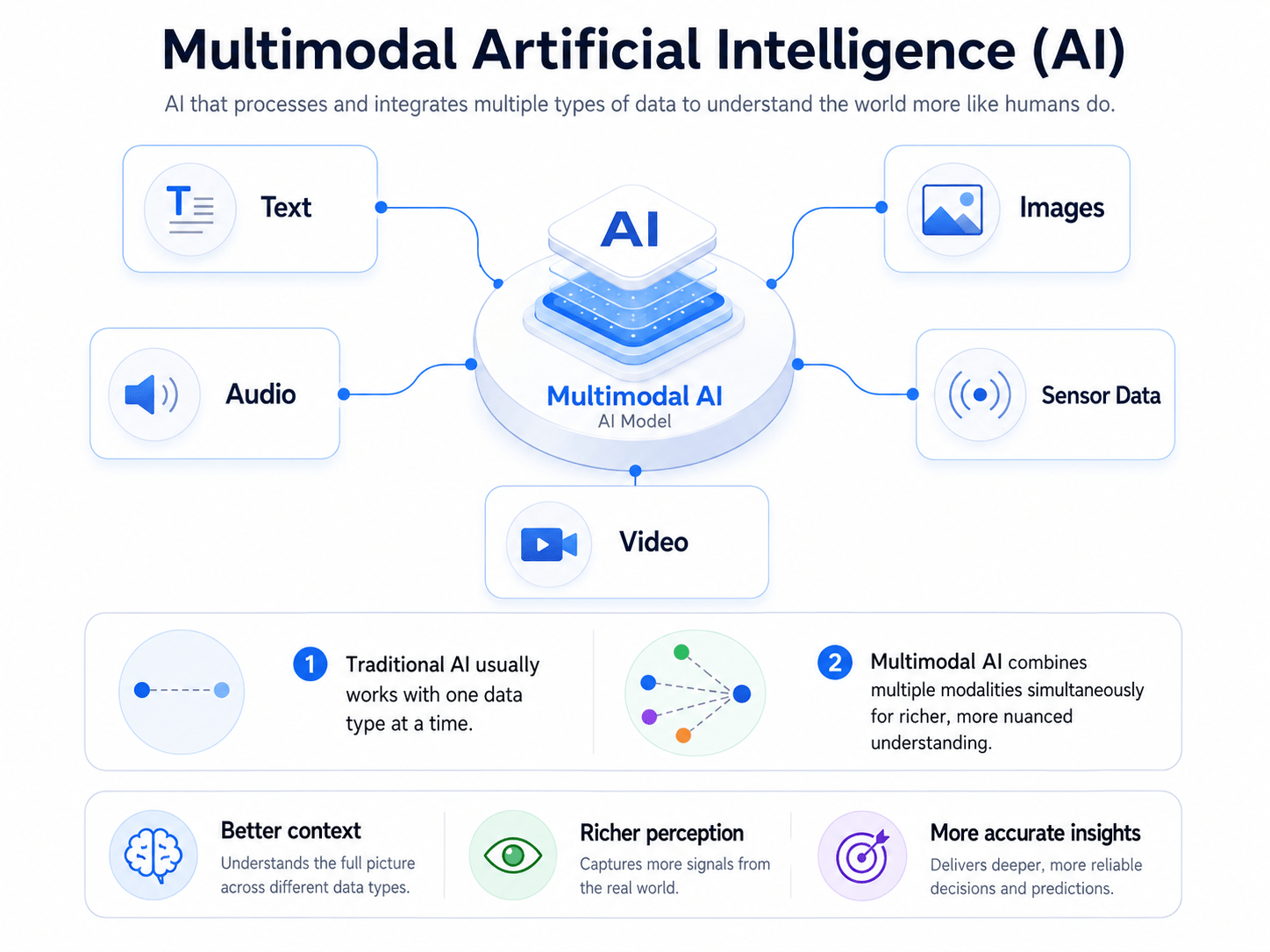
This capability enables these advanced models to generate not only more robust outputs but also outputs that can span across different modalities, such as producing a written recipe from an image of cookies or vice versa. The versatility of multimodal AI extends to allowing users to interact with these systems using virtually any type of content as a prompt, which can then be transformed into a wide array of outputs, not limited to the format of the initial input. This mirrors the innate human approach to understanding the world, where we seamlessly combine sensory inputs like sight, sound, and touch to form a more comprehensive grasp of reality.

In essence, one can think of multimodal AI as a sophisticated multilingual translator, capable of comprehending and communicating across various ‘languages’ of data formats, such as textual descriptions, visual elements, or spoken words. By harmonizing the strengths of different AI models, such as Natural Language Processing (NLP) for text, computer vision for images, and speech recognition for audio, multimodal AI achieves a more holistic understanding of the information it processes.

1.2 Beyond Single Data Streams: How Multimodal AI Differs from Traditional AI Models

Traditional AI models, often referred to as unimodal AI, are designed to operate on a single type of data input. For instance, a natural language processing model traditionally deals only with text, while a computer vision model analyzes only images. This focus on a singular data stream inherently limits the context that the AI can understand and utilize for generating responses or making predictions. In stark contrast, multimodal AI distinguishes itself by its ability to integrate multiple data forms concurrently. This simultaneous processing of various modalities, such as text, images, audio, and video, allows multimodal AI to achieve a far more comprehensive understanding of its environment.

Consequently, these models can provide responses that are not only more accurate but also significantly more contextually aware. While unimodal AI models are restricted to producing outputs within the same modality as their input, multimodal AI possesses the flexibility to generate outputs in multiple formats, offering a richer and more versatile interaction. This capability to transcend the limitations of single data types enables multimodal AI to tackle tasks and interpret situations with a level of nuance that is simply unattainable for unimodal systems, which essentially operate with a restricted sensory perception.

1.3 Multimodal AI vs. Unimodal AI: When Should Businesses Use Each Approach?

The evolution of artificial intelligence has moved from systems designed to process a single type of data toward models capable of interpreting text, images, audio, video, and other inputs together. Early unimodal AI applications, such as text-based chatbots, speech-recognition tools, and image-classification systems, performed effectively within narrowly defined domains. However, they often struggled when the information required to complete a task was distributed across multiple data formats—for example, analysing a video while interpreting its spoken dialogue, reviewing a document containing text and visual elements, or responding to a user through both voice and images.

Advances in deep learning, computing infrastructure, and large-scale multimodal datasets have enabled the development of more capable multimodal AI systems. Early multimodal applications focused primarily on areas such as image captioning, audiovisual speech recognition, and multimedia indexing. More recent large multimodal models can connect information across several modalities, allowing users to analyse images, interpret documents, hold voice-based conversations, and generate content through more natural interactions. The emergence of models such as GPT-4V and Google Gemini brought these capabilities into mainstream generative AI, demonstrating how multiple data types can be processed within a more unified system.

The main advantage of multimodal AI is not simply that it accepts more input formats. Its value comes from combining information across those formats to build a more complete understanding of context. A system reviewing an insurance claim, for example, could analyse the claimant’s written description, photographs of the damage, scanned forms, and supporting audio or video evidence. This cross-modal reasoning can improve accuracy, strengthen decision-making, and support automation scenarios that text-only systems cannot handle effectively.

Multimodal AI can also improve human–computer interaction. Users may communicate through the format most appropriate to their situation, whether that means typing a question, speaking naturally, uploading an image, or combining several methods. These flexible interactions can make AI systems feel more intuitive and accessible, particularly for users who may find traditional text-based interfaces difficult to use.

However, multimodal AI is not automatically the best option for every use case. Unimodal AI remains highly effective for focused tasks where the required information exists in a single, consistent data type. A text-only model may be sufficient for summarising structured reports, classifying emails, generating written content, or answering questions from a text knowledge base. In these cases, introducing additional modalities may increase infrastructure requirements, processing costs, testing complexity, and governance risks without creating meaningful business value.

Decision factorUnimodal AIMultimodal AI
Data inputsUses one primary data type, such as text, images, or audioCombines two or more data types
Best suited forNarrow, clearly defined tasksTasks where context is distributed across formats
System complexityGenerally simpler to build, test, and maintainRequires modality integration and more complex architecture
Implementation costTypically lowerOften higher due to computing and data requirements
Evaluation burdenPerformance can be assessed within one modalityRequires testing individual modalities and cross-modal reasoning
Typical use casesEmail classification, text summarisation, image recognitionDocument intelligence, visual inspection, voice assistants, video analysis
Key advantageEfficiency and task-specific performanceRicher context and more comprehensive understanding

When to Choose Multimodal AI

Choose a multimodal AI approach when a business decision depends on information contained across multiple data types, when users need to interact through different formats, or when a workflow requires the AI system to connect visual, textual, audio, and contextual evidence. Choose unimodal AI when the task is narrow, the input format is consistent, and adding further modalities would create unnecessary cost and operational complexity.

Ultimately, the decision should be based on the problem being solved rather than the sophistication of the technology. Unimodal AI offers an efficient and practical solution for specialised processes, while multimodal AI becomes valuable when richer context, cross-modal reasoning, accessibility, and more natural user experiences are essential.

1.4 Why Combining Modalities Improves Context

Multimodal AI improves contextual understanding by combining complementary information from different data types. A single input often provides only part of the evidence required to interpret a situation accurately. An image may show what an object looks like but not explain its purpose, while a written description may provide specifications without revealing visible damage, layout, or environmental conditions. When these inputs are analysed together, each modality can fill gaps left by the other, helping the system form a more complete interpretation.

This process also helps resolve ambiguity. The same word, sound, image, or gesture can carry different meanings depending on the surrounding context. For example, a product image alone may not indicate whether an item is defective, incorrectly packaged, or simply photographed from an unusual angle. Combining the image with a product description, customer complaint, or order record gives the AI additional signals to distinguish between these possibilities. Similarly, audio can provide spoken content, while video adds facial expressions, physical actions, and environmental cues that clarify what is happening.

Multiple modalities can also provide corroborating evidence. When separate inputs support the same conclusion, the system may have a stronger basis for making a decision. In document processing, for instance, an AI system could compare extracted text with tables, signatures, stamps, and related database records. In healthcare administration, it might review a scanned document alongside a clinical note to identify missing information or inconsistencies, without relying on either source in isolation.

However, more inputs do not automatically produce better results. Additional modalities can introduce irrelevant information, conflicting signals, privacy concerns, and higher processing costs. Poor-quality images, inaccurate transcripts, or outdated metadata may reduce rather than improve reliability. Multimodal systems therefore require careful input selection, validation, alignment, and testing.

A practical way to evaluate multimodal AI is to compare context gain against complexity cost:

Evaluation factorContext gainComplexity cost
Complementary informationFills gaps left by one data sourceRequires multiple data pipelines
Ambiguity resolutionClarifies uncertain or incomplete inputsConflicting signals must be reconciled
Evidence corroborationStrengthens confidence through supporting signalsMore extensive validation is required
User interactionSupports text, voice, image, and video inputsIncreases interface and accessibility testing
Automation potentialEnables richer end-to-end workflowsRaises infrastructure, governance, and monitoring demands

In practical terms, multimodal context is most valuable when each additional input contributes information that materially improves interpretation or decision-making. When the added modality only duplicates existing data or introduces more noise than useful evidence, a simpler unimodal approach may remain the more efficient and reliable choice.

2. Multimodal AI Examples: 10 Practical Use Cases

Multimodal AI creates business value by combining information that would otherwise need to be reviewed separately. Instead of processing only text, images, audio, video, or sensor data in isolation, a multimodal system can connect evidence across formats and use that combined context to support classification, analysis, content generation, recommendations, and workflow automation.
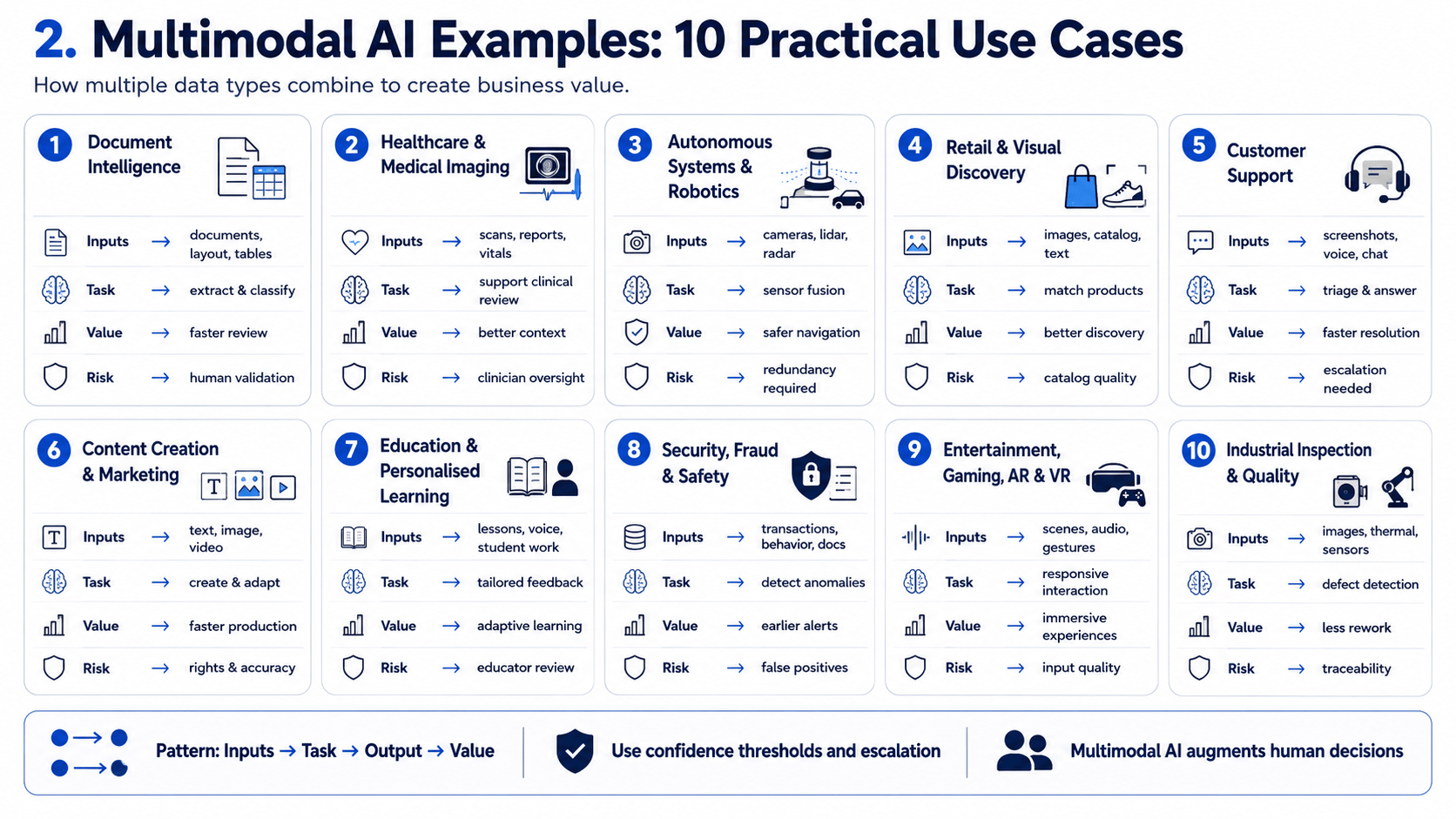
For example, a document-processing system may analyse written text together with tables, signatures, stamps, and page layouts. A customer-support assistant may combine a spoken explanation, an uploaded image, and account information to understand an issue more accurately. In manufacturing, AI may interpret camera footage alongside machine readings and maintenance records to identify potential equipment problems.

The following multimodal AI examples show how different industries can apply this technology. Each use case follows a consistent pattern:

Inputs → AI task → Output → Business value → Human control

This structure helps organisations evaluate not only what the technology can do, but also what data it requires, what operational outcome it produces, and where human review remains necessary.

2.1 Multimodal AI Example Matrix

Use caseInput modalitiesAI taskOutputBusiness valuePrincipal control or risk
Document intelligenceText, page layout, tables, images, signaturesClassify documents, extract fields, interpret structure, and identify inconsistenciesStructured data, document summaries, validation flagsReduces manual document review and accelerates downstream workflowsConfidence thresholds, access controls, and human validation
Multimodal customer supportVoice, text, screenshots, photos, customer recordsUnderstand the issue, retrieve relevant information, and recommend a responseSuggested answer, support summary, or routed caseImproves issue resolution by combining customer explanations with visual evidenceResponse approval, personal-data protection, and escalation rules
Visual product searchProduct image, text query, catalogue metadataMatch visual and semantic characteristics to available productsRanked product recommendationsMakes product discovery easier when users cannot describe an item preciselyIncorrect matching, catalogue quality, and recommendation bias
Healthcare document reviewScanned records, clinical notes, forms, charts, and imagesExtract, organise, and compare information across patient documentsStructured patient information and review alertsSupports faster administrative review and more complete record processingClinical oversight, privacy protection, and regulatory compliance
Manufacturing quality inspectionCamera images, video, sensor readings, and production specificationsDetect defects and compare observed conditions with expected standardsDefect classification, alerts, and inspection recordsImproves consistency and enables earlier identification of production issuesFalse positives, sensor quality, and human confirmation
Driver and vehicle assistanceCameras, audio, maps, radar or sensor dataInterpret road conditions, driver commands, nearby objects, and navigation contextAlerts, navigation guidance, or assisted actionsCreates more context-aware driving and fleet-management systemsSafety validation, environmental uncertainty, and manual override
Retail store analyticsVideo, shelf images, inventory data, and transaction recordsIdentify stock gaps, product placement issues, and customer-flow patternsRestocking alerts and operational insightsImproves shelf availability and store planningCustomer privacy, image retention, and inaccurate detection
Insurance claims assessmentClaim forms, photographs, video, voice notes, and policy dataCompare reported incidents with visual evidence and policy conditionsClaim summary, damage categorisation, and review flagsAccelerates initial assessment and helps prioritise complex claimsHuman adjudication, fraud bias, and explainability
Robotics and warehouse operationsVideo, depth data, spoken or written instructions, and location signalsRecognise objects, understand instructions, plan movements, and adapt to surroundingsRobotic actions, route updates, or exception alertsEnables safer and more flexible automation in dynamic environmentsPhysical safety, environmental changes, and emergency controls
Media search and content moderationText, images, audio, video, and metadataIndex content, detect policy violations, and understand cross-modal meaningSearchable media records, classifications, or moderation alertsImproves content discovery and supports scalable platform governanceContext errors, cultural bias, appeals, and human moderation

The matrix illustrates that multimodal AI is not one specific application. It is an architectural approach used when a workflow depends on evidence distributed across several data types. Its greatest value appears when combining those inputs improves the quality of the decision, reduces fragmented manual review, or enables a task that cannot be completed reliably from one modality alone.

However, organisations should not assume that adding more inputs will automatically improve performance. Each modality creates additional requirements for data integration, security, storage, model evaluation, and operational governance. High-risk applications should therefore include clear confidence thresholds, traceable outputs, escalation procedures, and appropriate human oversight.

2.2 Document Intelligence and Visual Document Understanding

Multimodal document intelligence uses AI to interpret not only the words in a document, but also its visual structure, layout, tables, images, signatures, and relationships between elements. This allows the system to process complex business documents more effectively than approaches that rely on text extraction alone.

Business documents are inherently multimodal. An invoice, contract, insurance claim, compliance report, or patient record may contain printed text, handwritten notes, checkboxes, logos, tables, charts, stamps, photographs, and signatures. The position of these elements can be as important as their content. A number located beside “Total Amount,” for example, has a different meaning from the same number shown in a tax field, table row, or payment schedule.

Traditional optical character recognition, or OCR, converts visible characters into machine-readable text. This is an important first step, but it does not necessarily explain what the extracted text means or how different parts of the page relate to one another. OCR may identify every word and number correctly while still failing to determine whether a checkbox is selected, which heading applies to a paragraph, how a table is organised, or whether a signature belongs to the correct approval field.

Multimodal document intelligence addresses this limitation by analysing several layers of information together:

  • Textual content, including printed and handwritten text.
  • Visual layout, such as headings, columns, sections, and reading order.
  • Document structure, including forms, tables, key-value pairs, and repeated fields.
  • Visual evidence, such as photographs, stamps, seals, logos, and signatures.
  • Contextual information, including document type, related records, business rules, and historical data.

A typical document-processing workflow may follow this sequence:

Document ingestion → quality assessment → OCR and visual analysis → document classification → field and table extraction → contextual validation → confidence scoring → human review → workflow action

For example, an insurance claim-processing system could receive a completed claim form, photographs of property damage, supporting invoices, and policy information. The AI system could classify each file, extract relevant fields, connect the photographs to the reported incident, identify missing documents, and flag inconsistencies for review. The resulting output might include a structured claim summary, extracted evidence, confidence scores, and a recommended next step. This pattern mirrors real deployments in the insurance sector: in one SmartDev engagement, an API-driven insurance platform serving B2B carriers and financial institutions across Asia used this kind of document workflow to speed up processing of insurance documentation for its customers.

Similarly, in accounts payable, multimodal AI can analyse an invoice’s text together with its table structure, supplier details, purchase-order references, and approval markings. It can then compare the extracted information with enterprise records before routing the invoice for payment, correction, or manual review.

A comparable workflow at a Singapore-based financial advisory firm replaced a manual “read-and-check” invoice process with AI invoice processsing – automated field validation, cutting reviewers’ workload and reducing payment discrepancies. In practice, teams using this kind of confidence-scored automation report that roughly 90% of routine extractions can flow straight through once benchmark accuracy on standard documents reaches the 95–98% range, with the remainder routed to a human for the cases that need judgment.

The business value extends beyond faster data extraction. Multimodal document intelligence can help organisations:

  • Reduce repetitive document review.
  • Improve consistency across high-volume processes.
  • Detect missing or conflicting information earlier.
  • Create structured data from complex unstructured documents.
  • Maintain stronger evidence trails for audits and approvals.
  • Connect document understanding with downstream workflow automation.

Nevertheless, document AI outputs should not be treated as automatically correct. Scanned documents may be incomplete, low-resolution, handwritten, incorrectly rotated, or visually inconsistent. Models may also misinterpret unusual layouts or documents that differ from their training data.

Reliable implementations therefore require confidence thresholds and escalation rules. High-confidence fields may proceed automatically, while low-confidence extractions, conflicting evidence, or high-risk decisions should be routed to an authorised reviewer. Organisations should also protect sensitive documents through encryption, role-based access, retention policies, audit logs, and appropriate controls over third-party model processing.

This last point matters in practice: rather than treating extraction as an isolated step, workflow-first approaches connect document intake, validation, drafting, and approval into a single governed process. For example, cross-referencing a live tender document against a firm’s own proposal history, or screening for missing information across engagement records, so a document moves from a client’s inbox to a reviewer’s desk without passing through several disconnected manual handoffs.

The objective is not to remove human involvement from every document workflow. It is to automate routine interpretation while directing human attention toward exceptions, uncertain cases, and decisions that require professional judgement.

2.3 Healthcare and Medical Imaging Support

Multimodal AI can support healthcare and medical imaging workflows by combining diagnostic images with relevant textual and structured patient information. Depending on the application, these inputs may include X-rays, CT or MRI scans, radiology reports, referral notes, laboratory results, previous examinations, and selected information from electronic health records. Analysing these sources together can provide practitioners with a more complete view of the case than reviewing each input independently.

In a medical imaging workflow, the system may examine visual patterns in a scan while using the accompanying report or clinical note to understand why the examination was requested. It could also compare current images with previous studies, organise relevant patient information, identify incomplete records, or generate a preliminary case summary for professional review. The resulting output may include highlighted areas for further examination, structured findings, draft documentation, or prioritisation alerts.

Multimodal clinical decision support refers to the use of AI to combine medical images with textual, numerical, or structured patient data and produce supporting information for qualified healthcare professionals. It does not independently establish a diagnosis or replace clinical judgement.

A controlled workflow may follow this pattern:

Medical images and patient data → data-quality checks → multimodal analysis → supporting output and confidence indicators → practitioner review → clinical decision or further investigation

Potential applications include radiology workflow support, comparison of current and historical scans, medical-record summarisation, report drafting, and case prioritisation. Biomedical vision-language models such as LLaVA-Med, developed by Microsoft Research, illustrate how images and natural-language instructions can be combined to support open-ended questions about biomedical figures: the model was trained on a large biomedical figure-caption dataset drawn from PubMed Central and evaluated on standard biomedical visual-question-answering benchmarks. Its authors and distributors are explicit that the released model and code are intended for research use and reproducibility only, and are not intended for clinical care or clinical decision-making. Such research models should not be presented as validated clinical diagnostic systems unless supported by appropriate clinical and regulatory evidence.

The principal value of multimodal AI in this context is its ability to organise and connect information that clinicians would otherwise need to review across separate systems. This can support more consistent workflows and help practitioners focus their attention on relevant evidence. Nevertheless, clinical use requires rigorous validation, representative data, privacy safeguards, continuous performance monitoring, and clear accountability.

FDA guidance similarly treats AI-enabled medical systems as regulated technologies: the agency’s draft guidance on AI-enabled device software functions sets out lifecycle-management and marketing-submission recommendations covering the device description, risk assessment, data management, model validation, and postmarket performance monitoring expected across a device’s total product lifecycle.

For this reason, multimodal AI should be positioned as a decision-support capability under practitioner oversight, rather than an autonomous diagnostic authority. Final interpretation, diagnosis, and treatment decisions should remain with appropriately qualified healthcare professionals.

2.4 Autonomous Vehicles, Robotics, and Physical-World Systems

Multimodal AI supports autonomous vehicles and robotic systems by combining multiple sources of information about the physical environment. Unlike software applications that work mainly with text or structured data, physical-world systems must continuously interpret objects, movement, distance, location, spoken instructions, and changing operating conditions. No single sensor can capture all of this context reliably, so these systems often depend on sensor fusion.

Sensor fusion is the process of combining signals from cameras, lidar, radar, GPS, maps, telemetry, microphones, and other sensors to create a more complete representation of the environment. Each modality contributes different information: cameras provide high-resolution detail on lane markings, signs, and object classification but can struggle in low light, while radar and lidar continue to estimate distance, speed, and spatial position under conditions such as fog or heavy rain where cameras lose reliability. GPS and maps support localisation and route planning, and telemetry provides information about the vehicle or robot itself.

Multimodal AI supports robotics by integrating visual, spatial, numerical, and language-based inputs so that a system can perceive its surroundings, interpret instructions, plan actions, and respond to changing conditions. A typical physical-world AI workflow may follow this pattern:

Sensor inputs → data synchronisation → multimodal perception → environment modelling → action planning → safety checks → assisted or autonomous action

Autonomous Vehicles

In autonomous and driver-assistance systems, multimodal AI may combine camera feeds with radar, lidar, map data, GPS, and vehicle telemetry. The system can use these inputs to recognise lanes, detect nearby vehicles or pedestrians, estimate movement, and support navigation decisions.

The value of combining modalities becomes clear when one sensor is incomplete or unreliable. A camera may provide detailed visual information but perform less effectively in darkness, glare, fog, or heavy rain. Radar may continue to detect movement and distance under some of these conditions but provide less visual detail; this complementary relationship that cameras reading signs and classifying objects, radar and lidar handling distance and robustness in poor weather is why camera-radar-lidar fusion has become the dominant sensing architecture across major manufacturers’ autonomous-driving stacks.

However, many vehicles described as intelligent or autonomous still operate as assisted or supervised systems. Their capabilities may be limited to particular roads, speeds, weather conditions, or geographic areas. Marketing terms should therefore not be treated as evidence of full autonomy.

Industrial and Service Robotics

In manufacturing, logistics, healthcare facilities, and other controlled environments, robots may combine cameras, depth sensors, force sensors, location signals, and written or spoken instructions. These inputs help robots identify objects, navigate around obstacles, manipulate equipment, and coordinate with human workers.

For example, a warehouse robot may use camera and depth data to identify a package, map information to locate its destination, and telemetry to monitor battery levels and movement. A robotic arm may combine visual recognition with force feedback so that it can adjust its grip when handling items of different shapes or materials.

Language input can add another layer of flexibility. Vision-language-action systems may allow a user to describe a task in natural language while the robot uses visual information to identify the relevant objects and environment. These capabilities remain dependent on controlled testing, clear operating boundaries, and appropriate supervision.

Why Redundancy Matters

In safety-critical systems, multiple inputs do more than improve context. They also provide redundancy. When one sensor fails, becomes obstructed, or produces uncertain data, another modality may provide supporting evidence. This does not eliminate risk, but it can help the system identify disagreement and respond more cautiously.

A controlled system may apply rules such as:

  • Continue only when several signals support the same interpretation.
  • Reduce speed or pause when sensor confidence falls.
  • Request human intervention when inputs conflict.
  • Move to a safe state when essential data becomes unavailable.

This failure-mode thinking is essential because multimodal systems can still make mistakes. Sensors may be misaligned, delayed, damaged, or affected by environmental conditions. Models may also encounter unfamiliar objects or situations that were not adequately represented during testing.

For this reason, safety depends not only on model capability but also on robust engineering. Autonomous and robotic systems require scenario-based testing, sensor-health monitoring, fallback procedures, cybersecurity controls, operational boundaries, and clear human override mechanisms. The goal of multimodal AI in physical-world systems is therefore not simply to make machines more autonomous. It is to help them perceive and act with greater contextual awareness while maintaining defined limits, redundancy, and human control wherever the consequences of failure are significant.

2.5 Retail, E-Commerce, and Visual Product Discovery

Multimodal AI can improve retail and e-commerce product discovery by combining product images, catalogue information, natural-language queries, and customer interaction data. Traditional keyword search depends on users describing an item with the same terms used in the product catalogue. This can be difficult when shoppers do not know the product name, style, material, or technical specification. Visual product discovery provides an alternative by allowing users to search with an image and refine the results through text.

Multimodal AI in visual product discovery uses images, product metadata, and natural-language intent together to identify and rank relevant products. Rather than matching only exact keywords, the system can compare visual characteristics such as shape, colour, pattern, style, and product category with catalogue descriptions and structured attributes.

A typical image-to-product matching journey may follow this pattern:

Customer image or screenshot → visual feature analysis → catalogue and metadata matching → natural-language refinement → ranked product results → customer selection

For example, a shopper may upload a photograph of a chair and ask for “a similar design in dark wood under a specific price.” The system can use the image to identify the general product type and visual style, then apply the written constraints to filter the catalogue. The output may include visually similar items, related products, or alternatives that meet the requested size, material, availability, and price criteria.

How Visual Search Differs from Keyword Search

FactorConventional keyword searchMultimodal visual product discovery
Primary inputWritten keywordsImage, text, or both
User requirementMust describe the product accuratelyCan show the desired product visually
Matching approachText and metadata matchingVisual similarity combined with semantic and catalogue matching
Best suited forKnown products and precise searchesStyle-led, exploratory, or difficult-to-describe products
Typical limitationVocabulary mismatch between users and catalogue dataVisual similarity may not reflect practical product requirements
Key dependencySearch taxonomy and keyword qualityImage quality, metadata accuracy, and catalogue coverage

Visual search is particularly relevant in categories where appearance influences purchasing decisions, such as fashion, furniture, home décor, beauty, automotive parts, and consumer electronics. A customer can photograph an item in a store, upload a screenshot from social media, or select part of an existing image to find comparable products. Text can then clarify intent through instructions such as “show this in another colour,” “find a smaller version,” or “look for a more affordable alternative.”

Multimodal AI can also support related retail workflows. Product teams may use it to identify missing catalogue attributes, generate draft product descriptions from images and specifications, or group visually similar items. Customer-service teams may combine product photographs, order information, and written complaints to understand issues such as damage, incorrect items, or missing components. In physical stores, shelf images can be analysed alongside inventory data to identify possible stock gaps or misplaced products.

The usefulness of these applications depends heavily on catalogue quality. Product records must contain accurate descriptions, consistent categories, current availability, and reliable attributes. When metadata is incomplete or images are inconsistent, the system may return products that look similar but differ in size, compatibility, material, or intended use.

Customer behaviour data can help refine relevance, but it must be used carefully. Click history, purchases, saved items, and previous searches may support more personalised rankings, yet they can also create repetitive recommendations or reinforce narrow assumptions about user preferences. Retailers therefore need clear privacy controls, appropriate consent mechanisms, and ways for users to reset or adjust personalisation.

Human control remains important in areas such as catalogue management, restricted-product handling, pricing, and customer disputes. Retail teams should also evaluate whether recommendations are accurate across different product categories, image conditions, customer groups, and devices.

The main value of multimodal AI in retail is not simply that customers can search with photographs. It is that the system can connect visual intent with language, product attributes, availability, and commercial rules. When these inputs are aligned, visual product discovery can make search more intuitive and help customers navigate large catalogues. When catalogue information is weak or visual similarity is treated as sufficient evidence, conventional filters and keyword search may remain more reliable.

2.6 Customer Support Using Text, Voice, Images, and Screenshots

Multimodal AI can support customer-service workflows by analysing several forms of customer evidence together, including written messages, voice recordings, screenshots, photographs, documents, chat history, and product or account data. This gives the system more context than a text-only chatbot, particularly when the issue is difficult to explain in words alone. Consumer expectations already reflect this shift: in Zendesk’s 2026 CX Trends research, more than three-quarters of consumers said they would choose a company that lets them share text, images, and video within the same conversation without having to start over.

For example, a customer experiencing a software problem may upload an error screenshot and describe what happened through chat or voice. The AI system can examine the visible error message, interface state, device information, previous conversation, and relevant product documentation before suggesting troubleshooting steps. In retail or insurance, the same pattern could combine a customer’s written explanation with photographs of a damaged product, order details, receipts, and warranty information.

Multimodal AI in visual product discovery uses images, product metadata, and natural-language intent together to identify and rank relevant products. Rather than matching only exact keywords, the system can compare visual characteristics such as shape, colour, pattern, style, and product category with catalogue descriptions and structured attributes. This is no longer a niche behaviour: Google has reported that Google Lens now handles close to 20 billion visual searches a month, around one-fifth of them shopping-related, matched against a shopping graph of tens of billions of product listings.

A typical support workflow may follow this pattern:

Customer message and supporting evidence → multimodal analysis → issue classification → severity and confidence assessment → automated response, agent assistance, or escalation

How Multimodal AI Supports Issue Resolution

A text-only support system depends heavily on the customer describing the problem accurately. Customers may use incorrect terminology, omit important details, or struggle to explain what they see. Images, screenshots, and voice inputs can provide additional evidence that helps clarify the issue.

A screenshot may reveal an error code, missing button, payment status, or incorrect configuration. A product photograph may show visible damage, missing components, or the wrong item. Voice can capture a customer’s explanation while reducing the effort required to type a detailed request. Documents such as invoices, contracts, or installation guides can add further context when the issue depends on specific terms or technical information.

Multimodal AI can use these inputs to perform tasks such as:

  • Classifying the issue and identifying the relevant product or service.
  • Extracting error codes, order numbers, dates, or other useful details.
  • Comparing screenshots with known interface states or troubleshooting documentation.
  • Summarising the customer’s explanation and supporting evidence.
  • Recommending next steps to the customer or support agent.
  • Routing the case to the correct team based on severity and subject matter.

Severity-Based Handoff Model

Not every support request should be handled in the same way. A practical implementation should distinguish between cases that can be automated, cases where AI should assist an agent, and cases that require immediate human escalation.

Support levelAppropriate useAI roleHuman control
AutomateCommon, low-risk, and well-documented issuesIdentify the problem and provide approved troubleshooting stepsCustomer can request an agent at any time
AssistMore complex issues requiring interpretation or account contextSummarise evidence, recommend actions, and prepare a responseSupport agent reviews and approves the action
EscalateHigh-severity, sensitive, uncertain, or regulated casesOrganise evidence and route the case with priority indicatorsQualified staff make the final decision

Automation may be suitable for issues such as password resets, basic configuration guidance, order-status checks, or common error messages. Agent assistance is more appropriate when the system must interpret several sources of evidence or when the solution affects an account, refund, warranty, or service entitlement. Immediate escalation is necessary when the case involves safety, fraud, legal disputes, sensitive personal information, repeated system failure, or low model confidence.

A support triage decision may therefore consider:

Issue severity + model confidence + customer impact + data sensitivity + required authority

When any of these factors exceed a defined threshold, the system should transfer the case to an authorised human representative rather than continue autonomously.

Business Value and Operational Limits

The principal value of multimodal AI in customer support is its ability to reduce fragmented investigation. Instead of asking customers to repeatedly explain the same issue, the system can organise their message, screenshot, documents, and account context into a single case summary. This may help agents understand the problem more quickly and provide a more consistent response.

However, more inputs can also create additional risks. Screenshots and photographs may contain passwords, payment details, personal messages, addresses, or other sensitive information. Voice recordings may capture background conversations or identifying information unrelated to the request. Organisations therefore need clear consent, secure storage, access controls, retention limits, and methods for masking unnecessary personal data.

Multimodal systems may also misinterpret unclear screenshots, low-quality photographs, accents, background noise, or incomplete account information. Their outputs should therefore include confidence indicators and traceable evidence showing which inputs informed the recommendation.

The objective is not to replace support agents in every interaction. It is to automate predictable requests, assist agents with complex evidence, and escalate cases where human judgement, authority, or empathy is required. This automate–assist–escalate model allows businesses to use multimodal AI while preserving appropriate customer protection and operational accountability.

2.7 Content Creation, Marketing, and Creative Production

Multimodal AI can support content creation and marketing workflows by working across text, images, video, audio, design references, and existing brand assets. Instead of treating each format as a separate production task, a multimodal system can interpret the relationship between them and help teams develop, adapt, and organise content across multiple channels.

For example, a marketing team may provide a campaign brief, brand guidelines, product images, customer research, and examples of previously approved content. The AI system can use these inputs to propose campaign concepts, draft copy, suggest visual directions, create content variations, or adapt a core message for different formats.

The resulting materials may include social posts, website copy, video scripts, storyboards, image concepts, captions, and voice-over drafts. A multimodal content workflow uses AI to interpret and transform text, visual, audio, and video assets while applying relevant brand and campaign context. Human review remains necessary to confirm accuracy, quality, usage rights, and suitability for publication.

A typical workflow may follow this sequence: Creative brief and source assets → multimodal interpretation → concept development → content generation or adaptation → brand and factual review → approval → publication

How Multimodal AI Supports Creative Workflows

Multimodal AI can assist at several stages of content production. During ideation, it can analyse a written brief alongside reference images, audience insights, and previous campaign materials to suggest themes or creative directions. During production, it can generate draft copy, image concepts, video scripts, shot lists, captions, or audio treatments. Besides, for adaptation, it can convert a long-form asset into shorter formats designed for different platforms or audiences.

Common applications include:

  • Developing campaign concepts from written and visual references.
  • Creating draft copy that reflects an approved tone of voice.
  • Generating image or video concepts from product information.
  • Producing captions, transcripts, summaries, and subtitles.
  • Converting webinars or interviews into articles and social content.
  • Adapting one campaign across languages, formats, and channels.
  • Creating initial storyboards or scripts for creative teams.
  • Organising and tagging large libraries of marketing assets.

A single source asset may also be transformed into several outputs. For example, a recorded webinar could be transcribed, summarised into an article, divided into short video clips, converted into social posts, and supported with suggested captions or visual assets.

Example Multimodal Content Workflow

Consider a product launch campaign requiring a landing page, social content, email copy, and a short promotional video.

The marketing team provides:

  • A written product brief.
  • Product photographs and demonstration videos.
  • Brand guidelines and approved terminology.
  • Audience profiles and campaign objectives.
  • Previous examples of approved marketing materials.

The multimodal AI system may analyse these inputs and produce:

  • A campaign message hierarchy.
  • Draft landing-page copy.
  • Suggested social-media posts.
  • An email sequence.
  • A video script and storyboard.
  • Alternative headlines and calls to action.
  • A list of assets requiring human creation or approval.

The outputs can accelerate early production, but they should remain drafts until reviewed by the relevant content, design, product, legal, or brand stakeholders.

Content Generation vs. Content Governance

The ability to generate content does not establish that the content is accurate, compliant, original, or authorised for commercial use. Marketing teams therefore need governance controls around every source asset and generated output.

Governance areaKey review question
Asset provenanceWhere did the source material come from, and can its origin be verified?
Usage rightsDoes the organisation have permission to use, modify, and publish the asset?
Brand alignmentDoes the output follow approved visual identity, terminology, and tone?
Factual accuracyAre product claims, statistics, quotations, and descriptions correct?
Personal dataDoes the content contain identifiable or sensitive information?
DisclosureIs AI-generated or altered content required to be labelled?
ApprovalHas the appropriate owner reviewed the final asset before publication?

This review process is particularly important when content includes customer testimonials, public figures, employee images, licensed music, third-party logos, product claims, or regulated information.

Brand Consistency and Human Review

Multimodal AI can use brand guidelines, design examples, and approved content to support consistency. However, it may still produce language that sounds generic, visuals that conflict with brand identity, or adaptations that lose important cultural context.

Human reviewers should therefore assess:

  • Whether the content communicates the intended message clearly.
  • Whether visual and written elements work together.
  • Whether the tone is appropriate for the audience and channel.
  • Whether claims are supported by approved evidence.
  • Whether the output could create reputational or legal risk.
  • Whether local adaptation preserves the original meaning.

Creative judgement is especially important for campaigns involving humour, emotion, cultural references, or sensitive social topics. AI may assist with production, but it does not fully understand brand reputation, audience reaction, or the strategic consequences of publication.

Intellectual Property and Commercial Use

Marketing teams should not assume that an output is commercially usable simply because a platform can generate it. Commercial use may depend on the platform’s terms, the source material, applicable intellectual-property rules, licensing arrangements, and the way the content is produced.

Teams should maintain records of source assets, prompts, model versions, approvals, and modifications where appropriate. They should also avoid uploading confidential brand materials or unreleased product information into systems that have not been approved for such data.

The main value of multimodal AI in content creation is its ability to connect creative inputs and accelerate the movement from idea to draft. It can help teams interpret briefs, reuse existing materials, create format variations, and organise complex production workflows. However, final responsibility for accuracy, originality, brand suitability, rights clearance, and publication should remain with authorised human reviewers.

2.8 Education and Personalised Learning Experiences

Multimodal AI can support education by interpreting different forms of learner input, including written answers, spoken responses, diagrams, handwritten work, images, video, and interaction data from learning platforms. By combining these signals, an AI system can provide feedback that reflects not only a learner’s final answer but also how they approached the task.

For example, a student solving a mathematics problem may submit a handwritten calculation and explain their reasoning aloud. A multimodal learning system could examine the written steps, transcribe the explanation, identify where the reasoning diverged from the expected method, and provide a targeted hint. In language learning, the system might combine a learner’s spoken pronunciation, written vocabulary exercises, and previous lesson history to suggest further practice.

Multimodal AI in education uses textual, visual, spoken, and structured learning data to support instruction, practice, and feedback. It should assist educators and learners rather than independently determine high-stakes academic outcomes.

A typical learner feedback loop may follow this sequence:

Learning activity → student response in one or more formats → multimodal interpretation → feedback or suggested next activity → learner revision → educator review

How Multimodal AI Can Support Learning

Multimodal systems can support several parts of the educational process:

  • Explaining concepts through combinations of text, diagrams, audio, and video.
  • Interpreting handwritten work or visual problem-solving steps.
  • Providing feedback on written and spoken language exercises.
  • Converting learning materials into alternative formats.
  • Generating practice questions based on course content.
  • Summarising lectures, discussions, or uploaded learning resources.
  • Helping educators identify areas where learners may require further support.
  • Supporting interactive tutoring through text, voice, and visual examples.

The principal advantage is flexibility. Learners may demonstrate understanding in different ways, while educators may present the same concept through several formats. A student who struggles with a long written explanation may benefit from a diagram or spoken walkthrough. Another learner may prefer captions, transcripts, simplified text, or additional visual examples.

Practical Personalised Learning Example

Consider a student completing a science assignment about electrical circuits. The student uploads a photograph of a hand-drawn circuit diagram, submits a short written explanation, and records a voice message describing how current moves through the circuit.

The multimodal AI system may:

  • Interpret the components and connections shown in the diagram.
  • Analyse the written explanation for key scientific concepts.
  • Transcribe and review the spoken reasoning.
  • Compare the three inputs to identify consistent understanding or possible misconceptions.
  • Provide a targeted hint or suggest an appropriate revision activity.
  • Prepare a summary for the teacher when further support may be required.

The AI could point out that the explanation does not match the arrangement shown in the diagram, but the teacher should remain responsible for deciding how the work is assessed and what instructional response is appropriate.

Personalisation Without Over-Automation

Personalised learning does not simply mean generating a different lesson for every student. It can also involve adjusting the pace, explanation format, practice difficulty, or type of feedback based on demonstrated needs.

Learning needPossible multimodal supportRequired human control
Difficulty understanding a conceptProvide text, visual, and spoken explanationsEducator confirms instructional suitability
Language-learning practiceAnalyse written and spoken responsesTeacher reviews consequential assessments
Visual or handwritten workInterpret diagrams, annotations, and calculation stepsLearner can correct misread content
Revision planningSuggest exercises based on previous activityEducator aligns tasks with curriculum goals
Accessibility supportProduce captions, transcripts, descriptions, or alternative formatsUsers verify that outputs meet individual needs
Progress monitoringSummarise patterns across learning activitiesEducators interpret patterns within broader context

AI-generated personalisation may be useful, but it should not be assumed to improve learning outcomes in every setting. Effectiveness depends on the subject, learner group, instructional design, quality of the source material, and how educators integrate the technology into teaching.

Accessibility and Inclusive Learning

Multimodal AI can make educational content available in several formats. A recorded lesson may be converted into a transcript and summary. An image may be accompanied by a written description. A learner may respond through speech rather than typing, while written instructions can be read aloud.

These capabilities can support accessibility, but they should not be treated as automatic substitutes for professionally designed accommodations. Captions may contain transcription errors, image descriptions may omit important details, and voice systems may perform inconsistently across accents, languages, or speech patterns.

Educational institutions should therefore test AI-supported accessibility features with the people who use them and provide a clear route for requesting corrections or alternative support.

Student Data, Privacy, and Assessment

Educational AI systems may process sensitive information, including student work, voice recordings, images, behavioural data, learning history, and performance indicators. Additional safeguards are particularly important when learners are children or when the system is used in formal education.

Institutions should define:

  • What student data is collected and why.
  • Whether learners and guardians have been appropriately informed.
  • How long recordings and submitted work are retained.
  • Who can access the information.
  • Whether data is used to train external models.
  • How students can review or correct AI-generated interpretations.
  • Which decisions require educator approval.

Multimodal AI should also be used cautiously in assessment. A system may misread handwriting, interpret an unusual solution as incorrect, or fail to recognise cultural and linguistic differences. High-stakes grading, admissions, disciplinary decisions, and determinations about learner ability should not depend solely on automated outputs.

The primary value of multimodal AI in education is its ability to support more flexible interactions between learners, educational content, and educators. It can help explain concepts, interpret different forms of student work, and provide timely practice feedback. However, teachers and educational institutions must remain accountable for learning design, assessment, accessibility, student welfare, and the appropriate use of learner data.

2.9 Security, Fraud Detection, and Safety Monitoring

Multimodal AI can support security, fraud detection, and safety-monitoring workflows by combining signals that would otherwise be investigated separately. These signals may include transaction records, identity documents, account activity, device information, images, video, voice recordings, written communications, location data, and behavioural patterns. Analysing them together can help organisations identify inconsistencies, prioritise alerts, and provide investigators with a more complete view of an event.

For example, a financial institution reviewing a suspicious account application may compare the submitted identity document with a selfie, application details, device information, and previous account activity. A security team may analyse an access alert alongside camera footage, badge records, system logs, and employee communications. Each signal provides partial context; the multimodal system connects them to support further review.

Multimodal fraud detection uses AI to combine transactional, visual, textual, behavioural, and contextual signals to identify activity that may require investigation. A detected pattern is an indicator of risk, not proof that fraud or misconduct has occurred.

A typical workflow may follow this sequence:

Documents, transactions, images, communications, and behavioural signals → data validation → multimodal analysis → risk scoring and alert generation → human investigation → approved action

How Multimodal AI Supports Investigation

Fraud and security events rarely appear in one data source alone. A transaction may look unusual but still be legitimate. An identity document may appear valid when reviewed visually, while other account information suggests an inconsistency. A safety alert from a sensor may require video or operational records to determine what happened.

Multimodal AI can help investigators by:

  • Comparing identity documents with submitted images and account details.
  • Connecting unusual transactions with device, location, and behavioural information.
  • Analysing written or spoken communications for relevant case context.
  • Reviewing camera footage alongside access-control or operational records.
  • Grouping related alerts across systems and channels.
  • Extracting evidence into a structured investigation summary.
  • Identifying conflicting information or missing documentation.
  • Prioritising cases based on severity, confidence, and potential impact.

The system’s purpose is generally to narrow the investigation space and organise relevant evidence rather than make a final determination. This is also the design principle behind audit-trail-first compliance workflows: every step from document intake, screening, match flagging with confidence scores, human review to final disposition is built to produce a structured, timestamped record automatically, so the compliance team can retrieve evidence of a decision rather than reconstruct it after the fact.

Practical Multimodal Fraud-Review Example

Consider an online insurance claim that includes a completed form, photographs of damaged property, repair invoices, a voice explanation, and policy information.

The AI system may:

  • Extract claim details from the form and invoices.
  • Analyse the photographs for visible objects and damage indicators.
  • Transcribe and summarise the claimant’s voice explanation.
  • Compare dates, locations, descriptions, and policy conditions.
  • Identify missing documents or conflicting information.
  • Assign an alert priority and prepare a structured case file.

If the information appears complete and consistent, the system may route the claim through the standard review process. When evidence conflicts or model confidence is low, the case should be escalated to an authorised investigator. The AI output should not independently establish that the claimant has acted fraudulently.

The “Signal Is Not Proof” Principle

An unusual pattern may indicate that further review is appropriate, but it does not confirm wrongdoing. Legitimate activity may appear suspicious because of travel, shared devices, accessibility requirements, unusual purchasing behaviour, administrative errors, or changes in personal circumstances. For this reason, organisations should apply the following principle: A risk signal justifies investigation; it does not justify an automatic conclusion.

Automated systems should therefore avoid imposing serious consequences solely on the basis of a model score or detected pattern. Actions such as closing an account, rejecting a claim, restricting access, reporting an individual, or initiating disciplinary procedures should require evidence review and appropriate human authority.

Alert Prioritisation Framework

A practical alerting model should consider more than the number of detected anomalies.

Evaluation factorKey questionPossible response
Signal strengthHow strongly does the observed pattern differ from expected activity?Monitor, review, or prioritise
Evidence consistencyDo independent data sources support or contradict the alert?Increase or reduce priority
Potential impactCould the event affect people, assets, systems, or regulated processes?Apply severity-based routing
Model confidenceHow reliable is the analysis given the available input quality?Automate only at defined thresholds
Data sensitivityDoes the case involve personal, biometric, financial, or confidential information?Apply stricter access controls
Required authorityWho is permitted to investigate or act on the finding?Route to an authorised reviewer
Time sensitivityDoes delayed action create additional operational or safety risk?Trigger expedited review

This approach helps distinguish between low-priority anomalies, cases requiring analyst assistance, and events that may need immediate escalation.
False Positives, Bias, and Privacy Risks

Multimodal systems can generate false positives when legitimate activity differs from historical patterns or when one input is incomplete. Poor-quality images, inaccurate transcripts, inconsistent records, shared devices, and outdated data may all contribute to incorrect alerts.

Bias can also emerge when models perform differently across demographic groups, languages, accents, locations, or behavioural patterns. Organisations should evaluate performance across relevant user groups and investigate whether alert rates or error rates are distributed unfairly.

Privacy is another central constraint. Fraud and safety systems may process highly sensitive data, including identity documents, financial records, communications, biometrics, location history, and surveillance footage. Controls should cover:

  • Clear purpose limitation and lawful data use.
  • Role-based access to investigation records.
  • Data minimisation and retention limits.
  • Encryption and secure transfer.
  • Audit logs showing who accessed or changed a case.
  • Processes for correcting inaccurate information.
  • Human review before consequential decisions.
  • Appropriate notice, appeal, and redress mechanisms.

The primary value of multimodal AI in security and fraud workflows is its ability to connect fragmented evidence and help teams prioritise complex investigations. Its role should be to surface relevant signals, explain why an alert was generated, and support qualified reviewers. It should not treat correlation as proof or replace the judgement, accountability, and procedural safeguards required for consequential decisions.

2.10 Entertainment, Gaming, AR, and VR Experiences

Multimodal AI can support entertainment, gaming, augmented reality, and virtual reality by combining visual scenes, audio, speech, gestures, movement, and interaction history. These inputs allow digital environments to respond to users through more than traditional buttons or text commands, creating experiences that feel more interactive and context-aware.

For example, a VR training experience may interpret a user’s spoken instruction, hand movement, position, and surrounding virtual scene at the same time. In a game, the system may combine player dialogue, character location, recent actions, and environmental events to select an appropriate response. In an AR application, it may analyse the physical environment through a camera while considering voice commands and on-screen interactions.

Multimodal AI in AR, VR, and gaming combines visual, auditory, linguistic, spatial, and behavioural inputs to support responsive digital interactions. It does not necessarily mean that virtual characters or environments operate with complete autonomy.

A typical interaction stack may follow this sequence:

Visual, audio, gesture, and language inputs → input synchronisation → scene and intent interpretation → response selection → animation, dialogue, or interface action → user feedback

How Multimodal AI Supports Interactive Experiences

Traditional digital interfaces often depend on predefined controls, menus, or dialogue choices. Multimodal systems can offer more flexible interactions by interpreting several user signals together.

For example, a player may look toward an object, point at it, and ask a virtual character, “What is that?” The system must identify the referenced object from the visual scene, interpret the gesture and language, and use the current game state to generate a relevant response. None of these inputs may be sufficient alone.

Multimodal AI can support tasks such as:

  • Interpreting spoken commands alongside gaze or gestures.
  • Recognising objects and events within virtual or physical environments.
  • Generating context-aware dialogue for non-player characters.
  • Adjusting tutorials or experiences based on player actions.
  • Supporting voice, gesture, and movement-based controls.
  • Creating captions, descriptions, or alternative interaction methods.
  • Assisting content teams with dialogue, scene, and asset production.

Gaming and Interactive Characters

In games, multimodal AI may help characters respond to a player’s language, behaviour, and surrounding context. A character could refer to objects currently visible in the environment, recall an earlier interaction, or react to a recent in-game event.

However, this should not be confused with fully autonomous character behaviour. Many systems still operate within predefined rules, approved dialogue boundaries, scripted objectives, and restricted action sets. AI may generate or select responses, but the game engine and design team continue to define what the character is permitted to know and do. Developer tooling in this space typically includes configurable content boundaries that let studios block topics or language outside defined parameters, alongside active monitoring for games with user-generated dialogue input.

Interaction capabilityMultimodal inputsControlled output
Context-aware dialogueSpeech, text, scene state, interaction historyCharacter response
Gesture-based interactionHand movement, body position, visual sceneInterface or character action
Adaptive guidancePlayer behaviour, progress, errors, spoken requestsHint or tutorial adjustment
Dynamic scene responseEnvironmental events, player location, object stateAnimation, audio, or narrative trigger
Accessibility supportVoice, captions, visual descriptions, alternative controlsAdapted interface or content

AR and VR Applications

AR systems combine digital content with information about the user’s physical surroundings. A maintenance application, for example, may recognise a machine component through a camera, listen to a technician’s question, and display the relevant instruction over the object. A museum experience may identify an exhibit and provide audio, visual, or text-based information based on the visitor’s selected interaction mode.

VR systems can use head position, hand tracking, voice, spatial audio, and virtual-scene information to create responsive simulations. These capabilities may support gaming, education, product demonstrations, workplace training, and collaborative virtual environments.

A practical workflow might involve a trainee entering a simulated industrial environment. The system observes where the trainee is looking, tracks their hand movement, listens to spoken questions, and uses the current task state to provide guidance. The AI may explain the next step or highlight an object, while the training programme determines the approved procedure and assessment criteria.

Accessibility and User Experience

Multimodal interaction can make digital experiences usable through several input and output formats. Users may communicate through voice instead of controllers, receive captions for spoken dialogue, use visual indicators alongside sound, or access descriptions of important on-screen content.

However, these features require careful testing. Speech recognition may perform inconsistently across languages, accents, or noisy environments. Gesture tracking may be affected by lighting, camera position, mobility differences, or physical space. Developers should provide alternative controls and allow users to correct misinterpreted inputs.

Safety, Privacy, and Design Controls

Immersive systems may collect sensitive information, including voice recordings, facial movement, gaze direction, physical motion, room images, and behavioural data. These inputs can reveal more about a user than conventional interface data.

Organisations should therefore define:

  • Which sensor data is necessary for the experience.
  • Whether information is processed locally or remotely.
  • How long recordings and interaction histories are retained.
  • Whether user data is used for model training or personalisation.
  • How users can disable particular sensors or interaction modes.
  • Which content and behaviour boundaries apply to AI-generated characters.
  • How inappropriate, unsafe, or unexpected outputs are handled.

Content controls are especially important for experiences involving children, social interaction, user-generated content, or emotionally realistic virtual characters. AI-generated dialogue and behaviour should remain within defined safety, age, and brand guidelines.

The main value of multimodal AI in entertainment and immersive interfaces is its ability to connect user intent with the surrounding digital or physical context. It can make interactions more natural, support flexible controls, and enable characters or environments to respond to several signals at once. However, these systems should be described according to their actual operating boundaries rather than presented as fully autonomous or human-like experiences.

3. How Multimodal AI Works

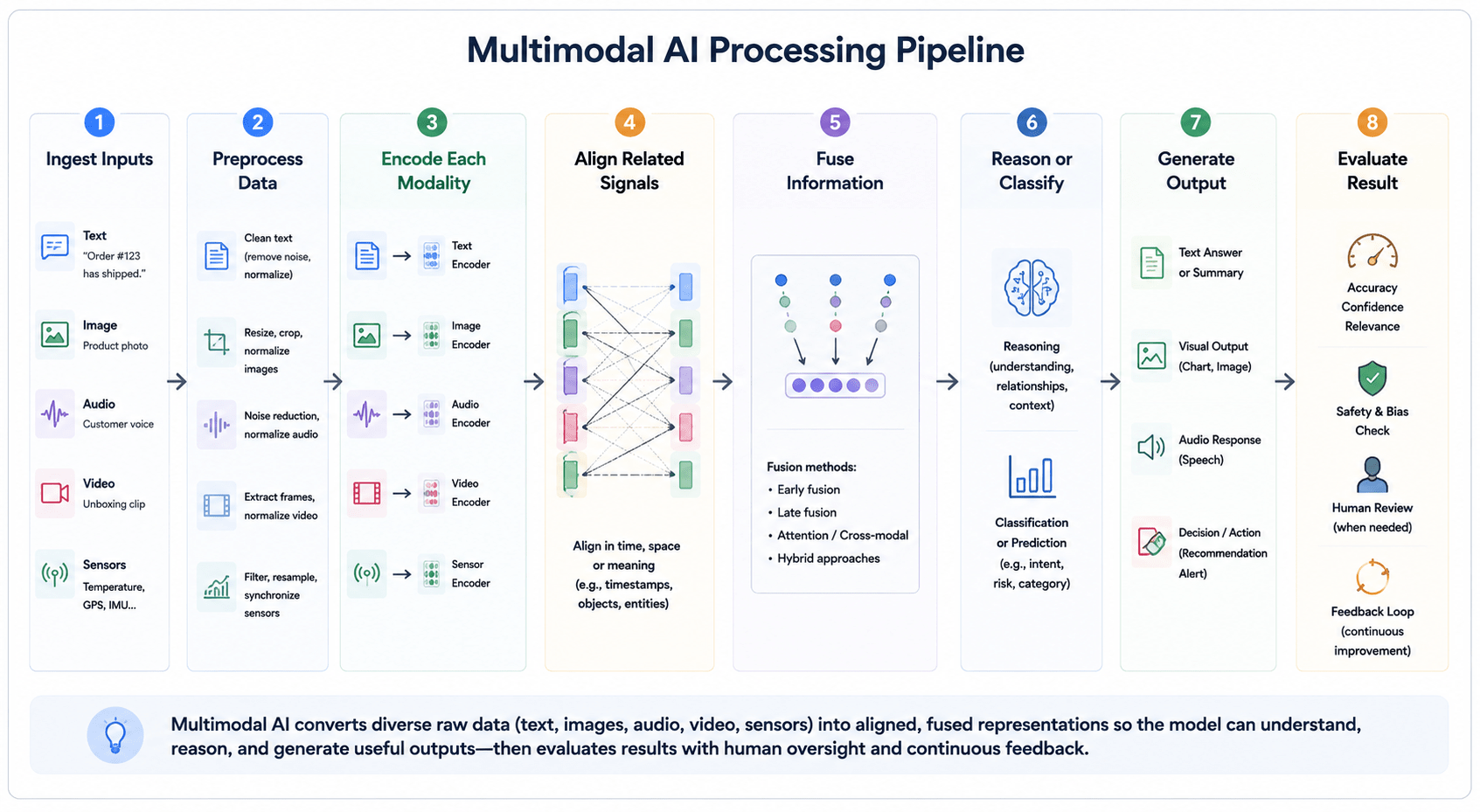
Multimodal AI works by converting different types of raw data into representations that a model can compare, connect, and reason over. Text, images, audio, video, and sensor signals are fundamentally different formats, so they cannot simply be placed together and interpreted without preparation. Each input must first be processed, encoded, aligned with related information, and combined through an appropriate fusion method.

In plain language, the multimodal processing pipeline follows this pattern:

Ingest inputs → preprocess data → encode each modality → align related signals → fuse information → reason or classify → generate an output → evaluate the result

The exact architecture varies by model and task. A document-intelligence system may combine text with page layout and tables, while a robot may process camera feeds, depth measurements, location data, and language instructions in real time. Despite these differences, implementation quality generally depends on three factors: whether the input data is reliable, whether the modalities are aligned correctly, and whether the final system is evaluated under realistic operating conditions.

3.1 The Multimodal AI Pipeline: Input, Encoding, Fusion, Reasoning, and Output

A multimodal AI system typically moves through several processing stages before producing a response or action. Each stage contributes to the final result, but each can also introduce errors that affect downstream performance.

Input Ingestion

The system first receives one or more input modalities. These might include:

  • Written text or structured records.
  • Photographs, diagrams, or scanned documents.
  • Speech, sound, or other audio recordings.
  • Video frames and motion information.
  • Telemetry, location, or environmental sensor data.
  • User actions, interaction history, or application state.

Inputs may arrive simultaneously, as in a live video call, or at different points in a workflow, such as a claim form followed by supporting photographs. A common failure at this stage is incomplete or inconsistent data. An image may be missing, a recording may be truncated, or the metadata connecting two files may be incorrect. The system must therefore verify file quality, format, availability, and basic relationships before deeper analysis begins.

Preprocessing

Each input is cleaned and prepared according to its modality. Text may be tokenised, images resized, audio divided into segments, and video sampled into frames. Sensor readings may require filtering, normalisation, or timestamp correction.

Preprocessing is important because multimodal models are sensitive to poor input quality. A blurred image, inaccurate transcript, incorrectly rotated page, or delayed sensor signal can reduce the value of the other modalities.

Typical preprocessing tasks include:

  • Removing irrelevant noise.
  • Standardising formats and dimensions.
  • Detecting language or document type.
  • Separating audio from video.
  • Correcting orientation or image quality.
  • Synchronising timestamps.
  • Redacting sensitive information.

A failure at this stage may produce an input that appears valid but no longer represents the original source accurately.

Modality Encoding

The system then converts each data type into a numerical representation known as an embedding. An encoder is a model component designed to capture useful features from a particular modality. A text encoder may represent the meaning of words and sentences. An image encoder may capture objects, shapes, colours, and spatial relationships. An audio encoder may represent speech, rhythm, tone, or environmental sounds. Video encoders may capture both visual content and movement over time.

These representations allow different modalities to be processed within a shared computational system. However, encoded inputs are not automatically comparable. The system still needs to determine which parts belong together.

Alignment

Alignment connects related elements across modalities. It may link a phrase to an object in an image, a spoken sentence to the correct video segment, or a sensor alert to the corresponding event in a camera feed.

Alignment can occur through timestamps, spatial positions, labels, metadata, learned similarity, or combinations of these signals. Poor alignment may lead the model to reason over valid information that has been connected incorrectly. For example, a video-analysis system may correctly transcribe a sentence but attach it to the wrong speaker or moment. The resulting explanation can sound plausible while being factually incorrect.

Fusion

Fusion is the stage where information from different modalities is combined. Depending on the system architecture, fusion may occur before detailed processing, within shared model layers, after separate predictions have been produced, or at several stages. The goal is not simply to place several inputs side by side. Effective fusion allows one modality to clarify, qualify, or add context to another. A product image may identify style, while a text query supplies size and price constraints. A sensor reading may indicate abnormal movement, while video helps explain what caused it.

Cross-Modal Reasoning

Once information has been aligned and combined, the system can perform the required task. This may involve:

  • Answering a question about an image or document.
  • Classifying an event.
  • Comparing evidence across files.
  • Detecting inconsistencies.
  • Summarising a video and its dialogue.
  • Recommending an action.
  • Generating text, images, audio, or structured data.
  • Supporting navigation or robotic control.

Some architectures use cross-modal attention, which allows the model to focus on the most relevant parts of one modality while processing another. For example, when answering a question about a chart, the model may attend to particular labels, visual regions, and words in the question.

Reasoning can fail when the system overweights one modality, ignores contradictory evidence, or generates a conclusion that is not grounded in the supplied inputs.

Output Generation

The system converts its internal representation into a usable output. Depending on the application, this may be:

  • A written response or summary.
  • Structured fields extracted from a document.
  • A classification or risk score.
  • A generated image, audio clip, or video.
  • A recommended workflow action.
  • A machine command or robotic movement.
  • An alert requiring human review.

Output design should match the risk of the use case. A low-risk content application may provide a creative draft, while a regulated workflow may require confidence scores, citations, audit logs, and an explicit human approval step.

Evaluation and Monitoring

Evaluation determines whether the complete system performs reliably, not merely whether each individual model component works in isolation. Multimodal systems should be tested on both individual modalities and the relationships between them.

Evaluation may assess:

  • Accuracy within each modality.
  • Correct alignment between inputs.
  • Cross-modal reasoning quality.
  • Performance when one input is missing.
  • Resistance to noisy or conflicting evidence.
  • Latency and infrastructure cost.
  • Fairness across relevant user groups.
  • Traceability and explainability.
  • Human-review effectiveness.

Once deployed, the system should be monitored for changes in input quality, user behaviour, model performance, and data distributions. Pipeline Stages and Common Failure Modes

Pipeline stageMain purposeExample failure
IngestionReceive and identify inputsA supporting file is missing or incorrectly linked
PreprocessingClean and standardise dataA poor transcript changes the meaning of a spoken statement
EncodingRepresent each modality numericallyThe encoder fails to capture domain-specific features
AlignmentConnect corresponding informationA sentence is linked to the wrong video frame
FusionCombine complementary signalsOne modality overwhelms more reliable evidence
ReasoningInterpret relationships and perform the taskThe model draws an unsupported conclusion
OutputProduce a usable result or actionA confident answer is shown without uncertainty indicators
EvaluationTest performance and operational reliabilityOnly ideal examples are tested before deployment

This pipeline is a general model rather than a universal technical design. Some systems combine stages, use external tools, retrieve information from enterprise databases, or rely on several specialised models instead of one end-to-end model.

3.2 How Models Align Text, Images, Audio, Video, and Sensor Data

Alignment is the process of determining which information from one modality corresponds to information in another. It allows the model to understand that a sentence describes a particular image, that a sound occurred during a specific video moment, or that a sensor measurement relates to a particular machine or location.

Without reliable alignment, a multimodal system may combine accurate inputs in the wrong context. This can produce outputs that appear coherent because the individual pieces of information are valid, even though the relationship between them is not.

Alignment generally occurs in three forms: temporal, spatial, and semantic alignment.

Temporal Alignment

Temporal alignment connects events that occur at the same or related times. It is especially important for audio, video, telemetry, and other streaming data.

Examples include:

  • Matching spoken words with the correct video frames.
  • Connecting a machine vibration alert with footage from the same moment.
  • Synchronising GPS position with camera and radar data.
  • Linking a customer’s spoken explanation to the screen action being demonstrated.

Timestamps are often used to support this process, but timestamps may be missing, delayed, or generated by systems with different clocks. Real-time applications therefore require mechanisms for synchronisation, buffering, and latency management.

Spatial Alignment

Spatial alignment identifies where elements are located and how they relate within a visual or physical environment.

Examples include:

  • Connecting a label with the correct field in a form.
  • Matching a written annotation to a region in a medical image.
  • Determining which object a user is pointing toward.
  • Relating radar or lidar measurements to objects detected by a camera.
  • Identifying which table header applies to a specific value.

Spatial relationships may be represented through coordinates, bounding boxes, page layouts, depth measurements, or learned visual features.

Semantic Alignment

Semantic alignment connects information that has related meaning even when it does not share the same time or physical location.

For example:

  • Matching the phrase “red leather chair” with a visually similar catalogue item.
  • Connecting a written product complaint with a photograph of the fault.
  • Relating a question to the relevant chart or document section.
  • Comparing a clinical note with information shown in a scan.
  • Associating a spoken instruction with an available robotic action.

Models may learn semantic relationships from paired datasets containing text and images, audio and transcripts, or other combinations. Similar concepts are represented closer together within a shared embedding space.

A Misalignment Failure Example

Consider a warehouse-monitoring system that receives video, equipment telemetry, and maintenance notes. A temperature alert is recorded at 10:05, while the camera system operates with a two-minute timestamp delay. If the system aligns the alert with footage labelled 10:05 rather than the actual moment at 10:03, it may associate the event with the wrong machine activity.

The AI could then produce a plausible explanation based on unrelated footage. The error does not come from inaccurate video or faulty sensor data. It comes from incorrectly connecting two valid inputs. This illustrates why multimodal evaluation must test the relationships between modalities, not only the quality of each source independently.

How Alignment Is Implemented

Alignment methods vary depending on the application:

Alignment methodHow it worksTypical use
TimestampsConnects inputs recorded at the same timeAudio-video, telemetry, monitoring
Spatial coordinatesLinks information by physical or visual locationDocuments, robotics, medical images
MetadataUses file IDs, device IDs, user IDs, or source recordsEnterprise workflows and data platforms
Paired examplesLearns relationships from labelled modality pairsImage–text and audio–text models
Embedding similarityMatches inputs with related semantic representationsSearch, retrieval, and recommendations
Cross-modal attentionLearns which parts of one input relate to anotherVision-language and multimodal generative models
Human annotationUses manually defined correspondencesSpecialist and high-accuracy applications

In production systems, alignment is often a data-engineering challenge as much as a model-design challenge. Reliable identifiers, timestamps, metadata, and source governance may be as important as the neural architecture.
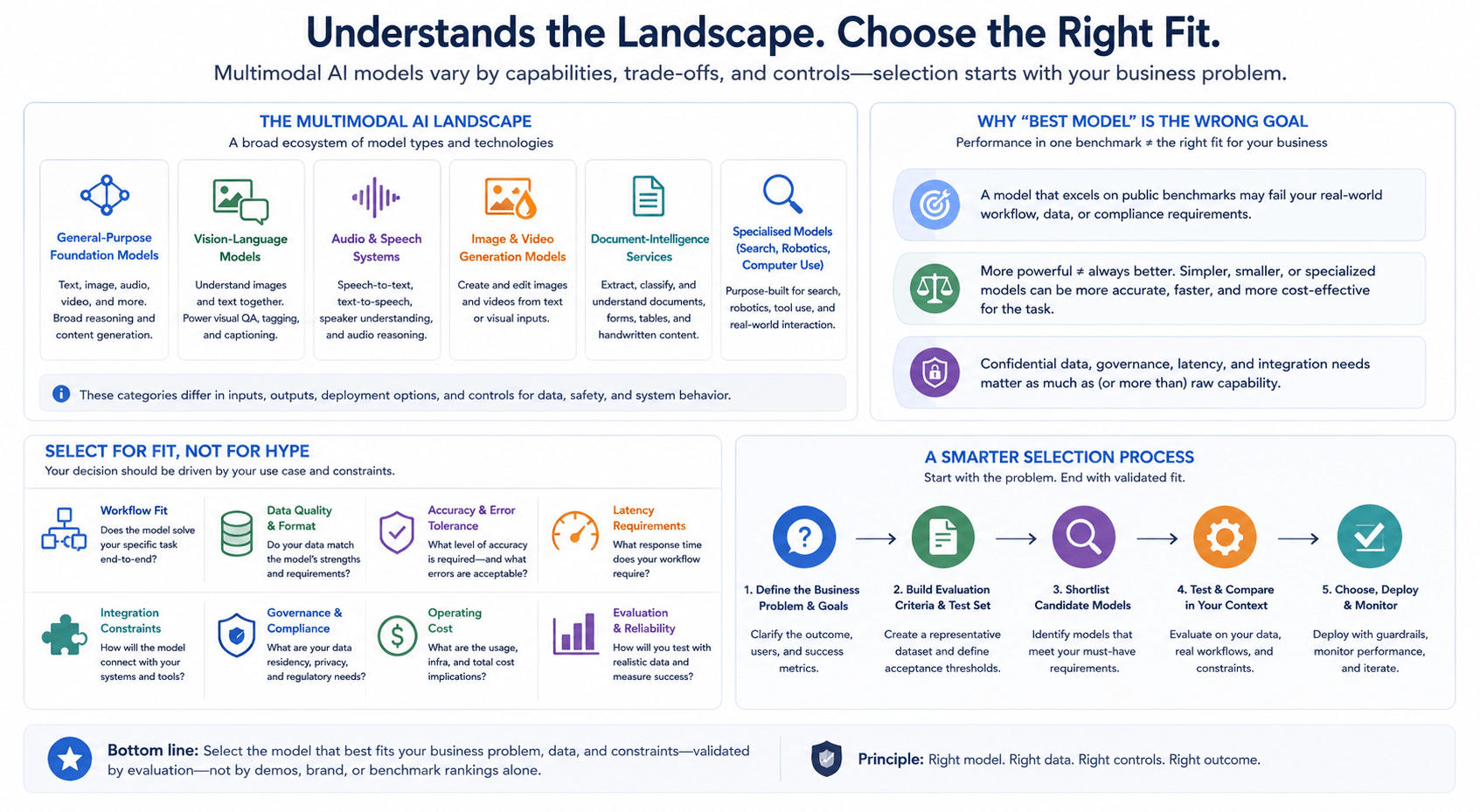
3.3 Fusion Approaches: Early, Intermediate, Late, and Hybrid

Multimodal fusion is the process of combining information from different modalities so that a model can use their relationships to perform a task. Fusion may occur at different points in the architecture, and the appropriate method depends on the application, latency requirements, data availability, model complexity, and need for cross-modal reasoning.

There is no universally superior fusion approach. Each method creates different trade-offs.

Early Fusion

Early fusion combines inputs or low-level features near the beginning of the processing pipeline. The system creates a joint representation before substantial modality-specific reasoning occurs.

For example, encoded text and image features may be combined and passed into a shared model.

Early fusion can allow the system to learn relationships between modalities from the outset. However, it usually requires the inputs to be well aligned and consistently available. It can also be difficult to manage when modalities have very different structures, resolutions, or timing.

Potential advantages:

  • Supports close interaction between modalities.
  • Can capture low-level cross-modal relationships.
  • May work well when inputs are consistently paired.

Potential limitations:

  • Sensitive to missing or poorly aligned data.
  • Can create large and computationally demanding representations.
  • May reduce modularity and make failures harder to isolate.

Intermediate Fusion

Intermediate fusion processes each modality separately at first, then combines the resulting representations within shared model layers. This allows specialised encoders to extract relevant features before cross-modal interaction occurs.

Many modern multimodal models use this general pattern. Text, images, or audio may be encoded separately and then connected through shared transformer layers or cross-attention mechanisms.

Potential advantages:

  • Balances modality-specific processing with cross-modal reasoning.
  • Supports richer interaction than late fusion.
  • Can preserve specialised encoders for different data types.

Potential limitations:

  • Architecturally complex.
  • Requires careful training and alignment.
  • May create significant computing and memory requirements.

Late Fusion

Late fusion allows each modality to produce an independent prediction or result before combining those outputs at the end of the pipeline.

For example, an image model may produce a defect score while a sensor model produces an anomaly score. A separate decision layer then combines the two scores to generate an alert.

Late fusion is often easier to implement and maintain because each component can operate independently. It may also continue functioning when one modality is unavailable. However, it provides less opportunity for detailed cross-modal reasoning because the modalities interact only after much of the processing is complete.

Potential advantages:

  • Modular and comparatively easy to maintain.
  • Supports independent testing of each modality.
  • Can tolerate missing inputs more effectively.
  • Existing unimodal systems may be reused.

Potential limitations:

  • May miss detailed relationships between inputs.
  • Conflicting predictions can be difficult to reconcile.
  • Final decisions may oversimplify rich modality-specific information.

Hybrid Fusion

Hybrid fusion combines information at several stages. A system may use intermediate fusion for closely related inputs and late fusion for independent evidence sources. It may also retrieve external data after an initial multimodal analysis and incorporate it into a later reasoning stage.

For example, an autonomous system might combine camera and lidar features at an intermediate stage while incorporating map and route predictions through late fusion.

Hybrid approaches offer flexibility, but they are generally more difficult to engineer, evaluate, and explain.

Fusion Approach Comparison

ApproachWhere inputs are combinedCross-modal reasoningFlexibilityComplexityExplainabilityTypical latency profile
Early fusionNear the input stageHigh potential from the startLower when inputs varyHighOften lowerCan be computationally intensive
Intermediate fusionAfter modality-specific encodingStrongModerate to highHighModerateDepends on shared architecture
Late fusionAfter separate predictionsLimitedHighLowerOften higherCan support parallel processing
Hybrid fusionAt multiple stagesPotentially strongestHighVery highDepends on designApplication-specific

Choosing a Fusion Strategy

The fusion strategy should reflect operational requirements rather than model novelty. Early or intermediate fusion may be appropriate when:

  • Inputs are tightly connected.
  • Detailed cross-modal reasoning is essential.
  • Data is consistently available and well aligned.
  • The organisation can support the required infrastructure and evaluation.

Late fusion may be suitable when:

  • Existing unimodal models are already available.
  • Inputs may be missing or arrive independently.
  • Modularity and explainability are priorities.
  • The final decision can be based on separate modality-level results.

Hybrid fusion may be justified when:

  • Different input groups require different levels of interaction.
  • The application combines real-time and historical information.
  • System performance warrants additional engineering complexity.
  • Strong monitoring and evaluation processes are available.

The best fusion architecture is therefore the one that produces sufficient context and reliability for the task while remaining feasible to operate, test, govern, and maintain.

3.4 The Role of Multimodal LLMs and Vision-Language Models

Multimodal large language models and vision-language models are important parts of the multimodal AI landscape, but the terms are not interchangeable. They describe overlapping model categories with different architectural scopes and intended uses.

A vision-language model, or VLM, is designed to connect visual and linguistic information. Depending on its architecture, it may match images with text, generate image descriptions, answer questions about visual content, retrieve visually similar items, or interpret documents, charts, and screenshots.

A multimodal large language model, or MLLM, typically uses a large language model as a central reasoning or interaction component while connecting it to encoders or interfaces for other modalities. These additional modalities may include images, audio, video, documents, and sensor-derived information. Research literature commonly describes this architecture as combining an LLM with modality-specific encoders and alignment components that translate non-text inputs into representations the language model can process.

In practical terms, a vision-language model focuses specifically on the relationship between visual and textual data, while a multimodal LLM may support a broader set of inputs and language-led tasks.

Model categoryTypical inputsTypical outputsCommon role
Unimodal language modelTextTextWriting, summarisation, classification, and question answering
Vision modelImages or video framesLabels, locations, scores, or visual featuresObject detection, inspection, segmentation, and image classification
Vision-language modelImages and textText, similarity scores, labels, or retrieved resultsImage captioning, visual question answering, document analysis, and visual search
Multimodal LLMText plus images, audio, video, or other encoded inputsPrimarily language, structured outputs, media, or tool actionsGeneral-purpose multimodal interaction and cross-modal reasoning
Specialised multimodal systemApplication-specific sensor or enterprise dataPrediction, alert, score, or physical actionRobotics, fraud detection, industrial monitoring, and autonomous systems

How a Multimodal LLM Processes Non-Text Inputs

Large language models are fundamentally designed to process sequences of tokens. Images, audio recordings, and video frames must therefore be converted into representations compatible with the model.

A simplified architecture may include:

Image, audio, or video input → modality-specific encoder → alignment or projection layer → language-model reasoning → generated response or action

For an image-based request, a vision encoder first converts the image into numerical features or visual tokens. A projection or alignment component maps those features into a representation that can interact with the language model. The model can then use the visual information together with the user’s written instruction to produce an answer.

Some newer models are trained more natively across modalities rather than connecting entirely separate systems at inference time. For example, OpenAI described GPT-4o as a model trained to reason across text, vision, and audio within a unified model, rather than relying solely on a pipeline of separate speech and language components.

However, product capability still varies by model. Current commercial model families may support different combinations of image, text, audio, video, document, and media-generation functionality. Their supported input and output types should therefore be checked in current first-party documentation rather than inferred from the broad label “multimodal.”

Vision-Language Models

Vision-language models range from relatively focused matching systems to large generative assistants.

A retrieval-oriented VLM may compare an image with product descriptions and return the closest matches. A generative VLM may answer detailed questions about an image, explain a diagram, summarise a chart, or extract information from a document. Some document-processing systems can analyse both extracted text and visual elements such as tables, figures, and page layouts.

Typical vision-language applications include:

  • Image captioning and visual question answering.
  • Visual product search.
  • Screenshot and interface interpretation.
  • Document, chart, and diagram analysis.
  • Image-based content moderation.
  • Visual inspection support.
  • Image–text retrieval and classification.

The term VLM does not indicate that a model can process every other modality. A model that handles images and text may not necessarily accept audio, understand long videos, generate images, or control software tools.

Not Every Multimodal System Is an LLM

Many production systems combine multiple modalities without using a large language model as the central component. An autonomous vehicle may use separate computer-vision, radar, lidar, localisation, and route-planning models. A manufacturing system may combine an image-based defect detector with a sensor anomaly model and a rules engine. A fraud-detection platform may fuse transaction scores, identity-document analysis, device signals, and behavioural patterns.

These architectures may be more appropriate when the task requires:

  • Low and predictable latency.
  • Highly specialised outputs.
  • Deployment on constrained hardware.
  • Strictly bounded system behaviour.
  • Independent validation of each component.
  • Numerical predictions rather than natural-language interaction.

An LLM can still be added as an interface or orchestration layer. For example, it may summarise outputs from specialised models or help an analyst inspect an alert. However, it does not need to replace the underlying task-specific components.

The correct question is therefore not whether every organisation needs a multimodal LLM. It is whether language-based reasoning and interaction add sufficient value to the specific multimodal workflow.

3.5 Why Multimodal Systems Can Improve Contextual Understanding

Multimodal systems can improve contextual understanding by connecting complementary signals that clarify, verify, or challenge one another. Operationally, “more context” means that the system has additional evidence with which to interpret an input—not that it possesses human-like comprehension.

A photograph may reveal what is visibly present, while a written description explains what the user wants to know. Audio may capture spoken words, while video shows who is speaking and what is happening at the same moment. A document may contain extracted text, but its layout reveals which values belong to which headings or table rows.

When these inputs are correctly aligned, the additional modality may perform one of three functions:

  • Clarification: supplying information missing from the original input.
  • Corroboration: providing independent evidence supporting an interpretation.
  • Contradiction detection: revealing that two sources do not agree.

Before-and-After Context Example

Consider a customer-support request containing only the text: “The application does not let me continue.”. From this description alone, the system cannot determine whether the customer has encountered a validation error, a disabled button, a connection problem, or an incomplete form.

Now consider the same request accompanied by a screenshot. The screenshot shows that the “Continue” button is disabled and that one mandatory field has been left blank.

Available contextPossible system interpretation
Text onlySeveral causes remain possible; more information is required
Text plus screenshotThe interface state suggests that a required field is incomplete
Text, screenshot, and product-version dataThe system can select instructions relevant to that particular interface version

The image does not automatically guarantee a correct answer. The screenshot may be outdated, cropped, or associated with the wrong account. However, it narrows the range of plausible explanations by adding evidence not contained in the written description.

Context Can Verify or Expose Contradictions

Additional modalities can also test whether information is internally consistent. In a claims workflow, a written form may state that an item has severe external damage, while the submitted photographs show no visible damage. This difference should not be treated as proof of misrepresentation, but it may justify additional review.

Similarly, a document-extraction system may identify a payment amount from OCR text but find that its position on the page corresponds to the tax field rather than the total field. Visual layout provides context that changes the interpretation of the extracted number. This is one of the primary operational benefits of multimodal processing: it can compare signals rather than relying on a single representation of the event.

More Context Can Also Introduce Noise

Adding another modality is useful only when the information is relevant, sufficiently reliable, and correctly aligned. An unrelated image, inaccurate transcript, or delayed sensor reading may shift the system toward an incorrect conclusion.

Additional inputPotential context gainPotential failure
Product photographShows visible condition or modelImage may be blurred or show a different item
Voice explanationCaptures detail that is difficult to typeTranscription may misinterpret names or numbers
VideoAdds movement and temporal contextRelevant event may occur outside the sampled frames
Account historyProvides operational backgroundHistorical behaviour may not explain the current case
Sensor signalAdds numerical or environmental evidenceFaulty or unsynchronised sensors may create contradictions

Visual-language research has documented alignment and misalignment risks at the object, attribute, and relationship levels. A system may correctly recognise the objects in an image while connecting the wrong description, attribute, or relationship to them.

For that reason, multimodal context should be treated as an evidence-integration problem. The system should identify which inputs informed the result, detect conflicts where possible, and allow irrelevant or low-quality inputs to be excluded. The objective is not to maximise the number of modalities. It is to identify the smallest set of inputs that materially improves the task while remaining feasible to validate, protect, and operate.

3.6 Common Technical Challenges in Training and Evaluation

Multimodal systems are difficult to build and evaluate because failures can originate within an individual modality, at the connection between modalities, or in the final reasoning and output layer. A model may perform well on text and images independently while still connecting them incorrectly when they are combined.

The challenge also differs significantly between two engineering scenarios:

  • Training or substantially adapting a multimodal foundation model, which requires large datasets, extensive computing resources, model research, and specialised training infrastructure.
  • Building an application on top of an existing multimodal model, which focuses more on data pipelines, prompting, retrieval, orchestration, workflow controls, testing, and monitoring.

Most organisations pursuing business applications fall into the second category. However, using an existing model does not remove the need for rigorous engineering and evaluation.

Data Quality and Coverage

Multimodal systems depend on several forms of input data, each with different quality problems. Images may be blurred or poorly framed. Audio may contain background noise. Documents may have inconsistent layouts. Video may omit important moments. Sensors may drift or produce missing readings. Text may contain ambiguous terminology or incomplete descriptions.

The training or evaluation data must also represent the conditions expected in production. A system tested only on clear product photographs may perform differently on screenshots, low-light images, mobile-camera uploads, or partially obstructed objects.

Coverage should therefore account for:

  • Different devices and file formats.
  • Lighting, noise, resolution, and recording conditions.
  • Languages, accents, and communication styles.
  • Missing or partially available modalities.
  • Unusual document layouts or physical environments.
  • Conflicting evidence across sources.
  • Relevant demographic and accessibility differences.

Alignment and Pairing

Training data must correctly pair related inputs. Incorrect image captions, delayed audio-video sequences, mismatched documents, and unreliable metadata can teach the system false relationships. Alignment problems may also appear during application operation. A workflow may retrieve the correct customer record but attach the wrong supporting image, or connect an equipment alert with a camera feed from a different timestamp. Evaluation must therefore include tests for both data accuracy and relationship accuracy.

Compute, Latency, and Infrastructure

Multimodal inputs are often more computationally demanding than text alone. High-resolution images, long audio recordings, and video sequences can create substantial processing, memory, storage, and network requirements.

Engineering teams must make decisions about:

  • Image resolution and compression.
  • Video frame sampling.
  • Audio segmentation and transcription.
  • Maximum document or recording length.
  • Real-time versus batch processing.
  • Cloud versus edge inference.
  • Caching and repeated processing.
  • Cost and latency thresholds.

Reducing input size can improve speed and cost, but it may remove important detail. Increasing resolution or frame coverage may improve information availability while creating operational delays.

Evaluation Across Multiple Failure Types

A single overall accuracy score is rarely sufficient for a multimodal system. Evaluation should distinguish among several layers:

Evaluation areaKey question
Text performanceDoes the system interpret the written input correctly?
Visual performanceDoes it recognise the relevant objects, text, layout, or scene?
Audio performanceDoes it correctly process speech and relevant sounds?
Temporal performanceDoes it connect events to the correct moments?
Spatial performanceDoes it associate labels, objects, and regions correctly?
Cross-modal alignmentDoes it link the correct information across inputs?
Reasoning qualityIs the conclusion supported by the combined evidence?
Missing-modality resilienceWhat happens when an expected input is unavailable?
Conflict handlingDoes the system notice when inputs disagree?
Output groundingCan the result be traced to the supplied evidence?
Safety and fairnessAre error patterns concentrated among particular users or scenarios?
Operational performanceAre latency, availability, and cost acceptable?

Surveys of MLLM evaluation distinguish among perception, reasoning, trustworthiness, domain-specific capabilities, and modality-specific tasks. They also emphasise that multimodal evaluation requires broader benchmark and metric coverage than evaluating a language capability in isolation.

Hallucination and Unsupported Inference

A multimodal system may generate a plausible description of something that is not visible or supported by the supplied evidence. It may infer an object from the user’s question rather than the image, overlook conflicting information, or confidently explain a chart it has interpreted incorrectly.

Evaluation should include:

  • Questions whose answer is not present in the input.
  • Images containing similar but distinct objects.
  • Contradictory text and visual evidence.
  • Cropped or obstructed content.
  • Documents with complex layouts.
  • Prompts containing false assumptions.
  • Requests requiring the model to express uncertainty.

The desired behaviour may be to ask for clarification, state that the evidence is insufficient, or route the case to human review rather than produce a definitive answer.

Privacy and Data Governance

Multimodal data can contain sensitive information that is less obvious than conventional text fields. Images may reveal faces, addresses, computer screens, or physical environments. Audio may capture background conversations. Video and sensor streams may expose location, behaviour, and operational activity.

Governance should address:

  • Whether each modality is necessary for the task.
  • How consent and notice are managed.
  • What information should be redacted before processing.
  • Whether data is used for model training.
  • Where inputs and outputs are stored.
  • How long they are retained.
  • Which employees or systems can access them.
  • How deletion and correction requests are handled.

Monitoring and Failure Analysis

A multimodal application can deteriorate even when the underlying model has not changed. Users may upload different types of files, product interfaces may be redesigned, document layouts may change, or a data source may become less reliable.

Monitoring should therefore track:

  • Input quality by modality.
  • Missing-input frequency.
  • Alignment and retrieval errors.
  • Confidence and escalation rates.
  • Human corrections.
  • Differences across devices, languages, or user groups.
  • Model and prompt versions.
  • Processing latency and cost.
  • Recurring failure categories.

A practical evaluation process should not end with a benchmark score. It should create a feedback loop in which human corrections, escalated cases, and production incidents are used to improve data preparation, system instructions, retrieval logic, validation rules, or model selection. The central technical challenge of multimodal AI is not merely enabling a model to accept several input formats. It is ensuring that those inputs are reliable, correctly connected, meaningfully combined, appropriately evaluated, and governed throughout the application lifecycle.

4. Leading Multimodal AI Models and Technologies

The multimodal AI market includes general-purpose foundation models, vision-language models, audio systems, image-generation models, document-intelligence services, and specialised models for areas such as search, robotics, and computer use. These technologies differ substantially in the input types they accept, the outputs they generate, their deployment options, and the controls available around data, safety, and system behaviour.

For business teams, the objective should not be to identify a universally “best” multimodal AI model. Model selection depends on the workflow, the quality and format of available data, acceptable error levels, latency requirements, integration constraints, governance obligations, and operating cost.
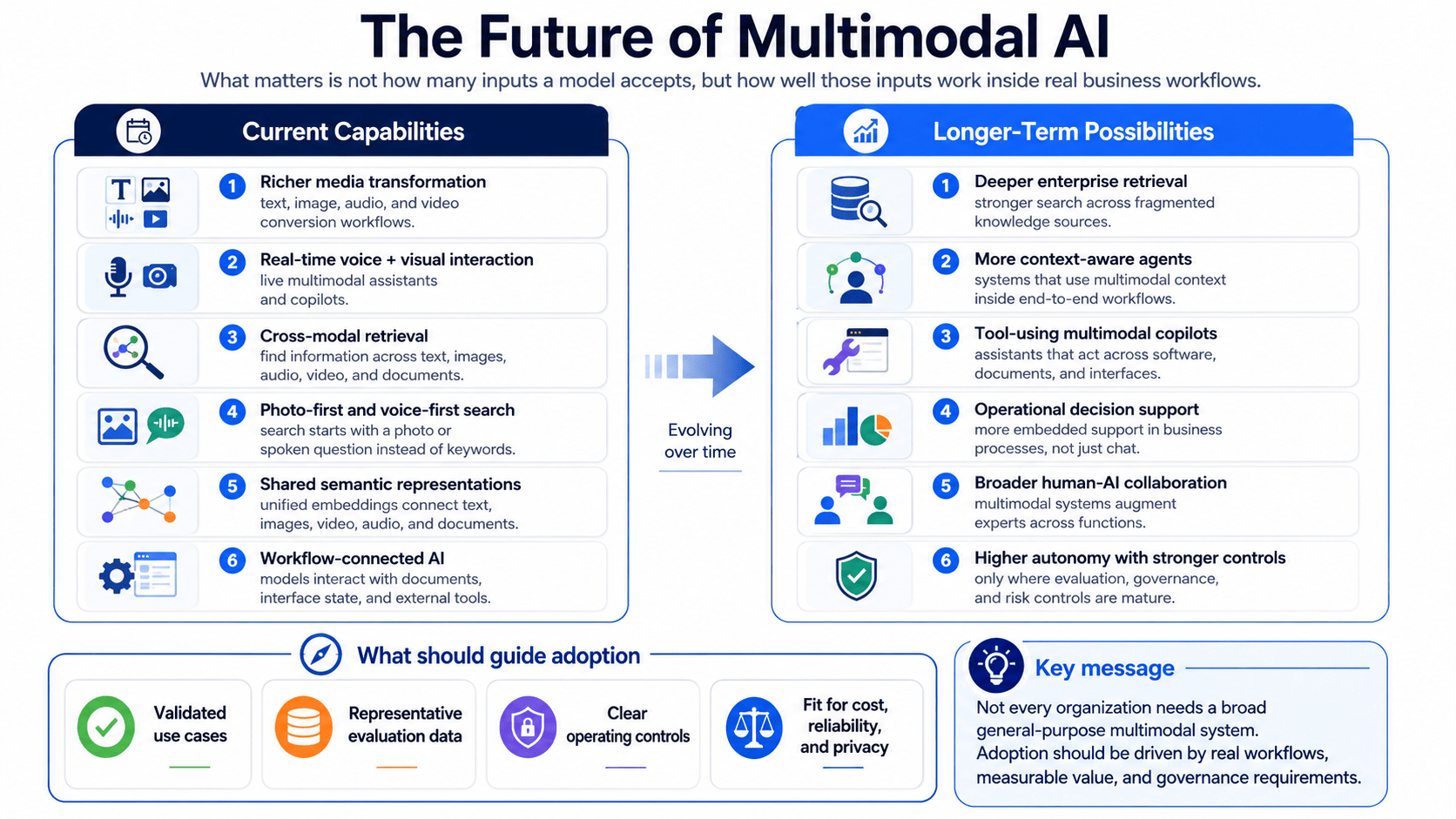
A model that performs well in a public image-question benchmark may not be suitable for processing confidential enterprise documents. Similarly, a powerful general-purpose model may be unnecessary for a high-volume classification task that can be handled by a smaller and less expensive system. A multimodal AI model should be selected according to its fit with a defined business workflow and representative evaluation set—not brand recognition, product demonstrations, or general benchmark rankings alone. The selection process should therefore begin with the business problem and evaluation criteria before moving to individual providers.

4.1 How to Compare Multimodal AI Models

A useful model comparison should examine the complete operating environment rather than focusing only on model intelligence. Teams should assess what information the model can receive, what it can produce, how reliably it performs the target task, and what is required to deploy and govern it.

Supported Input and Output Modalities

The first question is whether the model supports the required combination of data types.

Potential inputs include:

  • Text and structured data.
  • Images, screenshots, and scanned pages.
  • PDF documents and complex page layouts.
  • Audio and spoken language.
  • Video and temporal information.
  • Sensor or telemetry data converted into compatible representations.

Potential outputs may include:

  • Textual answers or summaries.
  • Structured JSON or extracted fields.
  • Images or edited visual assets.
  • Speech or other audio.
  • Video.
  • Classifications, scores, or embeddings.
  • Tool calls and workflow actions.

“Multimodal” does not mean that every model accepts and generates every modality. One system may accept text and images but produce only text. Another may support audio input and output but not images. A specialised image model may accept text and image references while generating an edited image. Current first-party documentation must therefore be checked for the precise input-output combination required by the application.

Reasoning and Task Fit

Teams should evaluate the type of reasoning required rather than asking only whether the model can technically process an input.

Relevant capabilities may include:

  • Identifying objects or visual attributes.
  • Reading text from images and documents.
  • Interpreting charts, forms, and page layouts.
  • Comparing evidence across several files.
  • Following complex instructions.
  • Handling long documents or recordings.
  • Detecting contradictions between modalities.
  • Producing reliable structured outputs.
  • Calling external tools or enterprise systems.
  • Expressing uncertainty when evidence is insufficient.

A product-search system, for example, may prioritise visual embeddings and retrieval quality. A compliance workflow may place greater emphasis on document reasoning, structured extraction, citations, and auditability. A voice assistant may prioritise streaming latency, interruption handling, and audio quality.

General benchmark scores can help identify candidates, but they do not replace task-specific testing. The evaluation set should reproduce the organisation’s actual document types, image conditions, languages, user requests, and failure cases.

Context and Input Limits

Multimodal inputs may consume substantially more context and computing resources than text alone. High-resolution images, long PDFs, audio files, and video sequences can affect latency, cost, and the amount of information a model can consider in one request.

Teams should verify:

  • Maximum text context.
  • Number and size of supported images.
  • PDF and document limitations.
  • Maximum audio or video duration.
  • Whether content is sampled, compressed, or resized.
  • Maximum output length.
  • Behaviour when context limits are exceeded.
  • Support for caching repeated inputs.

A large advertised context window does not guarantee that the model will use every part of a long multimodal input equally well. Long-context performance should be tested using realistic inputs and information placed at different positions.

Deployment and Data Governance

Deployment requirements may eliminate otherwise capable models from consideration. Organisations should determine whether the system will use:

  • A public model API.
  • A managed enterprise cloud deployment.
  • A dedicated or isolated endpoint.
  • A virtual private cloud arrangement.
  • A self-hosted open-weight model.
  • Edge or on-device inference.
  • A hybrid architecture combining several options.

The deployment decision affects where data is processed, who manages infrastructure, how updates are applied, and which security controls are available.

Review questions should include:

  • Is customer data retained after processing?
  • Can submitted data be used for model training?
  • In which regions is processing available?
  • Are encryption and private networking supported?
  • Can access be managed through enterprise identities and roles?
  • Are requests and outputs logged?
  • Can the organisation lock a specific model version?
  • What audit, compliance, and contractual documentation is available?
  • What happens when a model or API version is retired?

Cost and Latency

Model pricing is only one part of total operating cost. A multimodal system may also require image preprocessing, transcription, document parsing, vector storage, retrieval, orchestration, monitoring, and human validation. Total cost may include:

Model inference + media processing + data storage + integration infrastructure + monitoring + human review

Teams should test cost with representative inputs rather than estimating it only from text-token prices. A request containing several detailed images or a long audio file may cost and perform differently from a short text prompt.

Latency should also be measured end to end. A fast model response may still lead to a slow user experience if files require extensive upload, conversion, retrieval, or preprocessing.

Reliability and Safety Controls

A production model should be evaluated not only on successful cases but also on how it behaves when inputs are incomplete or misleading. Important controls include:

  • Confidence thresholds.
  • Structured output validation.
  • Source citations or evidence references.
  • Content-safety filters.
  • Personal-data redaction.
  • Prompt-injection defences.
  • Tool permission boundaries.
  • Human approval requirements.
  • Audit logging.
  • Fallback models or workflows.
  • Model-version monitoring.

The appropriate controls depend on the consequences of error. A creative-content assistant may tolerate a higher level of variation than a system processing financial, legal, healthcare, or safety-related information.

Weighted Model-Selection Scorecard

Teams can convert these criteria into a weighted scorecard. The weights should reflect the use case rather than a universal template.

Selection criterionQuestions to evaluateExample weight
Modality supportDoes the model accept and produce the required formats?15%
Task performanceHow well does it perform on representative business examples?25%
ReliabilityDoes it handle ambiguity, missing inputs, and contradictions appropriately?15%
IntegrationDoes it support required APIs, tools, structured outputs, and platforms?10%
Data governanceDoes deployment meet privacy, residency, security, and retention requirements?15%
LatencyDoes end-to-end processing meet operational expectations?5%
Operating costWhat is the projected cost at realistic volume and input size?10%
Provider and lifecycle fitAre support, versioning, availability, and roadmap acceptable?5%

The example weights above are illustrative. A customer-facing assistant may place more weight on latency, while a regulated document workflow may prioritise governance, reliability, and traceability.

4.2 Commercial Platform Examples

Commercial platforms provide managed access to multimodal models through APIs, cloud services, development environments, and enterprise applications. They can reduce the infrastructure required to deploy a system, but they also introduce provider dependencies, usage costs, regional availability considerations, and product-specific capability boundaries.

The following examples describe major platform categories rather than ranking providers.

OpenAI Multimodal Models

OpenAI provides general-purpose models that support text and image inputs, alongside specialised model families for real-time audio, transcription, speech generation, image generation, moderation, and other media workflows. Its current API documentation separates frontier reasoning models from specialised image and audio systems, meaning a production workflow may use one model or coordinate several model families depending on the required inputs and outputs.

Potential applications include:

  • Analysing documents, screenshots, and photographs.
  • Extracting structured information from visual inputs.
  • Generating text grounded in uploaded images.
  • Supporting voice-based interactions.
  • Transcribing and summarising calls.
  • Generating or editing visual content.
  • Calling tools and enterprise functions.
  • Producing schema-constrained outputs.

The latest general-purpose OpenAI model families support text and image input with text output, while separate real-time and audio models are designed for audio-in and audio-out interactions. Image-generation models accept textual and visual instructions and produce image outputs. Teams should therefore distinguish between multimodal understanding, speech interaction, and media generation when designing the architecture.

OpenAI may be suitable where teams need a managed API, general-purpose visual reasoning, tool integration, structured outputs, or coordinated text, image, and voice workflows. However, they should verify current model availability, supported endpoints, data terms, regional requirements, rate limits, and model-deprecation status before implementation.

Google Gemini

Google positions Gemini as a multimodal model family capable of processing combinations of text, images, audio, video, and documents, although specific modality support and output types vary between models. Google also provides multimodal embedding capabilities that place text, images, video, audio, and PDFs within a shared representation space for cross-modal search and retrieval.

Gemini-based applications may include:

  • Video and audio analysis.
  • Image understanding and visual question answering.
  • Processing PDFs and long-form documents.
  • Cross-modal semantic search.
  • Content classification and extraction.
  • Agentic and tool-connected workflows.
  • Applications integrated with Google Cloud or Google Workspace environments.

Google offers different model tiers intended to balance reasoning capability, latency, and cost. Its documentation, for example, distinguishes more capable models from Flash and Flash-Lite variants designed for faster or higher-volume workloads.

Gemini may be particularly relevant when an application depends on native handling of several media types, long-context processing, multimodal retrieval, or integration with Google’s cloud ecosystem. Teams should still evaluate each selected model on their own data and confirm whether a capability is generally available, in preview, or restricted by region or product.

Microsoft Azure and Copilot Ecosystem

Microsoft Foundry provides a managed model catalogue containing models from Microsoft, OpenAI, Meta, and other providers. Microsoft describes the catalogue as covering foundation, reasoning, small language, multimodal, domain-specific, and industry models, with different provider and deployment arrangements.

Relevant Microsoft capabilities may include:

  • Azure-hosted OpenAI models.
  • Third-party and community models available through the Foundry catalogue.
  • Managed model endpoints.
  • Vision-enabled chat and image analysis.
  • Azure AI Search for text and image retrieval.
  • Content-safety and governance services.
  • Integration with Microsoft data, identity, and application platforms.
  • Copilot and agent development environments.

The principal distinction is that Microsoft is not only a single-model provider. It acts as a cloud and model-delivery platform through which organisations can evaluate and deploy multiple model families. Some models are sold directly by Azure, while others come from partners or the broader model community. These categories may differ in billing, support, availability, deployment, and contractual terms.

Microsoft Foundry may be relevant for organisations already operating within Azure, requiring centralised identity and infrastructure controls, or wanting to compare several commercial and open-weight models within one cloud environment. However, availability can vary by model, subscription, region, deployment type, and service version.

The broader Microsoft Copilot ecosystem should also be distinguished from direct model access. A packaged Copilot product provides an application-level experience with predefined integration and governance, whereas Foundry or Azure OpenAI enables teams to build custom systems around selected models.

Meta Models and Platforms

Meta develops multimodal and open-weight model families that can be accessed through Meta platforms or deployed through cloud and infrastructure partners. Llama 4 introduced natively multimodal Scout and Maverick models using a mixture-of-experts architecture, following earlier Llama 3.2 vision models.

Meta’s ecosystem includes:

  • General-purpose multimodal Llama models.
  • Vision-enabled language models.
  • Safeguard models for multimodal inputs and outputs.
  • Computer-vision foundation models.
  • Models accessible through cloud and hosting partners.
  • Weights that can be deployed under Meta’s applicable licence terms.

Meta models may appeal to teams that want greater infrastructure choice, model customisation, or deployment outside a single proprietary API. However, “open-weight” does not automatically mean unrestricted open source. Organisations must review the model licence, acceptable-use conditions, attribution requirements, deployment obligations, and commercial limitations for the exact version selected.

Meta also provides specialised safety research such as Llama Guard 3 Vision, which is designed to classify image-and-text interactions for multimodal safeguards. Such components can supplement application controls, but they do not remove the need for domain-specific evaluation and policy enforcement.

Commercial Platform Comparison

Platform categoryPotential strengthsImportant considerations
OpenAIGeneral-purpose reasoning, image understanding, structured outputs, tools, specialised voice and image modelsModel families have different modality support; verify data terms, cost, limits, and deprecations
Google GeminiBroad multimodal input coverage, audio/video processing, long-context workflows, multimodal embeddingsCapabilities vary by model tier and preview status; validate regional and cloud requirements
Microsoft FoundryBroad model catalogue, Azure integration, managed deployment and enterprise infrastructure controlsTerms and support differ between Azure-sold and partner models; product naming and service versions evolve
Meta ecosystemOpen-weight deployment options, customisation potential, vision-language and safeguard modelsLicence is model-specific; teams assume more deployment, security, and maintenance responsibility

This table should be treated as a platform-level orientation, not as a performance ranking. The most appropriate choice depends on the application and deployment environment.

4.3 Open-Source and Open-Weight Multimodal Models

Open-source and open-weight multimodal models give organisations more control over deployment, customisation, infrastructure, and model behaviour. However, these terms should be used carefully.

An open-weight model makes model parameters available for download under a specified licence. This does not necessarily mean that the training data, source code, full training process, or unrestricted commercial rights are available. Each licence must be reviewed independently.

Current open-weight multimodal ecosystems include model families from Meta, Qwen, Mistral, and other research or commercial organisations. Examples include Meta’s multimodal Llama releases, Alibaba Cloud’s Qwen vision-language series, and Mistral’s open-weight multimodal models.

Potential advantages include:

  • Deployment in private or controlled infrastructure.
  • Greater control over model and runtime versions.
  • Domain-specific fine-tuning or adaptation.
  • Integration with custom safety and retrieval components.
  • Reduced dependency on a single hosted API.
  • Potential edge or offline deployment.
  • Access to internal model representations and serving configurations.

However, these benefits come with greater operational responsibility.

Teams may need to manage:

  • GPU or accelerator infrastructure.
  • Model serving and scaling.
  • Quantisation and runtime optimisation.
  • Security patching.
  • Licence compliance.
  • Model and dependency updates.
  • Safety filtering.
  • Evaluation and red-team testing.
  • Data pipelines and fine-tuning.
  • Monitoring and incident response.

Examples of Open-Weight Multimodal Ecosystems

Meta Llama: Meta’s Llama 4 Scout and Maverick are natively multimodal open-weight models. Their weights allow organisations to pursue different hosting approaches, subject to Meta’s licence and usage terms.

Qwen-VL: Qwen maintains vision-language and broader multimodal model families, including Qwen3-VL and previous models designed for image, text, document, and video-related tasks. The official repositories provide model files and implementation guidance, but teams should verify the licence and infrastructure requirements of the selected release.

Mistral: Mistral’s model catalogue includes open-weight multimodal models of different sizes alongside managed or “Premier” offerings. This creates options ranging from self-managed deployment to provider-hosted access, depending on the model.

Hugging Face ecosystem: Hugging Face Transformers supports loading and running numerous model architectures and provides tooling for multimodal and any-to-any generation. The platform is an ecosystem rather than a single model provider; licences and quality vary across individual repositories.

Managed vs. Self-Managed Multimodal Models

FactorManaged commercial modelSelf-managed open-weight model
Initial deploymentUsually faster through an API or managed endpointRequires infrastructure, serving, and deployment engineering
Infrastructure ownershipPrimarily managed by the providerPrimarily managed by the organisation
CustomisationLimited to supported prompting, tools, retrieval, or fine-tuningPotentially greater, depending on architecture and licence
Data controlDepends on provider terms and deployment arrangementCan remain within organisation-controlled infrastructure
ScalingOften handled by the platformMust be designed and operated internally
Version controlProvider may update or retire modelsOrganisation can preserve a chosen version
Security maintenanceShared with providerOrganisation assumes greater responsibility
Cost profileUsage-based operating expenditureInfrastructure, engineering, and maintenance expenditure
SupportCommercial support may be availableCommunity, partner, or internal support required
Licence reviewGoverned by service termsRequires detailed model-specific licence analysis

An open-weight model is not automatically less expensive. At low or inconsistent volume, a managed API may cost less than maintaining dedicated infrastructure. Self-managed deployment becomes more attractive when control, privacy, customisation, predictable volume, or operational independence justifies the additional engineering.

4.4 Selecting a Model for a Business Use Case

Model selection should be treated as an evaluation process rather than a procurement decision based on a product demonstration.

A practical five-step process is:

Step 1: Define the Workflow and Decision Boundary

Document the workflow before evaluating models.

Specify:

  • What users or systems provide as input.
  • Which modalities are essential.
  • What task the model must perform.
  • What output format is required.
  • What systems must receive the output.
  • Which actions may be automated.
  • Which decisions require human approval.
  • What the consequence of an incorrect output would be.

For example, “analyse invoices” is too broad. A clearer definition would be:

Extract header and line-item data from PDF invoices, compare it with purchase-order information, identify missing or conflicting fields, and route low-confidence cases to an accounts-payable reviewer.

This definition makes it possible to identify appropriate models and measurable success criteria.

Step 2: Build a Representative Evaluation Set

The evaluation set should contain real or realistically simulated examples from the intended operating environment.

It should include:

  • Common, straightforward inputs.
  • Low-quality images and scans.
  • Unusual layouts.
  • Different languages and file formats.
  • Missing modalities.
  • Contradictory information.
  • Out-of-scope requests.
  • Sensitive or adversarial content.
  • Examples requiring escalation.
  • Cases where no valid answer is available.

Ground-truth outputs and acceptable error ranges should be defined with relevant domain experts.

Step 3: Test Quality and Failure Behaviour

Evaluate more than average task accuracy.

Measure:

  • Field-level or task-level correctness.
  • Cross-modal alignment.
  • Unsupported claims or hallucinations.
  • Structured-output validity.
  • Sensitivity to prompt wording.
  • Performance with missing inputs.
  • Conflict and uncertainty handling.
  • Repeatability.
  • Human-review effort.
  • Error distribution across relevant user groups.

A model that produces fewer errors overall may still be unsuitable if its errors are difficult to detect or occur in high-impact cases.

Step 4: Validate Security, Integration, Cost, and Operations

For models meeting the quality threshold, assess production feasibility.

Test:

  • API and integration compatibility.
  • Authentication and access controls.
  • Data retention and training terms.
  • Regional processing.
  • Private networking or self-hosting.
  • End-to-end latency.
  • Throughput and rate limits.
  • Cost per completed workflow.
  • Monitoring and logging.
  • Version-locking and update processes.
  • Provider support and lifecycle policies.

Operating cost should be calculated per business transaction rather than only per token:

Total monthly cost ÷ number of successfully completed workflows

This incorporates model calls, preprocessing, retries, storage, infrastructure, and human review.

Step 5: Select the Deployment Model and Run a Controlled Pilot

The final decision should cover both the model and deployment architecture.

Possible outcomes include:

  • One managed general-purpose model.
  • A smaller model for routine cases and a larger model for exceptions.
  • Separate models for vision, speech, and reasoning.
  • A commercial model combined with internal retrieval and rules.
  • A self-hosted open-weight system.
  • A hybrid approach based on data sensitivity or workflow severity.

The selected model should first be deployed in a controlled environment with human review, defined success criteria, and rollback procedures. Production monitoring should compare actual results with evaluation findings and record new failure categories.

Five-Step Model-Selection Checklist

  1. Define the workflow: Specify inputs, outputs, users, decision boundaries, and risk.
  2. Create the evaluation set: Use representative, difficult, incomplete, and conflicting examples.
  3. Compare model behaviour: Test accuracy, alignment, grounding, uncertainty, and failure handling.
  4. Validate operational fit: Assess integration, privacy, security, latency, cost, and deployment.
  5. Pilot before scaling: Introduce human review, monitoring, version controls, and escalation procedures.

The central principle is that model capability should be evaluated within the complete business system. Data preparation, retrieval, workflow rules, human controls, and monitoring can influence the outcome as much as the underlying foundation model.

A well-known model that performs strongly in general demonstrations may still fail a specialised workflow. Conversely, a smaller or open-weight model may provide sufficient performance with lower latency, greater deployment control, or more predictable behaviour. The appropriate choice is the model—or combination of models—that meets the organisation’s documented quality, risk, governance, and operating requirements.

5. When Multimodal AI Is the Right Fit

Multimodal AI is the right fit when important information is genuinely distributed across several data types and combining those inputs materially improves a business decision or workflow. It is most useful when employees currently need to compare text with images, audio, video, document layouts, or sensor data before they can understand a case or take action.

However, multimodality should not be adopted simply because the technology is available. Every additional input type introduces new requirements for data collection, alignment, storage, privacy, integration, evaluation, and monitoring. A workflow that can be handled reliably using structured data, deterministic rules, or text-only AI may not benefit enough from multimodal processing to justify the added complexity.

Choose multimodal AI when the workflow depends on evidence across multiple formats, the additional context changes the quality of the decision, and the organisation can govern the data, evaluation process, and human controls required to operate the system responsibly.

A practical adoption decision should answer three questions:

  1. Does the workflow genuinely require more than one modality?
  2. Is the expected business value greater than the implementation and governance burden?
  3. Is the organisation operationally ready to deploy, evaluate, and maintain the system?

5.1 Signals That a Workflow Needs More Than Text-Only AI

The clearest signal that a workflow may benefit from multimodal AI is that people already compare several forms of evidence manually. Employees may read a form while examining an image, listen to a call while reviewing account records, or compare a sensor alert with video footage before making a decision.

The following five signals can help identify workflows in which text-only AI may be insufficient.

Signal 1: Critical Information Is Contained in Visual Elements

Text extraction does not capture all the meaning contained in documents, images, diagrams, or interfaces.

Examples include:

  • Tables whose meaning depends on rows, columns, and merged cells.
  • Contracts containing stamps, signatures, and handwritten annotations.
  • Product images showing damage or missing components.
  • Screenshots revealing interface state or error messages.
  • Engineering drawings containing spatial relationships.
  • Medical or industrial images requiring visual review.

In these cases, converting the input into plain text may remove information that influences the decision.

Signal 2: Employees Regularly Compare Different Data Types

A workflow may be a strong candidate when employees manually move between several systems or files to build a complete understanding of a case.

Examples include:

  • Comparing an insurance claim form with photographs and invoices.
  • Reviewing a customer complaint alongside screenshots and call recordings.
  • Connecting transaction records with identity documents and device signals.
  • Matching maintenance notes with sensor data and camera footage.
  • Comparing a product description with an uploaded customer image.

This manual comparison often indicates that the workflow already contains multimodal reasoning, even if it is currently performed by people.

Signal 3: A Single Input Is Frequently Ambiguous

Multimodal AI may help when one input alone leaves several plausible interpretations.

A written support request stating that “the system is not working” provides limited diagnostic value. A screenshot, product version, and voice explanation may reveal whether the problem involves an error message, incorrect configuration, or incomplete form.

Additional modalities are especially useful when they can:

  • Clarify an ambiguous description.
  • Confirm information from another source.
  • Reveal a contradiction.
  • Supply missing spatial or temporal context.
  • Reduce the number of follow-up questions required.
Signal 4: The Workflow Involves Physical or Temporal Events

Text-only AI is often insufficient for workflows involving movement, timing, sound, physical conditions, or changing environments.

Examples include:

  • Video and telemetry analysis.
  • Industrial safety monitoring.
  • Vehicle and robotics systems.
  • Call analysis combined with screen activity.
  • Equipment inspection using images and sensor signals.
  • Training applications involving gestures or spoken responses.

These workflows depend on when and where events occur, not only on written descriptions of them.

Signal 5: Users Need Flexible Ways to Interact

Multimodal AI may be valuable when users cannot easily communicate through text alone.

A customer may find it easier to upload a product photograph than describe the item. A field technician may prefer to speak while using both hands. A learner may submit a diagram and verbal explanation. An accessibility-focused interface may need to support speech, captions, images, or alternative input methods.

Flexible interaction can improve usability, but only when the system can process each modality reliably and provide suitable alternatives when one input method fails.

When Multimodal AI Adds Little Value

A workflow does not necessarily require multimodal AI simply because multiple files or systems are involved. A simpler approach may be more appropriate when:

  • The decision is made reliably from clean, structured text.
  • Images or audio merely duplicate information already available elsewhere.
  • Deterministic business rules can complete the task.
  • Inputs are too inconsistent or low quality to support reliable analysis.
  • The additional modality rarely changes the outcome.
  • Processing cost and latency outweigh the expected benefit.

For example, classifying standard customer emails by topic may be handled effectively with text-only AI. Adding image or voice capabilities would introduce unnecessary complexity unless those inputs form a meaningful part of the support workflow.

Five-Workflow-Signals Checklist

A workflow is a stronger candidate for multimodal AI when several of the following statements are true:

  • Staff manually compare information across different formats.
  • Important context is lost when inputs are converted into text.
  • Single-modality inputs regularly create ambiguity.
  • The workflow involves physical, spatial, or temporal evidence.
  • Users need to communicate through images, speech, video, or documents.
  • Combining modalities changes the decision or next action.
  • The expected volume makes manual cross-format review difficult to scale.

The presence of one signal alone does not justify implementation. Teams should next evaluate whether the use case offers sufficient value and whether the data and operating environment are ready.

5.2 Use-Case Fit: Data Availability, Task Complexity, and Expected Value

A promising multimodal use case must balance business value against implementation burden. The fact that a model can technically process several modalities does not mean the workflow will deliver reliable or economically useful results. Use-case fit should be assessed across six dimensions:

  • Decision criticality.
  • Data availability and quality.
  • Modality alignment.
  • Task complexity.
  • Error cost.
  • Expected operational value.

Decision Criticality

The consequences of an incorrect output should shape the level of automation and validation.

Low-risk use cases may include:

  • Drafting product descriptions.
  • Organising media libraries.
  • Suggesting visually similar products.
  • Summarising a recorded meeting.

Higher-risk use cases may include:

  • Reviewing identity documents.
  • Prioritising healthcare cases.
  • Detecting potential fraud.
  • Monitoring physical safety.
  • Supporting vehicle or robotic actions.

High-risk use cases are not automatically unsuitable, but they require stronger evidence, human oversight, auditability, and formal validation. The appropriate initial objective may be decision support rather than autonomous action.

Data Availability and Quality

The required modalities must exist in sufficient quantity and quality.

Teams should determine:

  • Whether all necessary inputs are consistently captured.
  • Whether historical data is available for evaluation.
  • Whether file formats and metadata are standardised.
  • Whether images, audio, or video are usable under realistic conditions.
  • Whether the organisation has permission to process the data.
  • Whether examples include relevant edge cases and user groups.

A technically attractive use case may fail because images are too blurred, timestamps are unreliable, documents are incomplete, or recordings are not retained consistently.

Modality Alignment

The system must know which inputs belong together.

An insurance photograph must be connected to the correct claim. A sensor alert must correspond to the correct machine and time. A transcript must be linked to the correct speaker or video segment.

Alignment may depend on:

  • Case or transaction identifiers.
  • Timestamps.
  • Device or location metadata.
  • Document relationships.
  • Spatial coordinates.
  • Human annotations.
  • Reliable retrieval logic.

If alignment cannot be established, adding more modalities may create misleading context rather than better decisions.

Task Complexity

Multimodal AI is better suited to tasks that can be defined clearly and evaluated consistently. A narrowly defined task such as extracting invoice fields and identifying missing signatures is easier to test than an open-ended objective such as “understand all company documents.”

Teams should specify:

  • What the model must identify or produce.
  • Which evidence is relevant.
  • What constitutes a correct answer.
  • When the system should express uncertainty.
  • Which cases must be escalated.
  • What downstream action follows the output.

The broader and more subjective the task, the more difficult it becomes to measure performance and control errors.

Error Cost and Tolerance

Not all mistakes have the same impact.

A poor product recommendation may create inconvenience. An incorrect fraud alert may restrict a legitimate customer. A missed safety event may create physical risk.

Teams should classify potential errors:

Error typeExamplePotential control
False positiveLegitimate activity is flagged as suspiciousHuman investigation before action
False negativeA relevant defect or event is missedSecondary checks and sampling
Extraction errorA document field is captured incorrectlyConfidence thresholds and validation rules
Alignment errorData from different cases is combinedIdentifier and timestamp verification
Unsupported inferenceThe model states more than the evidence showsEvidence references and uncertainty requirements
Workflow errorCorrect analysis triggers the wrong downstream actionPermission boundaries and approval controls

The acceptable error rate must be defined according to the business and regulatory consequences, not according to a general model benchmark.

Expected Business Value

Value should be tied to a measurable workflow outcome.

Potential benefits include:

  • Reduced manual review.
  • Faster case triage.
  • Fewer repeated customer questions.
  • Improved data completeness.
  • More consistent classification.
  • Better accessibility.
  • Faster content adaptation.
  • Earlier identification of exceptions.
  • Greater capacity without proportional staffing increases.

Teams should avoid treating “better AI” as the outcome. The expected value should be expressed through business metrics such as processing time, review effort, backlog, escalation rate, throughput, or service quality.

Value-versus-Complexity Matrix

Lower implementation complexityHigher implementation complexity
Higher expected valuePrioritise: strong pilot candidate with measurable impactValidate carefully: proceed through controlled proof of concept
Lower expected valueConsider selectively: useful only if implementation is inexpensiveDo not prioritise: complexity is unlikely to be justified

Strong initial candidates often combine high manual effort, accessible data, a clearly defined output, and manageable consequences of error.

Use cases with high impact but high risk should generally begin with AI-assisted review rather than full automation. Use cases with low expected value and difficult data should normally be postponed, even when the technology appears technically feasible.

5.3 Multimodal AI Readiness Checklist

Before implementation, organisations should assess whether the required data, controls, infrastructure, and ownership are in place. Each item can be labelled:

  • Ready: sufficient evidence and controls are already available.
  • Needs work: the gap can be resolved during a pilot.
  • Blocking issue: implementation should not proceed until the issue is addressed.

Data Quality, Access, and Modality Alignment

Readiness questionStatus
Are the required text, image, audio, video, document, or sensor inputs consistently available?Ready / Needs work / Blocking issue
Is the input quality representative of real operating conditions?Ready / Needs work / Blocking issue
Can related inputs be linked through reliable identifiers, timestamps, or metadata?Ready / Needs work / Blocking issue
Are edge cases, missing inputs, and poor-quality examples available for testing?Ready / Needs work / Blocking issue
Does the organisation have the right to collect and process each modality?Ready / Needs work / Blocking issue
Can sensitive or irrelevant information be removed before processing?Ready / Needs work / Blocking issue

A blocking issue exists when the system cannot reliably establish which inputs belong together or when the organisation lacks permission to use the data.

Evaluation Criteria and Human Review

Readiness questionStatus
Is the target task defined clearly enough to measure?Ready / Needs work / Blocking issue
Is there a representative evaluation dataset?Ready / Needs work / Blocking issue
Are correct outputs or acceptable result ranges documented?Ready / Needs work / Blocking issue
Have modality-specific and cross-modal failure cases been identified?Ready / Needs work / Blocking issue
Are confidence thresholds and escalation conditions defined?Ready / Needs work / Blocking issue
Is a qualified human reviewer available for uncertain or high-impact cases?Ready / Needs work / Blocking issue
Can users challenge or correct an AI-generated interpretation?Ready / Needs work / Blocking issue

A pilot should not proceed when success is defined only through general impressions or model demonstrations.

Privacy, Security, and Compliance

Readiness questionStatus
Has each data type been classified according to sensitivity?Ready / Needs work / Blocking issue
Are data retention, deletion, and access rules defined?Ready / Needs work / Blocking issue
Are provider data-use and model-training terms understood?Ready / Needs work / Blocking issue
Are regional processing and data-residency requirements satisfied?Ready / Needs work / Blocking issue
Are encryption, access control, and audit logging available?Ready / Needs work / Blocking issue
Have prompt injection, malicious files, and adversarial media been considered?Ready / Needs work / Blocking issue
Have relevant legal, compliance, or sector specialists reviewed the use case?Ready / Needs work / Blocking issue

For regulated or high-risk workflows, this checklist should complement—not replace—a formal security, privacy, legal, and risk assessment.

Integration, Latency, and Cost

Readiness questionStatus
Can the system access the required applications and data sources securely?Ready / Needs work / Blocking issue
Is the expected output compatible with downstream systems?Ready / Needs work / Blocking issue
Have end-to-end latency requirements been defined?Ready / Needs work / Blocking issue
Has cost been estimated using realistic media sizes and workflow volumes?Ready / Needs work / Blocking issue
Are fallback processes available when the model or input source is unavailable?Ready / Needs work / Blocking issue
Can model, prompt, and workflow versions be tracked?Ready / Needs work / Blocking issue
Is monitoring available for quality, latency, cost, and escalation rates?Ready / Needs work / Blocking issue

A model may be affordable per request but expensive at the workflow level once transcription, media processing, retries, storage, and human review are included.

Change Management and Operating Ownership

Readiness questionStatus
Is there a named business owner for the workflow?Ready / Needs work / Blocking issue
Is there a technical owner responsible for maintenance and monitoring?Ready / Needs work / Blocking issue
Are employees trained to interpret and challenge AI outputs?Ready / Needs work / Blocking issue
Are responsibilities for reviewing escalated cases documented?Ready / Needs work / Blocking issue
Is there a process for recording corrections and recurring failures?Ready / Needs work / Blocking issue
Are model updates and provider changes subject to review?Ready / Needs work / Blocking issue
Is there a rollback or manual-continuity plan?Ready / Needs work / Blocking issue

Multimodal AI is not a one-time deployment. Inputs, model capabilities, user behaviour, and business processes will change, requiring ongoing ownership and evaluation.

Readiness Decision

The checklist can support three broad outcomes:

Readiness resultRecommended action
Mostly ready, no critical blockersProceed with a controlled pilot and defined evaluation plan
Several gaps, but manageableResolve data, integration, or governance gaps before expanding the pilot
Critical blockers presentDo not deploy yet; redesign the use case or use a simpler approach

An organisation may also determine that the workflow is ready for AI assistance but not for autonomous execution. For example, the system may summarise evidence and propose a recommendation while a human retains responsibility for approval.

The central adoption principle is to use the simplest architecture capable of producing the required business outcome. Multimodal AI is justified when its additional context creates measurable value that cannot be achieved reliably through a narrower system. When that condition is not met, text-only AI, specialised computer vision, deterministic automation, or existing enterprise software may remain the more practical choice.

6. Benefits, Limitations, and Responsible Deployment

Multimodal AI can create value by combining text, images, audio, video, documents, and sensor data within one workflow. This broader evidence base may help systems interpret complex situations, reduce fragmented review, support more natural user interactions, and automate tasks that cannot be completed reliably through text alone.

However, adding modalities also increases technical and governance complexity. Larger inputs require more processing, storage, evaluation, and monitoring. Images, voice recordings, video, and location signals may reveal sensitive information that is not immediately obvious. Errors may also emerge within a single modality or from incorrect relationships between otherwise valid inputs.

The main risks of multimodal AI include unreliable cross-modal reasoning, bias across different input types, privacy exposure, security vulnerabilities, higher operating costs, and insufficient human oversight. Responsible deployment therefore requires organisations to connect each expected benefit with measurable conditions, known limitations, and appropriate controls.

Potential benefitCorresponding limitationRequired control
Richer contextAdditional inputs may introduce noise or contradictionsInput-quality checks and evidence tracing
Better workflow supportMore system components create more failure pointsEnd-to-end testing and fallback procedures
Flexible interactionSpeech, images, or gestures may not work equally well for all usersAccessibility testing and alternative input methods
Reduced manual handoffsAutomation can move errors downstream more quicklyConfidence thresholds and human approval
Broader data coverageMore sensitive information may be collectedData minimisation, access controls, and retention limits
More capable decisionsOutputs may appear convincing without being correctRepresentative evaluation and escalation paths

The appropriate balance depends on the use case. A creative assistant and a safety-monitoring system should not operate under the same error tolerance, review process, or governance requirements.

6.1 Potential Benefits: Context, Accuracy, Accessibility, and Automation

The benefits of multimodal AI are conditional. They appear only when the added modality contributes meaningful information, the inputs are correctly aligned, and the system is integrated into a well-designed workflow.

Richer Context

Multimodal systems can connect complementary signals that would otherwise be reviewed separately. A customer’s written complaint may explain the issue, while a screenshot shows the interface state and an account record provides product context.

This broader evidence base can help the system:

  • Clarify ambiguous requests.
  • Verify information across separate sources.
  • Detect inconsistencies.
  • Interpret spatial or temporal relationships.
  • Produce a more complete case summary.

Benefit only if: each additional input is relevant, sufficiently reliable, and linked to the correct case, user, object, or event.

More context does not automatically produce a better conclusion. An outdated image, inaccurate transcript, or mismatched document may make the output less reliable.

More Reliable Task Performance

Combining modalities may improve task performance when one source compensates for the limitations of another. Document layout can clarify extracted text. Radar may supplement camera data under certain conditions. Product metadata can narrow the results of a visual search.

However, claims about increased accuracy should be supported by task-specific evaluation rather than assumed from the architecture.

Benefit only if: the multimodal system performs better than the relevant unimodal baseline on representative business data and across the error types that matter operationally.

Teams should compare:

  • Text-only or single-modality performance.
  • Multimodal performance.
  • Human review effort.
  • False-positive and false-negative rates.
  • Performance when one modality is missing.
  • Outcomes under noisy or conflicting inputs.

More Natural and Accessible Interaction

Multimodal AI can let users communicate through text, voice, images, documents, gestures, or combinations of these formats. A field technician may speak while working, a customer may upload a photograph instead of describing a fault, and a learner may submit both a diagram and verbal explanation.

It may also support captions, transcripts, image descriptions, speech output, and alternative interaction formats.

Benefit only if: these capabilities are tested with the intended users and supported by reliable alternatives when a modality is inaccessible or misinterpreted.

Automatically generated captions or descriptions should not be assumed to meet every accessibility need. Human-centred design and user testing remain necessary.

Support for Complex Documents and Environments

Text-only systems may lose meaning contained in layout, tables, signatures, diagrams, photographs, movement, or physical surroundings. Multimodal processing can preserve more of this context.

Possible applications include:

  • Understanding complex forms and reports.
  • Comparing visual evidence with written records.
  • Interpreting diagrams and technical documents.
  • Analysing video with speech or telemetry.
  • Supporting robotics and sensor-based systems.

Benefit only if: the implementation can preserve and evaluate the relationships among the modalities, not merely extract each source independently.

Reduced Manual Handoffs

Many business processes require people to move between documents, screenshots, recordings, enterprise systems, and physical evidence. Multimodal AI may organise this information into one structured workflow.

It can potentially:

  • Classify incoming materials.
  • Extract relevant information.
  • Summarise evidence.
  • Identify missing or conflicting inputs.
  • Recommend routing or next steps.
  • Prepare cases for human review.

Benefit only if: the workflow is sufficiently standardised and the system reduces total handling effort without shifting additional work into correction, monitoring, or exception management.

Benefit–Condition Summary

Potential benefitBenefit only if…
Richer contextAdditional modalities materially change interpretation
Improved task performanceEvaluation shows improvement over a simpler baseline
More accessible interactionFeatures are tested with users and alternatives remain available
Better document understandingLayout and visual relationships are preserved correctly
Reduced manual reviewTotal workflow effort falls after validation and exception handling
Faster triagePrioritisation is reliable and does not create unacceptable false alerts
Broader automationDecision boundaries, escalation rules, and human authority are clearly defined

The relevant question is not whether multimodal AI is more capable in general. It is whether its added context creates a measurable improvement in the target workflow.

6.2 Cost, Compute, and Data-Processing Constraints

Multimodal systems often require more infrastructure and operating resources than text-only applications. Images, audio recordings, video, scanned documents, and sensor streams are larger and more complex to process. They may require separate preprocessing pipelines, specialist models, storage systems, and evaluation procedures before the final multimodal model is called.

The full cost should therefore be assessed across the complete system: Data collection and preparation + media processing + model inference + integration + storage + evaluation + monitoring + human review

Model Inference and Media Processing

Providers may charge according to tokens, images, audio duration, video length, compute time, or model tier. Even where media inputs are converted into tokens, cost can vary according to image resolution, document length, frame sampling, or audio duration.

Additional processing may include:

  • OCR and document parsing.
  • Image resizing or quality enhancement.
  • Audio transcription.
  • Video frame extraction.
  • Object detection.
  • Embedding generation.
  • Data redaction.
  • File conversion and validation.

A workflow that appears to require one multimodal model call may in practice rely on several processing services.

Data Preparation

Multimodal datasets are difficult to organise because each modality has different quality and metadata requirements. Teams may need to standardise file formats, repair timestamps, label images, align transcripts, remove sensitive content, or connect records through case identifiers. Preparation costs increase when:

  • Inputs come from several systems.
  • Metadata is missing or inconsistent.
  • Files have poor quality.
  • Human annotation is required.
  • Historical records were not collected for AI use.
  • Rare failure cases must be sourced manually.

Weak data preparation can also create hidden operational costs later through incorrect outputs and additional human review.

Integration Complexity

A multimodal application may connect to document repositories, cameras, microphones, customer platforms, sensor systems, databases, and workflow tools. Each integration introduces security, availability, versioning, and maintenance requirements.

The system may also need:

  • Queues for large or long-running files.
  • Asynchronous processing.
  • Storage for original and derived media.
  • Retry and failure-handling logic.
  • Data lineage and audit logs.
  • Human-review interfaces.
  • Fallback services.

These components should be included in the feasibility and cost assessment.

Evaluation and Monitoring

Multimodal evaluation is more expensive because teams must test both individual modalities and their relationships.

A system may need separate test cases for:

  • Clear and poor-quality images.
  • Different document layouts.
  • Languages and accents.
  • Long and short recordings.
  • Missing inputs.
  • Contradictory evidence.
  • Temporal and spatial alignment.
  • Adversarial or manipulated media.
  • Different devices and environments.

Production monitoring must also detect whether changes in one input source affect the entire workflow.

Human Review

Human oversight is not a temporary cost that necessarily disappears after deployment. In many workflows, reviewers remain responsible for uncertain, sensitive, or high-impact cases.

Review cost depends on:

  • The volume of escalated cases.
  • The quality of AI-generated summaries.
  • The evidence available to the reviewer.
  • The authority required to make the decision.
  • Whether corrections are captured efficiently.
  • The time required to verify each modality.

An application that automates 70% of cases but makes the remaining 30% substantially more difficult to review may not deliver the expected value.

Cost-Driver Framework

Cost areaTypical driversPossible control
InferenceModel size, input volume, media resolution, output lengthRouting, caching, smaller models, input limits
PreprocessingOCR, transcription, frame extraction, redactionReuse processed assets and standardise pipelines
StorageOriginal files, derived media, logs, embeddingsRetention limits and tiered storage
IntegrationNumber of systems, custom APIs, workflow complexityPrioritise standard interfaces and narrow pilots
EvaluationTest-set size, modality coverage, expert reviewRisk-based evaluation and reusable test suites
MonitoringQuality metrics, drift detection, incident analysisAutomated dashboards and sampled review
Human oversightEscalation rate, case complexity, reviewer expertiseBetter triage, evidence summaries, clear thresholds
MaintenanceModel updates, provider changes, data-source changesVersion controls and named operating ownership

Teams should measure total cost per completed business outcome rather than cost per model request alone.

6.3 Bias, Safety, and Fairness Risks

Bias can enter a multimodal system through any input type, its training data, the way modalities are aligned, or the interactions among model components. Adding modalities may provide more evidence, but it also creates more paths through which uneven performance can emerge.

Modality-Specific Bias

Different modalities can introduce different representation problems.

  • Text: language, dialect, terminology, and cultural assumptions.
  • Images: lighting, camera quality, skin tone, physical environment, and visual representation.
  • Audio: accent, speech pattern, background noise, age, and recording quality.
  • Video: camera angle, movement, frame selection, and environmental context.
  • Documents: layout conventions, language, handwriting, and template variation.
  • Sensors: device calibration, placement, coverage, and environmental conditions.

A system may perform reliably for one group or environment while producing more errors for another.

Cross-Modal Bias

Bias can also emerge from the way inputs are combined. The system may give more influence to one modality even when it is less reliable. A visual signal may override an accurate written statement, or historical behavioural data may distort the interpretation of a current event.

Teams should test whether:

  • One modality consistently dominates the result.
  • Conflicting evidence is handled fairly.
  • Missing data affects groups differently.
  • Error rates vary across languages, devices, or environments.
  • The model relies on irrelevant correlations.
  • Human reviewers over-trust particular output formats.

Safety Risks

Safety failures depend on the application. They may involve:

  • Incorrect physical actions by a robotic system.
  • Unsafe guidance generated from incomplete evidence.
  • Failure to escalate a serious support or monitoring case.
  • Misclassification of sensitive content.
  • Incorrect interpretation of visual or audio evidence.
  • Harmful generated media.
  • Overconfidence in clinical, financial, or safety-related workflows.

The existence of multiple signals should not be treated as automatic confirmation. Several sources may share the same underlying error or bias.

Modality-Specific Risk Register

Modality or interactionExample riskPossible control
TextAmbiguous or biased terminologyDomain review and language testing
ImagesUneven performance under different visual conditionsRepresentative image evaluation
AudioAccent or noise-related transcription errorsConfidence thresholds and transcript correction
VideoImportant events omitted during frame samplingTemporal coverage testing
DocumentsLayout or handwriting misinterpretationVisual validation and human review
SensorsCalibration drift or delayed readingsSensor-health monitoring
Cross-modal alignmentCorrect inputs linked to the wrong case or timeIdentifier and timestamp verification
FusionOne unreliable modality overwhelms other evidenceAblation testing and conflict rules
Generated outputUnsupported explanation or recommendationEvidence grounding and escalation

Fairness cannot be established through one benchmark or pre-launch review. It requires ongoing measurement, investigation of user complaints, analysis of error distribution, and governance over how outputs are used.

6.4 Privacy, Security, and Sensitive-Data Handling

Multimodal data often contains more sensitive information than organisations initially expect. A photograph may reveal faces, addresses, documents, screens, or physical surroundings. Audio may capture background conversations. Video may expose movement and behaviour. Sensor and location data can reveal operational or personal patterns.

Responsible deployment should begin with a review of the full data flow:

Collection → transmission → preprocessing → model processing → storage → output → human access → retention or deletion

Data Minimisation

Each modality should be collected only when it contributes materially to the task. A system should not request video when a photograph is sufficient, or retain full audio when an approved transcript meets the business need.

Teams should ask:

  • Is this modality necessary?
  • Can the task use a less sensitive input?
  • Can data be processed locally?
  • Can irrelevant regions or segments be removed?
  • Can identifiers be masked?
  • Is the original file required after processing?
  • Can the output expose sensitive information from the input?

Collecting more context “just in case” increases privacy and security exposure.

Consent, Notice, and Purpose

Users should understand what information is being captured, why it is needed, and how it will be used. This becomes especially important for voice, video, biometrics, location, workplace monitoring, education, and applications involving children or vulnerable users.

The organisation should also prevent data collected for one purpose from being reused for unrelated model training, analytics, or surveillance without appropriate review and authority.

Provider and Deployment Review

Before sending multimodal data to an external model or cloud service, teams should confirm:

  • Whether inputs and outputs are retained.
  • Whether the data may be used for model improvement.
  • Where processing and storage occur.
  • Which subprocessors are involved.
  • What encryption and access controls are available.
  • Whether private networking is supported.
  • How deletion requests are handled.
  • What logging and audit evidence is provided.
  • How model updates affect data handling.

These questions should be verified through current contractual and technical documentation.

Security Threats

Multimodal systems introduce attack paths beyond conventional text prompts.

Potential threats include:

  • Malicious instructions hidden in images or documents.
  • Prompt injection embedded in screenshots or web content.
  • Manipulated audio or synthetic media.
  • Malformed files targeting processing pipelines.
  • Sensitive-data extraction through generated outputs.
  • Poisoned retrieval content.
  • Unauthorised tool actions.
  • Adversarial patterns designed to evade detection.
  • Cross-tenant data leakage.

Security controls may include file scanning, media sanitisation, source validation, input isolation, output filtering, tool permission boundaries, and human approval for consequential actions.

Data-Flow Review Checklist

Review areaKey question
CollectionIs each modality necessary and appropriately disclosed?
TransferIs data encrypted and transmitted only to approved systems?
ProcessingWhich models, services, and subprocessors access the data?
StorageAre original and derived files retained, and for how long?
AccessWhich users and systems can view the inputs and outputs?
Model trainingCan the data be used to train or improve external models?
OutputCould the response reproduce or reveal sensitive information?
DeletionCan data and derived artefacts be removed when required?
LoggingAre access, decisions, and changes auditable?
Incident responseIs there a defined process for exposure or misuse?

Jurisdiction-specific obligations depend on the data, location, sector, and application. Legal, privacy, security, and compliance specialists should review high-risk deployments.

6.5 Explainability, Evaluation, and Human Oversight

Multimodal systems should be evaluated as complete workflows rather than isolated models. A model may correctly identify information in each input while connecting the inputs incorrectly or triggering the wrong downstream action.

Responsible evaluation therefore needs to cover:

  • The task.
  • Each modality.
  • Cross-modal alignment.
  • Final reasoning or classification.
  • Workflow integration.
  • Human review.
  • Consequences of error.

Explainability

Explainability does not always require exposing the internal reasoning of a model. In operational settings, it often means giving users enough evidence to understand and review the output.

Useful forms of explanation include:

  • Highlighted source regions.
  • References to document pages or fields.
  • Timestamps from audio or video.
  • Extracted evidence supporting a classification.
  • Identification of conflicting inputs.
  • Confidence or uncertainty indicators.
  • A record of rules and tools used.
  • Clear reasons for escalation.

A general natural-language explanation generated by the same model should not be treated as proof that the underlying output is correct.

Evaluation Plan

A practical evaluation plan should define:

Evaluation elementRequired definition
TaskWhat must the system identify, generate, or recommend?
Test setWhich representative and difficult examples will be used?
MetricsHow will correctness, alignment, latency, and cost be measured?
Error toleranceWhich mistakes are acceptable, reviewable, or blocking?
ReviewerWho is qualified to validate the result?
ResponseWhat happens when confidence is low or evidence conflicts?
MonitoringWhich production indicators will be tracked over time?
RevalidationWhat changes trigger a new evaluation?

Evaluation should include cases where:

  • One modality is missing.
  • Inputs contradict one another.
  • Images or audio are low quality.
  • The prompt contains an incorrect assumption.
  • The correct answer is unavailable.
  • Sensitive information is present.
  • The system should refuse, defer, or escalate.
  • The downstream action is intentionally unavailable.

Confidence Is Not Correctness

Model confidence, probability scores, or fluent language can create an impression of reliability. These signals should not be confused with actual correctness.

A system may be:

  • Highly confident and wrong.
  • Correct but uncertain.
  • Accurate on common cases but unreliable on rare events.
  • Strong within each modality but weak at cross-modal alignment.

Confidence thresholds should therefore be calibrated against real evaluation results and combined with business rules, evidence checks, and human review.

Human-Oversight Framework

Human involvement should match the impact, uncertainty, and authority required.

Oversight levelSuitable applicationHuman role
Post-action reviewLow-risk, reversible outputsReview samples and monitor patterns
Exception reviewRoutine workflow with defined uncertainty thresholdsHandle low-confidence and conflicting cases
Pre-action approvalFinancial, contractual, access, or customer-impacting actionsApprove before the system acts
Expert decision supportClinical, legal, safety, or regulated contextsInterpret evidence and retain final authority
Human-controlled operationPhysical systems with significant failure consequencesSupervise, intervene, and override

Human oversight should be operationally meaningful. A reviewer who lacks time, evidence, authority, or training may only create the appearance of control.

Escalation Conditions

The system should escalate when:

  • Required inputs are missing.
  • Modalities conflict.
  • Input quality falls below a threshold.
  • The model cannot ground its answer in available evidence.
  • The case falls outside the validated scope.
  • Sensitive or regulated information is involved.
  • The action requires authority the system does not possess.
  • A user challenges the interpretation.
  • The potential consequence of error exceeds the automation boundary.

Ongoing Governance

Responsible deployment continues after launch. Teams should monitor:

  • Input quality by modality.
  • Human correction rates.
  • False positives and false negatives.
  • Escalation patterns.
  • Differences across user groups and environments.
  • Privacy and security incidents.
  • Cost and latency.
  • Changes in model behaviour.
  • New input formats and workflows.
  • Provider or model-version updates.

The central principle is that multimodal capability should increase neither decision authority nor automation by default. Systems should receive only the authority justified by demonstrated performance, clear controls, and the consequences of error.

Multimodal AI can improve context, interaction, and workflow coordination, but its value depends on disciplined implementation. The most responsible deployment is not necessarily the one using the most modalities or the most capable model. It is the one that achieves a defined outcome with the smallest necessary data footprint, measurable performance, appropriate safeguards, and accountable human control.

7. The Future of Multimodal AI

The future of multimodal AI is likely to be shaped less by the number of input formats a model can accept and more by how effectively those inputs can be used within real workflows. Current systems are already moving beyond isolated text prompts toward combinations of language, images, documents, audio, video, interface state, and external tools. At the same time, the reliability, cost, privacy implications, and operational value of these capabilities vary considerably by application.

Recent platform developments indicate several clear directions. Multimodal models are supporting richer media transformation, real-time voice and visual interaction, cross-modal retrieval, and search experiences that begin with photographs or spoken questions rather than keywords. Google has also introduced unified multimodal embeddings that map text, images, video, audio, and documents into a shared semantic space, illustrating how multimodality is expanding from generation into enterprise search and retrieval.


These developments should not be interpreted as evidence that every organisation needs a broad, general-purpose multimodal system. Adoption should remain grounded in validated use cases, representative evaluation data, and clearly defined operating controls.

A useful way to distinguish current capabilities from longer-term possibilities is:

HorizonWhat it includesBusiness implication
Current and documentedImage and document interpretation, voice interaction, media generation, video analysis, visual search, and cross-modal retrievalTeams can evaluate concrete workflows using available platforms
EmergingMore fluid real-time interaction, broader on-device processing, coordinated media generation, and increasingly capable multimodal agentsOrganisations should run controlled pilots and establish reusable governance
UncertainBroadly autonomous systems that reliably interpret unfamiliar real-world situations across domainsAvoid treating research direction or product demonstrations as guaranteed capability

The most useful preparation is therefore not forecasting which model will dominate. It is building strong data foundations, evaluation practices, security controls, and workflow ownership that can remain useful as the technology changes.

7.1 Multimodal Generative AI and Richer Content Workflows

Multimodal generative AI is expanding the range of assets that teams can interpret, generate, edit, and transform. A workflow may begin with a text brief, product photographs, existing video, audio interviews, and brand guidelines, then produce several connected outputs such as written copy, visual concepts, voice-over drafts, subtitles, and short-form video assets.

The emerging shift is from isolated generation toward asset transformation workflows. Instead of asking separate systems to write a caption, edit an image, transcribe a recording, and create a video script, teams can increasingly coordinate these tasks through shared instructions and source materials.

A typical workflow may follow this pattern:

Source assets and creative brief → multimodal interpretation → concept and message development → format-specific generation or editing → factual and rights review → approval → publication

Understanding, Generating, and Editing Are Different Tasks

The term “multimodal generation” can conceal several distinct capabilities:

CapabilityPurposeExample
UnderstandingAnalyse an existing assetSummarise a video or explain an image
GenerationCreate a new assetProduce an image from a written brief
EditingModify an existing assetReplace a background or revise visual elements
TransformationConvert between formatsTurn an interview recording into an article and social posts
OrchestrationCoordinate several creative tasksBuild campaign assets from one approved source package

These capabilities may use different models, services, and governance rules. A model that interprets a product image well may not be the most appropriate system for generating a commercially usable campaign asset.

OpenAI’s current documentation, for example, distinguishes general multimodal understanding from specialised image-generation models that accept both textual and visual instructions and produce image outputs.

Potential Workflow Changes

Multimodal systems may increasingly help creative teams:

  • Convert long-form content into several channel-specific formats.
  • Edit assets using natural-language instructions and visual references.
  • Maintain relationships between copy, imagery, audio, and video.
  • Search media libraries by meaning rather than filenames alone.
  • Produce first drafts of scripts, storyboards, captions, and layouts.
  • Create alternative versions for languages, audiences, or platforms.
  • Extract reusable assets from recorded events and demonstrations.

The practical value is not unlimited content generation. It is reducing the friction involved in moving between formats and keeping related assets connected.

Content Governance Remains Essential

The ability to generate or alter media does not establish that an output is accurate, authorised, original, or appropriate for commercial publication. Creative workflows should retain controls for:

  • Source and asset provenance.
  • Intellectual-property and licensing rights.
  • Permission to use a person’s image or voice.
  • Brand and factual approval.
  • Product-claim verification.
  • Disclosure of materially altered or AI-generated content where required.
  • Protection of confidential source materials.
  • Records of prompts, edits, model versions, and approvals.

The future content workflow is therefore likely to combine faster production with stronger asset governance. Teams that treat governance as part of the production system—not a final manual check—will be better positioned to use these tools consistently.

7.2 More Natural Human–AI Interaction and Assistants

Multimodal assistants can interpret a broader range of user signals than traditional chat interfaces. Depending on the system, those signals may include spoken language, camera input, screenshots, documents, interface state, interaction history, and information retrieved from connected tools. This can make interaction more flexible because users do not need to translate every problem into a carefully written prompt. A person may show an object, speak a question, share a screen, or combine several of these methods.

Current platforms already support increasingly fluid combinations of text, audio, and visual input. OpenAI’s GPT-4o was introduced as a model able to reason across audio, vision, and text, while more recent voice-model developments continue to focus on lower-latency, conversational interaction. Google has similarly documented real-time multimodal interaction through its Live APIs and Gemini experiences.

Context Helpfulness Matters More Than Modality Count

An assistant does not become more useful simply because it can access more inputs. Each source of context should contribute to the user’s current objective.

A useful framework is:

Context sourcePotential valueRequired user control
VoiceFaster, hands-free communicationAbility to stop recording and review transcripts
Camera or imageShows objects, documents, or visible problemsClear indication of what is being captured
Screen or interface stateHelps diagnose software and workflow issuesPermission to select specific applications or windows
Conversation historyMaintains continuity across stepsAbility to review, correct, or remove history
Location or device contextSupports situational assistanceExplicit permission and limited use
Connected applicationsEnables retrieval and task completionDefined access rights and action confirmation

The relevant question is not “How much can the assistant see?” but “What is the minimum context required to complete this task safely?”

Assistants as Workflow Interfaces

Multimodal assistants may increasingly act as interfaces to tools and workflows rather than as standalone answer generators. A field worker might show a piece of equipment and ask for the relevant procedure. A support agent might share an error screen and receive a structured diagnostic summary. A user might photograph a document, ask a question about it, and approve an extracted action.

A controlled assistant workflow may follow:

User input and approved context → intent and evidence interpretation → information retrieval or tool proposal → user confirmation → bounded action → result and audit record

The confirmation stage is particularly important when the assistant can modify data, send communications, approve transactions, or control another system.

Safe Handoffs and User Control

More natural interaction should not remove visible control from the user. Assistants should communicate:

  • Which data sources they are using.
  • Whether an input is being recorded or retained.
  • Which action they are proposing.
  • What information remains uncertain.
  • When professional or human support is required.
  • How the user can correct an interpretation.
  • How to cancel or reverse an action where possible.

Multimodal interaction may feel more conversational, but models should not be described as possessing emotions, intentions, awareness, or human-level comprehension. Their usefulness should be evaluated through observable behaviour, accuracy, and workflow outcomes.

7.3 Multimodal AI in Search and Visual Discovery

Multimodal search allows a user to search using more than written keywords. A query may combine a photograph, screenshot, spoken question, document, or video segment with natural-language instructions.

Multimodal search is a search approach in which the system interprets and connects two or more input types—such as an image and a written question—to retrieve or generate information relevant to the combined query.

This changes search behaviour because users no longer need to know the correct vocabulary before beginning. They can show the system what they are looking at and then refine the request through language.

From Keywords to Visual Questions

A traditional search might begin with: “Brown ceramic lamp with curved base.”

A multimodal search may begin with a photograph of the lamp and the instruction: “Find something similar, but smaller and suitable for an outdoor table.”

The image supplies shape, style, colour, and category information. The text adds constraints that may not be visually observable.

The query flow may be represented as:

Image or visual scene + natural-language question → scene analysis → query expansion or fan-out → retrieval across relevant sources → synthesised response with links

Google introduced image-based questioning in AI Mode in April 2025, allowing users to upload or capture an image and ask questions about the complete visual scene. Google states that the system uses Gemini and Lens to interpret objects, materials, colours, shapes, and relationships before issuing related searches and returning linked responses.

Later updates expanded visual exploration and shopping-oriented results through conversational refinement.

Multimodal Search as an Interface, Not a Separate Intelligence Category

Multimodal AI is a broad technology category. Multimodal search is one way of applying that technology through a search interface.

A multimodal search system may use:

  • Vision-language models to understand the query.
  • Multimodal embeddings to compare items across formats.
  • Conventional search indexes.
  • Product or knowledge graphs.
  • Query-expansion systems.
  • Retrieval and ranking models.
  • A generative model to organise the response.
  • Links or citations so users can inspect sources.

Shared multimodal embedding spaces are particularly relevant because they allow a text query, image, audio clip, video, or document to be compared semantically. Google’s Gemini Embedding 2 documentation describes mapping these modalities into one representation space for applications such as multimodal retrieval, agentic RAG, visual search, and content moderation.

Enterprise Search and Discovery

The same pattern can be applied inside organisations.

An employee might:

  • Upload a diagram and search for related engineering records.
  • Use a screenshot to locate product documentation.
  • Search call recordings using a written description.
  • Find visually similar defects across inspection archives.
  • Retrieve a presentation using an image remembered from one slide.
  • Search compliance records using a document excerpt and table structure.

Enterprise multimodal search depends on more than model capability. It requires authorised data access, reliable metadata, document and media indexing, secure retrieval, and source-level permissions.

Search Limitations

Multimodal search may still:

  • Misidentify an object or scene.
  • Retrieve visually similar but functionally different items.
  • Overlook information outside the selected image area.
  • Interpret an old screenshot as a current interface.
  • Return a generated explanation that is not fully supported by linked sources.
  • Expose information that a user is not authorised to access.

Search systems should therefore preserve links to original sources, respect access controls, and distinguish retrieved evidence from generated interpretation.

7.4 What Multimodality May Mean for Increasingly General AI Systems

Multimodality broadens the range of information an AI system can process and the forms through which it can respond. It can make a system useful across more tasks because many real-world workflows involve combinations of language, vision, sound, movement, and structured data. However, broader modality support does not by itself demonstrate general intelligence, reliable reasoning, or autonomous competence in unfamiliar environments.

A useful distinction is:

CapabilityWhat it demonstratesWhat it does not guarantee
Accepting several modalitiesThe system can process several input formatsCorrect interpretation of every input
Cross-modal generationThe system can transform information between formatsFactual or commercially safe outputs
Tool useThe system can interact with external systemsAppropriate judgement or unrestricted authority
Long contextThe system can receive more informationEqual attention to all relevant evidence
Real-time interactionThe system can respond with low delayAccurate situational understanding
Broad benchmark performanceThe system performs across defined testsReliable operation in every real environment

Multimodality can increase capability by providing additional evidence and interaction methods. It can also increase the number of failure modes. A system may recognise an image but misunderstand its relationship to a question, transcribe audio correctly but associate it with the wrong speaker, or process several signals while still making an unsupported inference.

The responsible position is therefore: More modalities can broaden what an AI system can attempt, but capability breadth is not a guarantee of reliability, judgement, or safe autonomy.

Organisations should continue to evaluate models according to defined tasks and operating environments rather than using multimodality as a proxy for general intelligence.

FAQ: Multimodal AI

1. What is multimodal AI?

Multimodal AI is an artificial intelligence approach that can process, connect, or generate information across more than one data type. These data types may include text, images, audio, video, documents, structured records, and sensor signals.

For example, a multimodal system may analyse a product photograph together with a written customer complaint or interpret a video alongside its spoken dialogue. Its value comes from using the relationship between the inputs, not simply accepting several file formats.

2. What are examples of multimodal data in AI?

Common examples include:

  • Text and images.
  • Audio and transcripts.
  • Video, dialogue, and timestamps.
  • Documents containing text, tables, signatures, and page layouts.
  • Camera footage and equipment telemetry.
  • Product photographs and catalogue metadata.
  • Medical images and related clinical documentation.
  • Screenshots, chat messages, and user-account information.

A dataset or workflow becomes multimodal when these different input types are connected for analysis, retrieval, generation, or decision support.

3. How is multimodal AI different from a traditional LLM?

A traditional large language model is primarily designed to receive and generate text. A multimodal model can also process other inputs, such as images, audio, video, or document layouts. Some multimodal systems use an LLM as the central reasoning and language interface. Others rely on specialised models, such as vision systems, speech models, sensor-processing models, and rules engines. Therefore, not every multimodal AI system is an LLM, and not every LLM supports multimodal input.

4. What are common real-world uses of multimodal AI?

Common applications include:

  • Document intelligence and visual document processing.
  • Customer support using text, voice, and screenshots.
  • Visual product search and e-commerce discovery.
  • Medical-imaging workflow support.
  • Manufacturing inspection and sensor analysis.
  • Autonomous and robotic systems.
  • Fraud and security investigation.
  • Education and interactive learning.
  • Content generation and media transformation.
  • Multimodal enterprise and web search.

These applications are most useful when information from several modalities materially changes the interpretation or next action.

5. What are the main risks of using multimodal AI?

Key risks include:

  • Incorrect alignment between different inputs.
  • Hallucinated or unsupported conclusions.
  • Bias across images, languages, accents, devices, or environments.
  • Privacy exposure through visual, audio, location, or behavioural data.
  • Malicious content hidden in documents, images, or media.
  • Higher processing, storage, and evaluation costs.
  • Excessive reliance on confident but incorrect outputs.
  • Automation of decisions without sufficient human oversight.

Risk controls should include data minimisation, representative evaluation, access controls, human review, evidence tracing, escalation rules, and ongoing monitoring.

6. How can a business assess whether it needs multimodal AI?

A business should consider multimodal AI when:

  • Employees regularly compare several forms of data manually.
  • Important context is lost when information is converted into text alone.
  • A second modality materially changes a decision or next action.
  • The required inputs are available, usable, and correctly linked.
  • The expected value justifies the integration and governance burden.
  • The organisation can evaluate errors and retain appropriate human control.

When a task can be completed reliably using structured data, rules, text-only AI, or a specialised unimodal model, those simpler approaches may be preferable.

Conclusion

Multimodal AI extends artificial intelligence beyond isolated text, image, or audio tasks by connecting several forms of evidence within a shared workflow. Its strongest applications are those in which context is genuinely distributed across different formats: documents whose layout affects meaning, customer issues supported by screenshots, physical systems combining cameras and sensors, or search experiences that begin with an image and a question.

The decision to adopt multimodal AI should remain evidence-led. Teams should define the workflow, compare it with a simpler baseline, verify data quality and alignment, select technology according to operational requirements, and establish evaluation, security, and human-review controls before scaling. The most useful multimodal system is not the one that processes the greatest number of modalities. It is the one that measurably improves a well-defined workflow while remaining understandable, governable, and proportionate to the consequences of error.

Next Steps

Begin by selecting one workflow in which staff currently compare information across several formats. Document the required inputs, decision points, manual effort, and acceptable error boundaries, then evaluate whether multimodal AI provides measurable value beyond a simpler approach.

Use the readiness checklist to identify data, integration, privacy, security, evaluation, and ownership gaps before beginning a controlled proof of concept. For higher-risk workflows, involve the relevant technical, security, legal, compliance, and domain stakeholders from the design stage rather than adding governance after deployment.

References:

  1. The Rise of Multimodal AI in UX
  2. Multimodal AI: The Next Frontier in Artificial Intelligence
  3. What is Multimodal AI? A complete overview
  4. Multimodal AI Research Trends 2025
  5. Top 10 Best Multimodal AI Models You Should Know
  6. A Comprehensive Overview of Multimodal Generative AI
Dieu Anh Nguyen

著者 Dieu Anh Nguyen

As a marketing enthusiast with a strong curiosity for innovation, she is driven by the evolving relationship between consumer behavior and digital technology. Dieu Anh's background in marketing has equipped her with a solid understanding of branding, communications, and market analysis, which she continually seeks to enhance through emerging trends. Besdies, her objective is to combine knowledge and enthusiasm for marketing and IT to develop cutting-edge, significant software solutions that benefit users and address practical issues.

その他の投稿 Dieu Anh Nguyen
共有