
TL;DR
- Plan before you build. A written design covering workflow, tool boundaries, data sources, and failure handling turns “build an AI agent” into a scoped project with clear acceptance criteria.
- Build in controlled stages. Define purpose and pattern first. Then add the model, knowledge, tools, guardrails, and interface. Each stage produces something concrete that the next stage depends on.
- Match the agent pattern to the real use case. Knowledge agents, workflow-automation agents, data-analysis agents, and multi-agent systems solve different problems and carry different levels of risk.
- Testing and monitoring don’t stop at launch. Functional, quality, safety, and human evaluation continue as an ongoing loop, supported by logs, traces, and disciplined change management.
- Security needs AI-specific controls, not just conventional ones. Prompt injection, unsafe tool use, and data leakage each need their own mitigations, alongside standard access management and governance.
- Choose tools against your requirements, not a trend. Builders, frameworks, and enterprise platforms each fit a different mix of team size, scale, and governance need.
- Production is a different bar than a prototype. Scaling an agent means planning for cost, latency, reliability, versioned releases, and clear long-term ownership.
- Prepare for what’s next without chasing it. Clean data, stable APIs, governance, and team capability are the foundations that let you adopt new capability quickly once it’s actually proven.
Introduction
Building an AI agent that holds up in production is not mainly a modeling problem. It’s a design, governance, and operations problem. The model sits inside that structure – it doesn’t replace it.
This guide is written for the people who need to make an agent project real. That includes technical leaders scoping a build. It includes product owners defining what the agent should and shouldn’t do. It includes business stakeholders deciding whether an agent is even the right tool for a specific problem. The guide walks the full path: planning before any code is written, building in controlled stages, testing and securing the result, deploying it responsibly, scaling it, and operating it over time. It closes with how to choose the tools and platforms that actually fit your situation, and how to prepare for what’s likely to change next.
Two things stay constant throughout. First, an agent’s usefulness depends far more on how clearly its purpose, boundaries, and data are defined than on how advanced the underlying model is. Second, the discipline that already makes conventional software reliable – testing, versioning, monitoring, clear ownership – applies just as directly here. AI agents need some additional, AI-specific controls layered on top. They don’t need a different set of rules altogether.
Start With the Right AI-Agent Use Case
Before choosing a platform, a model, or a vendor, the first decision that determines whether an AI agent succeeds or fails is simpler than any of that: is an agent actually the right tool for the job?
Not every business problem needs one. Some are better solved with a workflow automation, a chatbot, a search tool, or a conventional script. Using an agent where a simpler tool would do adds cost, risk, and complexity without adding value – and using a simpler tool where an agent is needed leaves real gains on the table.
This section gives you a practical framework for making that call: what an AI agent actually is, when it’s the right solution, how much autonomy to give it, and how to define what success looks like before you build anything.
What an AI Agent Is – and What It Is Not
An AI agent is a software system that can perceive its environment, reason about a goal, decide on a course of action, and take that action – often by calling tools, querying data, or triggering other systems – with limited or no step-by-step human direction. It doesn’t just respond to a single prompt; it can plan a sequence of actions, adapt as new information comes in, and keep working toward an outcome across multiple steps.
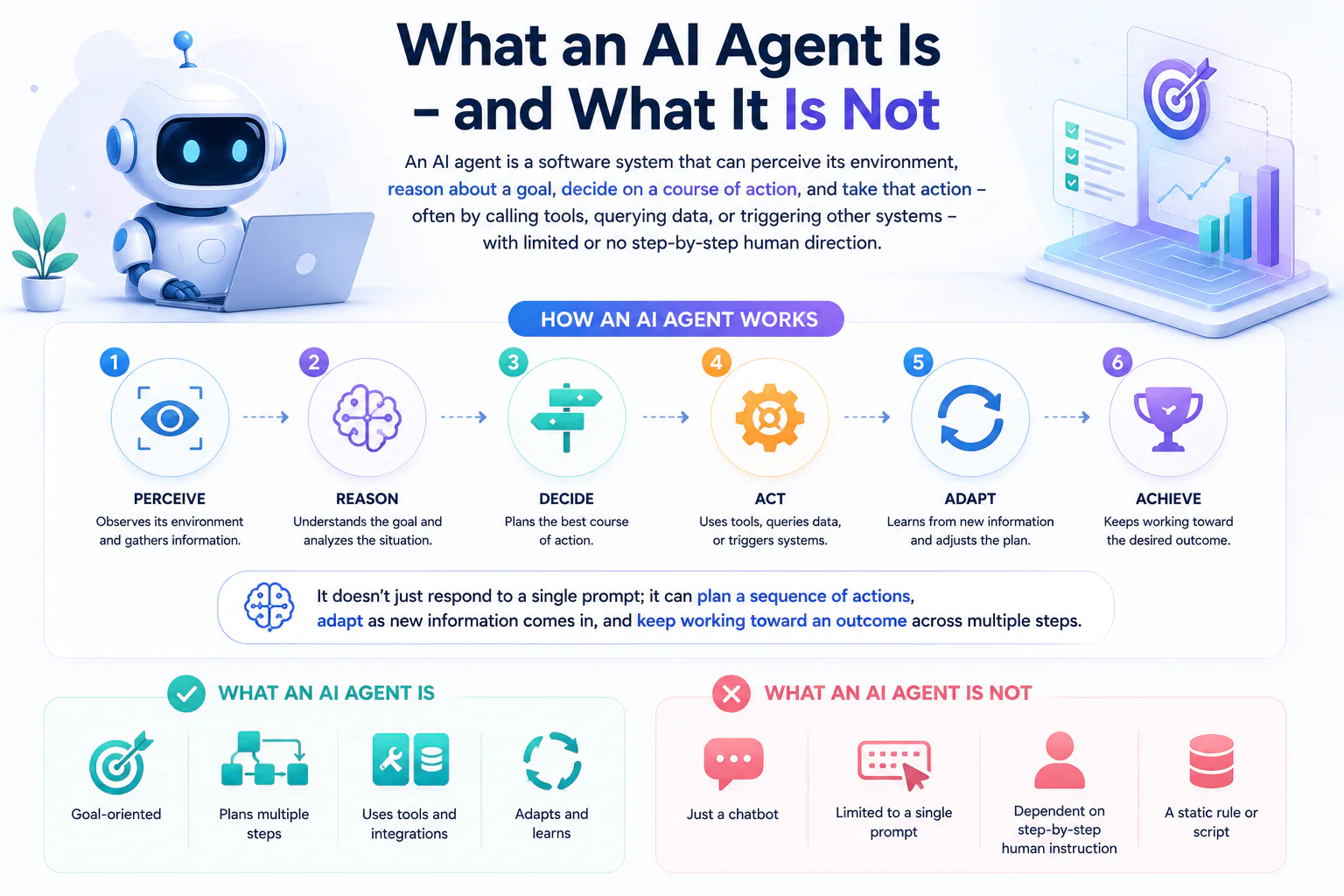
That’s a meaningfully different thing from several tools it’s often confused with:
- An AI agent is not just an AI model. A large language model generates text or predictions from an input. An agent uses a model as one component, wrapped in logic that lets it observe, decide, and act. (See Understanding AI Models vs. AI Agents for a deeper comparison.)
- An AI agent is not a chatbot. A chatbot answers questions in a conversation. An agent can hold a conversation, but it can also take action on your behalf – updating a record, executing a transaction, or orchestrating a multi-step process – without a human typing every instruction.
- An AI agent is not a rules-based automation. A traditional workflow automation follows a fixed, pre-defined path: if X happens, do Y. An agent can handle situations its designers didn’t explicitly script for, because it reasons about context rather than just matching conditions.
For business owners, that distinction matters. An AI agent is a technology for handling variability and judgment – not simply a faster way to run a fixed process.
When an AI Agent Is the Right Solution
Use an AI agent when a task requires judgment, changing context, coordination across tools, or a workflow that can’t be fully specified in advance. Avoid an agent – and use standard automation instead – when the process is deterministic, the inputs are predictable, and the correct action is always the same.
A simple way to sort a problem:
- Use conventional automation (AI workflow automation, or see how it compares to legacy tools in AI Workflow Automation vs. Legacy IDP) when the steps are fixed and repeatable (e.g., moving data from one system to another on a schedule).
- Use a chatbot or search tool when the goal is answering questions or retrieving information, with no action required beyond providing an answer.
- Use an API integration when two systems just need to exchange data in a defined format.
- Use an AI agent when the task involves interpreting ambiguous input, deciding between multiple possible actions, pulling from more than one data source or tool, or adjusting its approach based on what it finds along the way.
If you’re weighing this trade-off for your own business, this is exactly the kind of assessment our AI consulting team works through with clients before any build starts.
Four factors are worth weighing before committing to an agent:
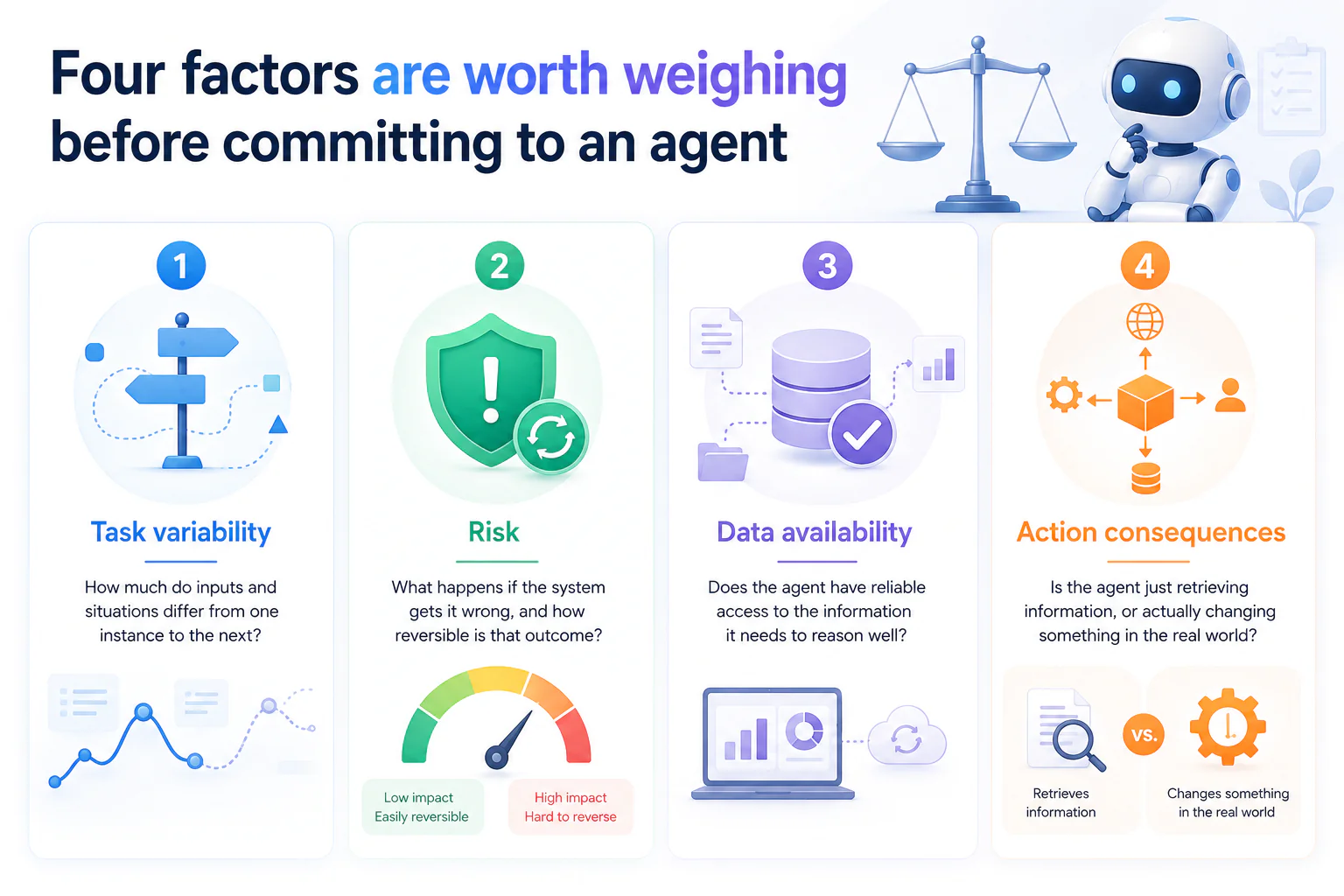
- Task variability – how much do inputs and situations differ from one instance to the next?
- Risk – what happens if the system gets it wrong, and how reversible is that outcome?
- Data availability – does the agent have reliable access to the information it needs to reason well?
- Action consequences – is the agent just retrieving information, or actually changing something in the real world?
High variability with low-to-moderate risk is where agents tend to shine. High risk with irreversible consequences calls for tighter human control – which is really a question of autonomy level, covered next.
Choose the Appropriate Autonomy Level
Not every agent should operate the same way. The right level of autonomy depends on how much confidence you have in the agent’s judgment and how costly a mistake would be. It’s useful to think of autonomy as a spectrum, not a single on/off switch.
Retrieve and Answer
The agent’s role is limited to finding and presenting information – pulling from documents, databases, or systems and returning an answer. It doesn’t take any action beyond that. This is the lowest-risk starting point, well suited to internal knowledge search, customer FAQs, or research support.
Recommend or Draft
The agent goes a step further and proposes a next step, a decision, or a piece of content – a draft email, a recommended discount, a suggested diagnosis – but a human reviews it before anything happens. This level is useful when judgment is required but the cost of an unreviewed error is too high to skip a human check.
Execute with Approval
The agent identifies the action it wants to take and is ready to carry it out, but waits for explicit human sign-off first. This keeps a person in the loop for accountability while still letting the agent handle the analysis and preparation work.
Execute Within Defined Guardrails
The agent acts independently, but only within boundaries set in advance – spending limits, approved categories of action, escalation triggers, or monitoring thresholds. This is the highest level of autonomy most businesses should extend, and it still depends on well-defined limits and audit logging to be safe.
Choosing the right level isn’t a one-time decision. Many organizations start an agent at “recommend or draft,” build confidence in its judgment over time, and only then move it toward greater autonomy.
Define the Business Outcome, Users, and Success Metrics
An AI agent isn’t worth building unless you can say, specifically, what it’s supposed to change. Before development starts, it’s worth pinning down three things:
- The business outcome – what measurable result the agent should produce: faster response times, lower cost per transaction, fewer errors, higher conversion, and so on.
- The users – who interacts with the agent, directly or indirectly: customers, employees, or another system. Their needs shape how much autonomy and transparency the agent needs.
- The success metrics – the numbers that will tell you whether it’s working: resolution rate, accuracy, time saved, escalation rate, cost per interaction.
The impact of getting this right is already visible across industries. In customer service, agent-driven systems are handling a growing share of interactions, with Gartner projecting that by 2025 around 70% of customer interactions will be managed by AI technologies. In e-commerce, personalized-recommendation agents contribute meaningfully to revenue, with McKinsey noting that recommendations drive a substantial share of Amazon’s sales. Banks use agents for algorithmic trading and fraud detection; hospitals use them to support diagnostics and patient triage.
None of those results came from deploying an agent and hoping for the best – they came from a clear outcome, a defined user, and a metric that proved the agent was actually helping. That’s the standard worth holding your own use case to before you build.
Understand the Core Architecture of an AI Agent
Before you build – or buy – an AI Agent, it helps to know what you’re actually assembling. Strip away the branding, and every agent is made of the same working parts: something that decides what to do, something that reasons, something that remembers, something that can reach outside itself, something that talks to people, and something that keeps all of that in check. Skip any one of them and the agent either can’t act, can’t be trusted to act, or can’t be reviewed after it acts. If you’re scoping this out for your own team, this is also the checklist our AI development services work through with clients before writing a line of code.
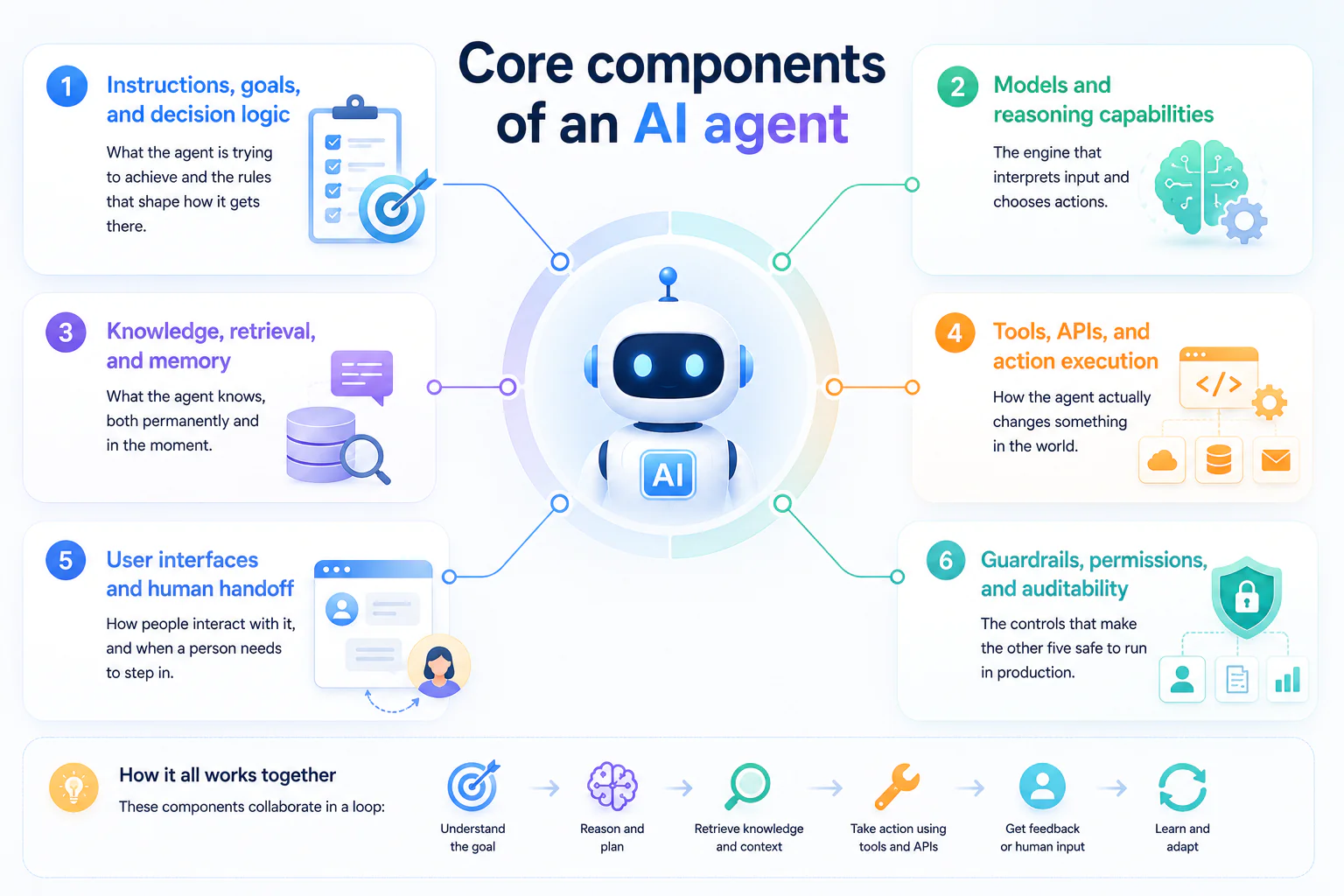
Core components of an AI agent:
- Instructions, goals, and decision logic – what the agent is trying to achieve and the rules that shape how it gets there
- Models and reasoning capabilities – the engine that interprets input and chooses actions
- Knowledge, retrieval, and memory – what the agent knows, both permanently and in the moment
- Tools, APIs, and action execution – how the agent actually changes something in the world
- User interfaces and human handoff – how people interact with it, and when a person needs to step in
- Guardrails, permissions, and auditability – the controls that make the other five safe to run in production
Instructions, Goals, and Decision Logic
This is the part of the agent that answers two questions before it does anything else: what am I trying to achieve, and what am I allowed to do to get there.
Goals define the outcome the agent is working toward – resolve a ticket, approve or flag a transaction, optimize a delivery route. Instructions shape the behavior around that goal – the tone to use, the order to follow, the cases to avoid. Decision logic is what the agent actually runs on to choose between options once goals and instructions are set, and it tends to fall into a few recognizable patterns:
- Rule-following logic picks a predetermined action for a known condition – useful when the situation is well understood and doesn’t vary much.
- Goal-driven planning evaluates possible sequences of actions and picks the path most likely to reach the objective – useful when there are multiple valid routes to the same outcome.
- Utility-based evaluation goes a step further and weighs trade-offs – balancing speed against accuracy, or return against risk – rather than treating every path to the goal as equally good.
A goal tells the agent where to go. A policy tells it which roads it’s allowed to take. Neither one is optional, and neither should live only inside a prompt – a well-designed agent enforces its policies through code-level checks and permissions, not just through phrasing in its instructions. A prompt can be ignored, reinterpreted, or bypassed by unexpected input; a permission boundary enforced in the surrounding system can’t.
Models and Reasoning Capabilities
The model is the reasoning engine – the component that interprets input, weighs the instructions and context it’s been given, and decides what to do next. Choosing one isn’t about picking the “smartest” option available; it’s a trade-off across several dimensions that matter differently depending on the task:
| Factor | What it affects |
|---|---|
| Task quality | Whether the model reasons well enough for the complexity of the decision it’s making |
| Latency | How quickly the agent needs to respond – real-time customer chat has very different tolerances than an overnight batch process |
| Cost | Per-call or per-token cost multiplied by expected volume, which can shift the economics of a use case entirely |
| Privacy and data residency | Whether sensitive data can leave your environment, or whether the model needs to run in a private or on-premises deployment |
| Modality | Whether the agent needs to handle only text, or also images, audio, documents, or video |
| Deployment constraints | Integration with existing infrastructure, uptime requirements, and vendor lock-in considerations |
A support agent answering routine questions and a clinical decision-support agent reviewing patient data are not the same buying decision, even if both are technically “an AI agent with a language model at the center.” Model capabilities, pricing, and available options change often enough that it’s worth checking current vendor documentation at the time you’re actually specifying a build, rather than relying on comparisons that may already be out of date – our guide to types of AI models is a useful starting point for narrowing the field.
Knowledge, Retrieval, and Memory
Three related but distinct things get lumped together under “the agent knows this,” and separating them matters for both accuracy and cost:
| What it is | When it’s used | |
|---|---|---|
| Static model knowledge | What the model learned during training | General reasoning, language understanding, common knowledge |
| Retrieval (RAG) | Looking up external, current, or proprietary information at the moment it’s needed | Answering from your documents, policies, product data, or anything that changes after the model’s training cutoff |
| Memory | Information carried across a session or across interactions with a specific user | Keeping context in a conversation, recalling a user’s prior preferences or history |
Retrieval grounds the agent’s answers in facts it doesn’t have baked in – a support agent pulling from your actual current return policy instead of a guess, or an internal tool pulling from this quarter’s data instead of last year’s. Memory is about continuity – remembering that a customer already explained their issue once, or that a user prefers a certain format, without making them repeat themselves.
Neither is “set and forget.” Retrieval systems need governance: who can access which documents, how fresh the indexed data is, and how the agent should indicate where an answer came from. Memory needs its own rules: what’s retained, for how long, and who can see it – since durable memory of a user’s data is itself a privacy decision, not just a UX one.
A simple test for whether you need retrieval: if the correct answer depends on information that changes after the model was trained, or that the model was never trained on in the first place (your internal data), you need retrieval. If the model already reasons well about the general domain and just needs to stay consistent within one conversation, memory alone may be enough. Retrieval architecture is part of the broader AI & machine learning work we do with clients – worth a look if you’re scoping this alongside model selection.
Tools, APIs, and Action Execution
This is where an agent stops being a conversation and starts being able to do something – call an internal API, update a record, send a notification, trigger a workflow in another system. It’s also where the risk profile changes the most, because a wrong answer in a chat is a bad response; a wrong action taken automatically is a bad transaction.
A workable permission model for tool use typically includes:
- Scoped credentials – the agent’s access should be limited to exactly what a given tool needs, not a broad service account that can do far more than the task requires
- Input validation – parameters passed to a tool should be checked before execution, not trusted blindly because the model generated them
- Confirmation steps for consequential actions – some actions should require a check (automated or human) before they execute, especially anything involving money, irreversible changes, or external communication
- Audit logs – every tool call should be recorded: what was called, with what parameters, by which agent run, and what the result was
Tool-call lifecycle, in short: the agent decides an action is needed → the system validates the request against permissions and input rules → the action executes (or is queued for approval) → the result is logged and returned to the agent to inform its next step.
Treat each tool integration the way you’d treat any other system with write access to production data – because that’s what it is, even when the caller is a model instead of a person. If you’re weighing how to expose your own systems to an agent, our comparison of REST, GraphQL, and gRPC for AI-powered APIs covers the integration-layer trade-offs in more depth.
User Interfaces and Human Handoff
Chat is the default assumption for how people interact with an agent, but it isn’t always the right one. The right interface depends on the task, the user’s expertise, how urgent the interaction is, and how serious the consequences of a mistake are:
- Conversational chat works well for open-ended questions and tasks where natural language is the fastest way to specify what’s needed.
- Voice fits hands-busy or eyes-busy contexts – a warehouse floor, a moving vehicle – where typing isn’t practical.
- Structured workflow interfaces (forms, guided steps) work better than open chat when the input needs to be precise and a free-text field would just invite ambiguity.
- Embedded UI – an agent surfaced inside an existing tool (a CRM, an admin panel) – reduces context-switching for users who already live in that system all day.
Human handoff is part of the interface design, not an exception to it. An agent should recognize when it’s out of its depth – low confidence, a request outside its scope, a high-stakes action – and hand off to a person with the full context already attached: what the user asked, what the agent already tried, and why it’s escalating. A handoff that drops the user back to square one defeats the purpose of having an agent in the first place.
Guardrails, Permissions, and Auditability
Guardrails aren’t a feature you bolt on once an agent works – they’re part of what makes it usable in production at all. Three layers typically need to be in place before an agent handles anything consequential:
- Guardrails – constraints on what the agent is allowed to say or do, independent of what the model decides in the moment. This includes content boundaries, topic restrictions, and hard stops for actions that should never be fully automated.
- Permissions – the access control layer determining which systems, data, and actions a given agent (or a given user, through the agent) can reach. Least-privilege access limits the blast radius of a mistake.
- Auditability – a record of what the agent did, when, why, and with what outcome, detailed enough that a failure can actually be investigated rather than just noticed.
A basic control-plane checklist:
- Is every consequential action logged with enough detail to reconstruct what happened?
- Does the agent operate with the minimum access required for its task, not broader system-level access?
- Are there defined limits (spend, scope, action type) the agent cannot exceed regardless of what it decides?
- Is there a clear, tested path for a human to intervene mid-process, not just after the fact?
- Has someone outside the build team reviewed what happens in the failure cases, not just the success cases?
This is operational and technical guidance, not a legal or compliance guarantee – regulatory requirements vary by industry and jurisdiction, and a guardrail checklist is a starting point for your own risk review, not a substitute for it.
Choose Your AI-Agent Build Path
Once you know what an agent needs to contain, the next decision is how to build it. There isn’t one right route – the right path depends on how complex the workflow is, how much control and customization you need, how sensitive the data is, what governance is required, your budget and timeline, and the engineering capacity you actually have available. Broadly, the options fall into three categories, plus a decision about whether you need more than one agent at all.
No-Code and Low-Code Builders
No-code and low-code platforms let you assemble an agent through visual configuration – connecting triggers, prompts, and pre-built integrations – rather than writing custom code. They’re generally the fastest way to get something working.
| Strengths | Limitations |
|---|---|
| Fast to prototype and iterate | Deep customization is often constrained by what the platform exposes |
| Common integrations are pre-built | Complex testing and evaluation workflows can be harder to implement |
| Lower upfront engineering cost | Governance and audit capabilities vary widely by platform |
| Accessible to non-engineering teams | Portability – moving off the platform later – can be difficult |
This path tends to fit well for internal tools, proofs of concept, and well-scoped tasks where the available integrations already cover what you need. Specific products in this space change quickly, so it’s worth checking current documentation and reviews rather than relying on older comparisons – our guide to no-code AI platforms walks through how to evaluate them.
Code-First Frameworks and SDKs
For teams with engineering capacity, building on a code-first agent framework or SDK trades speed for control. This route gives you direct access to the model layer, the ability to customize decision logic precisely, and full control over testing, deployment, and integration with existing systems.
When this route tends to make sense:
- The workflow doesn’t map cleanly onto a builder’s pre-set patterns
- You need fine-grained control over prompts, tool calls, and decision logic
- Testing, versioning, and deployment need to follow your existing engineering practices
- The agent needs to integrate deeply with proprietary or legacy systems
No single framework is objectively “best” – the right one depends on your team’s existing stack, the modalities you need to support, and how the framework handles state, tool calling, and observability. That’s a decision worth evaluating against your specific requirements rather than a general reputation.
Cloud and Enterprise Agent Platforms
Managed enterprise platforms sit at the other end of the spectrum from no-code builders – not necessarily faster to start with, but built for scale and governance. Depending on the provider, they may offer identity and access integration with your existing systems, built-in security controls, managed data connectivity, monitoring and observability, and formal support agreements.
This route tends to suit organizations that need agents to operate under the same governance model as the rest of their enterprise software – with centralized identity, logging that feeds into existing security tooling, and accountability that satisfies internal or regulatory review. Capabilities differ meaningfully between providers and change frequently, so specifics are worth verifying directly against current provider documentation rather than assumed from general category knowledge.
How to Choose Based on Complexity, Control, Data, and Team Capability
There’s no universal answer, but the trade-offs tend to line up along a few consistent axes:
| Consider… | Leans toward no-code | Leans toward code-first | Leans toward enterprise platform |
|---|---|---|---|
| Workflow complexity | Simple, well-defined tasks | Complex or highly custom logic | Complex logic within a governed environment |
| Data sensitivity | Low-sensitivity data | Depends on your own security implementation | High-sensitivity data needing built-in controls |
| Integration surface | Standard, pre-built integrations | Deep or unusual system integrations | Enterprise systems already using the same platform ecosystem |
| Expected scale | Small-scale or single-team use | Scale limited mainly by engineering capacity | Large-scale, organization-wide deployment |
| Ownership model | Business or ops teams | Engineering teams | Central IT or platform teams |
| Change frequency | Frequent, fast iteration | Iteration paced by development cycles | Iteration paced by governance and release cycles |
None of these factors decide the choice on their own – a highly complex workflow with strict data governance might still start on a no-code builder as a proof of concept before moving to a code-first or enterprise build once it’s proven out. Testing that assumption cheaply, with a scoped proof of concept, is often more useful than trying to pick the “permanent” architecture on day one.
When Not to Use Multi-Agent Systems
Multiple coordinating agents – one that plans, one that retrieves information, one that executes, one that reviews – can look appealing because it mirrors how a team of specialists would divide up work. But splitting a task across agents adds real cost: coordination overhead, harder debugging when something goes wrong across multiple hand-offs, and evaluation that’s more complex because failures can originate in any agent or in the communication between them.
Multi-agent systems tend to earn their complexity when:
- Responsibilities are genuinely separable – each agent has a distinct role, tool set, and area of expertise that doesn’t overlap much with the others
- The task is large enough that a single agent’s context or tool scope would become unwieldy
- Different parts of the workflow have different risk profiles and benefit from being evaluated and constrained independently
A single, well-scoped agent is usually the better choice when:
- One agent with the right tools could handle the whole task without exceeding a reasonable scope
- The main motivation is that multiple agents “sound” more sophisticated, rather than a specific coordination problem you’re solving
- You don’t yet have solid evaluation and monitoring in place for a single agent – adding more agents multiplies what you’re not yet able to observe
The practical test isn’t “could this be split into multiple agents” – almost anything can be. It’s whether splitting it actually reduces complexity for your team, or just relocates it into the harder-to-debug space between agents.
Plan the Agent Before You Build
Before any model gets selected or any line of code gets written, an AI agent needs a design. Skipping this stage is the single biggest reason agent projects stall after a promising demo: the workflow was never fully mapped, nobody defined which actions the agent was allowed to take on its own, the data it would rely on was never checked for quality or permissions, and no one planned for what happens when something goes wrong.
A build plan is not the same as the step-by-step implementation guide that follows. Implementation is about how you build; planning is about what you’re building and under what constraints. This is the same discipline behind a structured product discovery phase, and it fits within the planning stage of the broader software development lifecycle your agent will move through. Treat this as a short, written design pack – even a few pages are enough – that your team can review before committing engineering time, ideally with input from whoever handles solution architecture for the project. At minimum, it should define:
- The workflow the agent will operate in, including its inputs, decisions, and outputs
- The boundaries of its authority – what it can do unsupervised versus what needs a human sign-off
- The data and knowledge it will draw on, and whether that data is trustworthy and permissioned
- What happens when the agent is uncertain, blocked, or wrong
Getting these four elements down on paper first turns “build an AI agent” from an open-ended experiment into a scoped engineering project with clear acceptance criteria.
Map the workflow, decisions, inputs, and outputs
Every AI agent sits inside an existing business process, even if that process has never been written down. Before you automate any part of it, map it.
Start with the triggering event – what starts the interaction? A customer message, an inbound email, a scheduled job, a form submission, or a human typing a request. From there, trace the path the work currently takes:
- Context: What information does a person (or system) need on hand to handle this task correctly today? That’s the context your agent will also need.
- Decision points: Where does judgment get applied – do we approve this refund, escalate this ticket, choose this vendor? Each decision point is a place where the agent will either decide, ask for help, or defer entirely.
- Tool calls and actions: What systems get touched – a CRM lookup, an inventory check, an email sent, a record updated? List these as discrete actions rather than a vague description of “integrates with our systems.”
- Outputs: What does “done” look like – a reply sent, a ticket closed, a report generated, a task handed to a human?
- Exceptions: What currently goes wrong, and who handles it when it does?
- Ownership: Who is accountable for this process today, and who will be accountable for the agent’s version of it?
A simple way to structure this is a swimlane diagram – one lane for the user, one for the agent, one for each system or human the agent hands off to. You don’t need specialized software; a whiteboard or a shared doc works, as long as the lanes force you to be explicit about who does what and when control passes between them.
The output of this step is a workflow map, not a technical spec. It should be detailed enough that someone unfamiliar with the project could read it and understand exactly what the agent is meant to do, step by step, including the parts where a human is still involved.
Define tool boundaries and approval steps
Once you know what the agent will do, decide what it’s allowed to do without asking first. This is a security and governance decision as much as a product one, and it should be made before a single tool is wired up – not discovered after an agent takes an action nobody intended.
A useful way to organize this is an action-policy matrix with four categories:
- Allowed: Low-risk, easily reversible actions the agent can take on its own – looking up an order status, drafting a reply, searching a knowledge base.
- Disallowed: Actions the agent should never take, regardless of how confident it is – for example, actions outside its intended scope, or ones with legal, financial, or safety implications that require a licensed professional or authorized employee.
- Approval-required: Actions with real consequences that are reversible or bounded enough to automate, but that still need a human to confirm before execution – issuing a refund above a threshold, sending an email to an external party, modifying a customer record.
- Emergency stop: A clearly defined way for a human to halt the agent immediately, mid-task, and for that halt to actually take effect rather than being queued behind other actions.
Two principles from security engineering apply directly here. Least privilege means the agent’s credentials should only grant access to the systems and actions it actually needs – not a broad service account that happens to be convenient. Segregation of duties means that where possible, the agent shouldn’t be both the one proposing a high-stakes action and the one approving it; a second system or a human should sit in that loop.
Write this matrix down and review it with whoever owns security or compliance in your organization before integration begins. It becomes the specification your developers build the tool layer against when they connect tools and APIs, and the reference your test team validates against when they test for realistic tasks and failure cases.
Prepare your data and knowledge sources
An agent is only as reliable as the information it can access. Before you connect any data source, evaluate it against a few basic questions:
- Source and ownership: Where does this information live, and who is responsible for keeping it accurate?
- Freshness: How often does it change, and how will the agent know when it’s out of date?
- Access permissions: Does the agent’s access match what the end user is actually entitled to see, or could it expose information across permission boundaries?
- Update rules: How does new or corrected information get into the system the agent reads from, and how quickly?
- Citability: Can the agent point back to where an answer came from, so a human can verify it if needed?
Not every agent needs a vector database or a full retrieval pipeline. A narrow agent answering questions from a short, stable FAQ may do fine with that content placed directly in its instructions. A support agent drawing on thousands of help articles, product manuals, or policy documents will typically need a proper retrieval setup – but that’s a consequence of the data’s size and rate of change, not a default requirement for every agent. Decide based on volume, update frequency, and how precisely you need the agent to cite its source, not on habit.
A data readiness scorecard – rating each intended source on freshness, permissions, accuracy, and structure – is a practical way to surface gaps before they become production incidents. A source that scores poorly on permissions or accuracy is a reason to fix the source, restrict its use, or exclude it, not to hope the model compensates for it.
Design for failure, escalation, and safe fallback
AI agents will be uncertain, wrong, or blocked at some point – planning for that is part of the initial design, not an afterthought bolted on after launch. Four situations are worth designing for explicitly:
- Low confidence: When the agent isn’t sure an answer or action is correct, what should it do – ask a clarifying question, decline, or hand off to a human? Define this threshold deliberately; don’t assume the model’s own expressed confidence is calibrated or trustworthy without testing it against real outcomes.
- Tool or system failures: If an API call times out or a downstream system is unavailable, does the agent retry, wait, or tell the user something went wrong? Silent failures – where the agent proceeds as if nothing happened – are worse than visible ones.
- Unsafe or out-of-scope requests: When a user asks for something outside the agent’s intended purpose or the disallowed list from the tool-boundary policy above, the agent needs a clear, non-negotiable way to decline and, where useful, redirect the user to a human channel.
- Escalation and manual recovery: When a task can’t be completed automatically, who picks it up, how much context do they receive, and how does the handoff avoid making the user repeat themselves?
A failure-mode-and-response table – listing each failure type, its likely trigger, the agent’s expected response, and who gets notified – turns this from a vague safety concern into something your engineering and support teams can actually build and staff against. Hallucination deserves particular attention on this list: an agent that states an incorrect answer with full confidence is often more damaging than one that visibly fails, which is why ungrounded AI output is treated as a compliance risk in its own right, not just a quality issue. This table also becomes the backbone of the safety testing described later, when the agent is tested against realistic tasks and failure cases.
How to Create an AI Agent Step by Step
With the design work above in hand, building the agent becomes a sequence of controlled stages rather than a single leap from idea to production. Each step below produces a concrete output or decision – a document, a configuration, a passing test suite – that the next step depends on. Skipping a step doesn’t save time; it just moves the missing work later, usually into production, where it’s more expensive to fix.
The nine steps fall into three natural phases: defining what you’re building (Steps 1-2), assembling the agent’s capabilities (Steps 3-6), and delivering and operating it responsibly (Steps 7-9). Many of these stages map directly onto specialist work – AI development services for the model and reasoning layer, custom software engineering for the tools and interface around it, cloud services for where it runs, and DevOps services for how it ships and stays reliable – so it’s worth deciding early which of these you’ll staff internally and which you’ll bring in.
Step 1: Define the purpose and success criteria
Earlier, we covered why a clear purpose matters; this step is about turning that purpose into something testable. A one-page project brief should capture:
- The task: What specific job is the agent doing – not “help customers,” but “resolve order-status and return questions without human involvement.”
- The users: Who interacts with the agent, and what do they already expect from this process?
- Constraints: Budget, timeline, compliance requirements, and any systems it must or must not touch.
- Baseline: How is this task handled today, and how well – average handling time, error rate, cost per interaction?
- Quality threshold: What result counts as good enough to launch, and what would count as a regression later?
- Business outcome: What changes for the business if this works – reduced response time, lower cost per ticket, higher conversion?
- Owner: Who is accountable for the agent’s performance after launch?
Without a baseline and a quality threshold, there’s no way to know later whether the agent is actually helping. Write this brief before touching a model or a framework, and treat it as the reference point every later step gets checked against.
Step 2: Choose the agent pattern and build path
Two decisions belong here, and they’re related but distinct: what kind of agent are you building, and how are you going to build it?
Agent pattern and autonomy level
Not every use case needs the same level of independence. A single-purpose agent that answers questions from a fixed knowledge base is very different from an agent that plans multi-step tasks, calls several tools, and decides what to do next.
As a rule, autonomy should increase only when the task is well-bounded and easy to reverse. Narrow, low-risk tasks can support more autonomy. Open-ended or high-impact tasks should keep a human closer to the loop, especially at the beginning.
To decide the right level, map the use case against the tool-boundary criteria defined earlier. Focus on what actions the agent can take and which actions require approval.
Build path
Once you choose the agent pattern, decide how to build it. The main options include low-code or no-code platforms, managed cloud AI services, open-source frameworks, or custom development built on model provider APIs.
The right choice depends on your team’s technical capability, the level of customization required, data residency or compliance needs, and how quickly you need to launch.
For example, a narrow internal FAQ agent may work well on a no-code platform. A multi-tool agent that interacts with financial systems will usually require custom engineering and a dedicated security review.
Document both decisions – pattern and build path – as a short pattern-selection note. It becomes the basis for the model selection in Step 3 and the tool integration work in Step 5, and it’s the point where an informational research phase becomes a concrete build decision. If there’s real uncertainty about whether the use case justifies full custom development, a scoped proof of concept is a lower-cost way to test the pattern before committing to a build path.
Step 3: Select the model and prompting approach
With a pattern chosen, decide which model will act as the agent’s reasoning engine, and how you’ll instruct it.
Model evaluation
Choose a model based on your actual use case, not on reputation alone. Test a shortlist using representative questions, edge cases, and tool-calling scenarios that the agent will face in production.
Compare each model on task accuracy, latency, cost at your expected volume, context window size, and reliability when following structured tool instructions.
Because model capabilities and pricing change frequently, treat this comparison as a snapshot rather than a permanent decision. Revisit vendor documentation and independent benchmarks periodically. Also evaluate the model as part of your broader AI tech stack instead of assuming one model is universally “best.”
Instructions and constraints
Once you select a model, define how the agent should behave:
- System instructions: Specify the agent’s role, scope, tone, and boundaries clearly.
- Output constraints: Define the expected format, length, and structure, especially when downstream systems parse the output.
- Tool-use rules: State when the agent should call a tool, when it should answer directly, and how it should handle uncertain tool results.
- Refusal behavior: Define how the agent should respond when a request falls outside its scope or violates the tool-boundary policy.
Fine-tuning
Fine-tuning should be a conditional option, not a default step. Consider it only when prompting, retrieval, and tool design cannot deliver the required behavior or domain accuracy.
Most business agents can reach production quality without it. Fine-tuning adds training, evaluation, and maintenance overhead, so teams should try simpler approaches first.
Step 4: Add knowledge, retrieval, and memory
This step turns the data readiness work described earlier into a working knowledge layer, and adds the mechanisms that let the agent retain context across a conversation or a task.
Step 5: Connect tools and APIs
This is where the tool boundaries defined earlier become real integrations. For each tool the agent needs – a CRM lookup, an inventory check, a ticketing action, a payment operation – build it as a narrow, well-defined function rather than a broad, general-purpose API wrapper.
Good practice here includes:
- Input and output validation: Check what the agent sends to a tool and what it gets back, rather than trusting either blindly. Malformed or unexpected inputs should fail safely, not execute against production systems.
- Scoped credentials: Each tool should authenticate with only the permissions it needs, matching the least-privilege principle from the tool-boundary policy.
- Action logging: Every tool call the agent makes should be recorded – what was called, with what inputs, by which session, and what the result was – so behavior can be audited and debugged after the fact.
- Idempotent and reversible design where possible: A tool that can safely be called twice without duplicating an effect (like a refund or an email send) is far easier to retry safely after a failure or timeout.
Explicitly separate read actions from write or financial actions in how you design and permission tools. A tool that looks up an order status carries very different risk from one that issues a refund or moves money, and they shouldn’t share the same approval path just because they’re both “tool calls” in the code.
The output of this step is a working set of tools the agent can call, each one logged, scoped, and tested independently before the agent is allowed to chain them together.
Step 6: Add guardrails and human approval
Guardrails turn the tool-boundary and failure-handling policies defined earlier into enforced, running controls rather than intentions written in a design doc. This step is what makes it safe to give the agent real authority.
Build in:
- Content policies: Rules governing what the agent will and won’t say or generate, enforced independently of the model’s own judgment.
- Action rules and approval thresholds: Technical enforcement of the allowed/disallowed/approval-required matrix defined earlier – for example, a refund above a set amount is blocked from executing until a human confirms it, regardless of how confident the agent is.
- Permission checks: Verifying, at the moment of each action, that the agent (and the user it’s acting on behalf of) actually has rights to that action – not just relying on a check made earlier in the session.
- Rate limits: Bounding how many actions or tool calls the agent can make in a given window, to contain the impact of a malfunction or a manipulated conversation.
- Audit logs: A complete, tamper-resistant record of what the agent did and why, separate from ordinary application logs – the same standard of structured, decision-by-decision logging that regulators now expect from AI-assisted compliance decisions applies just as much to an agent’s day-to-day actions.
- Kill switches: A way to disable the agent, or a specific tool, immediately – building on the emergency-stop concept introduced earlier – without a full deployment cycle.
It’s worth being direct about what guardrails do and don’t achieve: they reduce risk and catch a large share of problems, but no set of controls eliminates risk entirely. Treat guardrails as a layer to be tested and improved over time – see Step 8 – not as a one-time checkbox that makes the agent inherently safe.
Step 7: Build the interaction experience
However capable the agent is underneath, the interface is what determines whether people trust and correctly use it. Design the experience to be transparent about what the agent is doing, not just about what it says.
Depending on the use case, this might be a chat widget embedded in a website or product, an assistant inside an internal tool like a team messaging app or helpdesk, a voice interface, or an agent triggered inside an existing workflow tool rather than through a standalone chat window at all. Whichever surface you choose, the interface should make a few things visible to the user:
- Status: Whether the agent is thinking, calling a tool, or waiting on something – silence during a multi-step task reads as broken, not busy.
- Sources, where relevant: What the agent’s answer is based on, especially for anything a user might need to verify.
- Action confirmations: A clear signal when the agent has actually done something in a live system, not just described an intention to.
- Errors: Honest, specific messaging when something fails, rather than a generic apology that hides what went wrong.
- Confidence caveats: Where appropriate, an indication that an answer is uncertain and should be checked, rather than presenting every response with the same authority.
- Escalation options: A visible, low-friction way to reach a human, especially once the agent has declined or failed at a task.
Keep the surface list focused on what your use case actually needs rather than building every channel at once – a web chat widget, an internal workspace bot, a voice interface, and a workflow-embedded agent each carry their own design and maintenance cost, and few projects need more than one or two to start.
Step 8: Test with realistic tasks and failure cases
Before the agent gets broad access or real action authority, it needs to be tested against more than a handful of happy-path examples. Structure testing across four distinct categories, since each answers a different question:
- Functional testing: Does the agent call the right tools with the right inputs, and produce outputs in the expected format? This is closer to conventional software testing and can largely be automated.
- Quality evaluation: Are the agent’s answers accurate, complete, and appropriately toned for realistic requests – including ambiguous or incomplete ones? Because outputs are probabilistic, evaluate against defined criteria for correctness and completeness rather than expecting word-for-word matches to a reference answer.
- Safety testing: Does the agent correctly refuse disallowed actions, respect approval thresholds, and hold up against adversarial or manipulative inputs designed to make it act outside its intended scope? This is where the failure-mode table and the guardrails defined earlier get validated directly against real attempts to break them.
- Acceptance testing: Does the agent meet the quality threshold and business outcome defined in the Step 1 brief, tested against real or realistic tasks by the people who will own it after launch?
A practical way to organize this is a test matrix crossing scenario type – normal, ambiguous, adversarial, incomplete input, and tool failure – against the categories above, so gaps in coverage are visible rather than assumed away. A structured framework for testing AI models is useful here, since what counts as “sufficient testing” changes depending on whether the agent is customer-facing, handles regulated decisions, or supports an internal workflow with a human reviewer downstream. Beta testers or trained annotators are particularly valuable for the quality-evaluation category, since tone and helpfulness are harder to check with automated tests alone.
The output of this step is a documented test suite and a pass/fail result against the Step 1 acceptance criteria – the gate that determines whether the agent is ready for staged deployment.
Step 9: Deploy, monitor, and improve safely
Deployment isn’t a single event; it’s the start of an operating loop that continues for as long as the agent runs. Bring together the deployment considerations covered elsewhere in this guide – hosting environment, scaling, and reliability – and apply them through a staged rollout rather than a single full launch:
- Staged release: Start with a limited audience or a low-stakes subset of the workflow, and expand access as the agent proves out in production conditions that testing couldn’t fully replicate. Canary releases or a defined beta period give you room to catch issues before they reach every user.
- Observe: Track quality signals (are responses still meeting the Step 1 threshold), failure rates, latency, and cost per interaction from day one, not as an afterthought once something breaks.
- Evaluate: Review flagged failures, unexpected tool-call patterns, and user feedback on a regular cadence – this is where real usage surfaces gaps that pre-launch testing didn’t anticipate.
- Improve: Feed what you learn back into prompts, retrieval sources, tool design, or guardrail thresholds, and version each change so you can trace what changed and roll it back if a new version underperforms.
This loop – observe, evaluate, improve – is what keeps an agent’s performance from quietly drifting as the data it relies on changes, as usage patterns shift, or as the underlying model is updated by its provider. An agent that passed acceptance testing at launch still needs this ongoing operating discipline to stay reliable months later.
Common AI-Agent Patterns and Use Cases
“AI agent” covers a wide range of systems, and the pattern that fits one use case can be the wrong choice for another. The patterns below differ along a few consistent dimensions: how much knowledge the agent needs, how much authority it has to take action, how complex the underlying workflow is, how much risk a mistake carries, and how the agent’s performance should be evaluated. Recognizing which combination applies to your use case is what turns a general idea – “we want an AI agent for X” – into a concrete design brief, and it connects directly back to the AI and machine learning solutions available to build it. The examples below are illustrative patterns rather than case studies; actual results depend on the data, systems, and governance a specific organization has in place.
Knowledge and customer-support agents
This is the most common entry point for AI agents: a system that answers questions by drawing on a defined body of knowledge – product documentation, policy manuals, an internal wiki, past support tickets – and hands off to a person when it can’t help. The pattern is built around grounded question answering: the agent’s value comes from how reliably it retrieves and represents real information, not from how fluently it writes.
The design elements that matter most here are the ones covered earlier under data and knowledge sources: strong, current, and permissioned content; retrieval controls that limit what the agent can pull from and how it ranks results; and an evaluation approach that checks answers for accuracy and grounding, not just tone. Just as important is knowing when the agent should abstain or escalate rather than answer. A knowledge agent that guesses at an answer it can’t support from its sources is worse than one that says “I’m not sure – let me connect you with someone who can help,” particularly for support and service use cases where customers are already interacting with AI-driven service tools and expect a reliable handoff when the automated answer runs out.
Workflow-automation agents
Where a knowledge agent mainly answers, a workflow-automation agent mainly acts – it coordinates a sequence of steps across one or more systems to move a task toward completion: routing a request, updating a record, triggering a downstream process, checking a status and following up.
The key design principle is to keep the workflow bounded. Define a clear start and end state, limit the agent to a fixed set of tools, and specify when human approval is required before it can continue.
It is also important to separate deterministic automation from agentic decision-making. Deterministic automation follows the same predefined sequence every time. An agentic step, by contrast, evaluates context and chooses between multiple possible actions.
Not every step needs agentic reasoning. Many tasks are cheaper, easier to test, and more reliable when handled through deterministic automation. The agent should focus only on steps that genuinely require judgment.
This distinction also matters when comparing agent-based systems with traditional automation. Workflow automation and legacy intelligent document processing solve different parts of the same problem. In practice, the strongest design often combines both rather than replacing deterministic automation entirely.
Data-analysis and reporting agents
This pattern covers agents that retrieve business data, perform some level of analysis or calculation, and present the result as a summary, chart, or report – for example, pulling sales figures, computing a trend, and drafting a narrative summary for a stakeholder.
Because the output here often feeds directly into a business decision, the control model needs to be stricter than for a general knowledge agent. Four things matter in particular:
- Data access should be scoped to exactly what the task requires, not a broad analytics warehouse;
- Calculation validation should check that any numbers the agent computes or restates match the underlying source rather than being inferred or approximated by the model;
- Provenance should make clear which system and time period a figure came from;
- Review controls should ensure a person checks outputs before they inform a consequential decision. This pattern often builds on existing business intelligence tools. If your agent sits on top of dashboards and reports, first review the current AI capabilities and use cases in platforms like Power BI. Then decide what the agent should handle and what the analytics platform already does well. Data-analysis agents are a poor fit for unverified, high-stakes decisions – treat their output as a fast first draft for a human analyst, not a substitute for one, until the specific use case has been validated over time.
Sales, operations, and internal-assistant agents
This is less a single pattern than a broad category of task-support agents used inside a specific business function – drafting a follow-up email, summarizing a meeting, checking inventory before a sales call, preparing a first pass at a status report. What varies is the task; what stays constant is the shape of the opportunity.
The best early opportunities in this category usually reduce repetitive coordination work. This includes chasing information, drafting routine communication, and consolidating updates. At the same time, they keep consequential decisions in human hands.
For example, a sales assistant that drafts a proposal is a strong fit. An agent that autonomously approves a discount belongs to a much higher-risk category, even though both could be described as “sales agents.”
Feasibility also depends heavily on data access and permissions. An internal assistant is only as useful as the systems it can access. This is why access-control questions often surface early in these projects, including in professional-services and other functional use cases.
Department-specific examples should therefore be treated as starting points, not a fixed menu. The right task depends on your actual systems, workflow, and risk level.
Multi-agent systems for specialized workflows
Instead of one agent handling an entire task, a multi-agent system splits the work across several specialized agents – one focused on retrieval, one on a specific domain task, one coordinating the others – with an orchestrator managing handoffs between them. This pattern shows up in agentic engineering as a way to keep each agent’s scope narrow and its instructions simpler, rather than asking a single agent to hold every responsibility at once.
Multi-agent systems add value when a task can be split into specialized sub-tasks with different knowledge or tool requirements. They make the most sense when the benefits of specialization outweigh the added coordination overhead.
However, they also introduce new design requirements. Teams need to define clear roles for each agent, establish rules for sharing context, and use an orchestration layer to manage handoffs and sequencing. They also need stronger evaluation and error-handling mechanisms, since a failure in one agent can affect the rest of the system.
For this reason, multi-agent systems should not be the default choice. Start with a single, well-scoped agent or deterministic automation where possible.
Only move to a multi-agent architecture when the task clearly exceeds the limits of a single agent and a specific coordination problem justifies the extra complexity.
Test, Evaluate, and Monitor Your AI Agent
Shipping an AI agent is not the end of the quality process – it’s the point where evaluation becomes continuous rather than a one-time gate. A useful agent scorecard should evaluate more than answer accuracy. It should measure three broader areas:
- Quality: task outcomes and groundedness
- Execution: action correctness and safety
- Performance: cost, latency, and user experience
This gives teams a more complete view of whether the agent is accurate, reliable, efficient, and genuinely useful.
This section works alongside the QA and testing services, DevOps practices, and ongoing software maintenance that keep any production system healthy – an AI agent needs all three, plus the AI-specific evaluation layered on top. There’s no universal passing score for any of these dimensions; set targets against your own baseline and business outcome, not a generic industry number.
Functional and tool-use testing
This is the layer closest to conventional software testing, and it should be treated with the same rigor: repeatable test cases, version-controlled test suites, and results that can be compared run over run rather than eyeballed each time. Test the agent across three types of scenarios:
- Normal operation: valid inputs and expected task completion
- Failure handling: invalid inputs, retries, and tool outages
- Control and consistency: permission errors and duplicate requests
The goal is to confirm that the agent succeeds when it should, fails safely when necessary, and never triggers unintended actions.
Automated testing infrastructure – of the kind used in automation testing services – can run much of this matrix on every change, catching regressions before they reach a live conversation.
Quality, safety, and hallucination evaluation
Functional testing checks whether the agent works mechanically. This layer focuses on whether its outputs are actually useful, trustworthy, and safe. A practical evaluation can be grouped into three areas:
- Content quality: accuracy, grounding, and relevance
- Policy behavior: compliance with defined rules and appropriate refusals
- Human handoff: escalation quality and whether the agent provides enough context for review
This makes it easier to judge the agent as a complete system rather than reducing performance to a single score.
Hallucination deserves its own attention within this rubric, since a confidently wrong answer is often more damaging than a visible failure – a pattern examined in more depth in the discussion of why hallucination is treated as a compliance risk, not just a quality one. A structured framework for testing AI models is a useful reference here, since what counts as adequate hallucination and safety testing differs by context – a customer-facing support agent, a regulated decision-support tool, and an internal productivity assistant each warrant a different depth of scrutiny. Resist the temptation to reduce this evaluation to a single composite metric; no single number proves an agent is safe or factually reliable across every scenario it will encounter.
Human evaluation and user-feedback loops
Some qualities – tone, helpfulness, whether an answer actually felt useful to the person who received it – are hard to capture with automated tests alone, which is why human review stays part of the evaluation loop even after functional and quality testing are automated.
Include three kinds of reviewers, each catching different things: domain reviewers who can judge whether an answer is substantively correct in a specialized area, operators who understand how the agent is meant to behave day to day, and end users, whose feedback reflects real usage rather than a test scenario.
Keep feedback collection separate from uncontrolled retraining – user signals are valuable input for improving prompts, retrieval sources, or guardrails, but feeding raw feedback directly back into a model without review risks reinforcing mistakes or introducing new ones. It’s also worth building this loop with the assumption that feedback itself can surface sensitive information: a user’s flagged conversation may contain personal or confidential details, so feedback review needs the same access controls and retention discipline as any other data source the agent touches.
Observability: logs, traces, costs, and failure monitoring
Once an agent is live, the team operating it needs visibility into what it’s actually doing – not just whether it’s up, but how it’s behaving on real traffic. At minimum, observability should cover: incoming requests, the context and sources retrieved for each one, every tool call made and its result, final outcomes, errors, latency, cost per interaction, safety-relevant events (refusals, escalations, blocked actions), and how often and why conversations get escalated to a human.
The goal is coverage across these categories of telemetry, not a specific dashboard product – the right tooling depends on your existing observability stack. What’s worth building deliberately, regardless of tooling, is a shared vocabulary for how a failure gets classified once it’s observed, since the absence of a structured way to categorize and track agent failure modes tends to be a governance gap more than a technical one – teams that can’t name a failure consistently struggle to notice when it’s recurring.
Iterate without breaking production workflows
An agent that passed every test at launch will still need updates – new tools, refined prompts, an updated knowledge source, a different model version – and each of those changes carries some risk of a regression that wasn’t there before. Treat changes to a live agent with the same change-management discipline used elsewhere in software delivery.
Treat every change to an AI agent like a normal software release. Version the components that shape its behavior, including prompts, tool definitions, retrieval sources, and the model itself, so production behavior remains traceable.
Before shipping a change, run regression tests and roll it out gradually to a small share of traffic. Then monitor the metrics most likely to be affected. If performance drops, use a predefined rollback plan rather than debugging the issue live in production.
This should follow the same deployment and CI/CD discipline described earlier in the guide. An AI agent does not need a separate release process; it needs a stricter version of standard software delivery.
Security, Privacy, and Responsible AI
AI agents introduce risks that go beyond traditional application security. Overly broad retrieval can expose sensitive data, excessive tool permissions can give agents more authority than necessary, and manipulated or misunderstood inputs can trigger incorrect actions. Probabilistic outputs can also introduce bias or inconsistency, while limited human oversight increases risk in high-impact decisions. Compliance becomes harder when teams cannot clearly explain why the system behaved a certain way. These are foreseeable consequences of giving a probabilistic system real access and authority, which is why strong planning, permissions, and guardrails matter. This guidance should complement broader cybersecurity practices, data security guidance, and organizational AI governance, not replace a security and legal review tailored to your organization and jurisdiction.
Data privacy and access control
The starting principle is straightforward even though it takes discipline to maintain: an agent should only see the data it needs for the task in front of it, and no more.
In practice this means:
- Minimize data: Retrieve and retain only what the agent needs to complete the task.
- Classify sources: Apply stricter controls to sensitive data such as financial, health, or personally identifiable information.
- Scope access: Follow least-privilege principles so the agent only accesses the systems and data it needs.
- Secure credentials: Protect authentication methods so compromised agent credentials cannot expose broader systems.
- Set retention rules: Define how long the agent can keep information across sessions.
- Log access: Record sensitive-data access so teams can review activity later.
These controls provide a starting point, not a certification. Do not claim compliance with GDPR, HIPAA, or another framework without a formal assessment.
Prompt injection, unsafe tool use, and data leakage
These threats are specific to systems built around language models, and they’re worth understanding as a distinct category from conventional application security. Prompt injection happens when content the agent processes – a document, a webpage, an email, a tool’s output – contains instructions crafted to hijack the agent’s behavior, causing it to ignore its original instructions or take an unintended action.
Unsafe tool use happens when an agent is manipulated or reasons its way into calling a tool in a way that wasn’t intended, particularly dangerous when that tool can write, send, or pay. Data leakage happens when an agent’s response exposes information it shouldn’t – pulling content across a permission boundary, or restating something sensitive from an earlier part of a conversation it should have kept confidential.
The core mitigation principle across all three is the same: treat any external content the agent processes as untrusted, the same way a web application treats user input. Separate instructions from data wherever the system allows. Before executing a tool call, verify the requested action instead of relying on the model’s stated intent. Apply permission checks at the moment each action occurs, not just at the start of a session. Teams should also monitor for unusual behavior, such as an agent attempting actions outside its normal scope.
Bias, transparency, and human oversight
Responsible decision support means being honest about what the agent’s outputs represent and where a person still needs to be accountable.
Test the agent across realistic scenarios, including edge cases and underrepresented situations where bias may appear. Be clear about its limitations, document what falls inside and outside its intended scope, and keep human oversight for high-impact decisions such as hiring, lending, or healthcare. It’s worth drawing a clear line between fairness evaluation – a structured, ongoing process of testing outcomes across different groups and contexts – and a generic claim of “unbiased AI,” which isn’t a property any system can credibly claim without that underlying testing. A more detailed look at how bias enters AI systems and how organizations measure and mitigate it is a useful next step for teams building oversight into a high-impact use case.
Regulatory and governance considerations
None of the above is meaningful without an organizational structure to sustain it. A strong governance structure should cover seven areas:
- Ownership: Assign clear accountability for the agent’s behavior and outcomes.
- Documentation: Record what the agent does, what data it uses, and which decisions it can influence.
- Risk classification: Categorize use cases by impact so low-risk and high-risk agents receive different levels of scrutiny.
- Review processes: Define when and how teams reassess the agent’s design and performance.
- Data controls: Formalize access and retention rules as policy.
- Incident response: Set clear procedures for handling unintended or unauthorized agent behavior.
- Evidence retention: Keep the audit trail and documentation needed to explain how important decisions were reached.
Regulatory requirements vary by jurisdiction, industry, and the level of impact an agent has on individuals. They also continue to evolve. Treat any reference to a specific law or standard as something that may apply to your situation, not as a definitive conclusion. Always verify current requirements against official sources before relying on them. This section is oriented toward building organizational readiness, not legal advice; pair it with an appropriate security and legal review before deploying an agent into any regulated or high-impact context.
Select Tools and Platforms for Your Requirements
There is no single best tool for building an AI agent. There’s only the tool that fits your requirements. Skip the “top 10 tools” style of comparison. Start instead from your own constraints, then compare options against them.
A useful evaluation covers seven areas:
- Capability: Can it actually do what your use case needs – retrieval, tool calling, multi-step reasoning?
- Integration: Does it connect cleanly to the systems you already run?
- Governance: Can you enforce the approval rules and boundaries defined earlier in your design?
- Deployment: Can it run where your data and compliance requirements require it to run?
- Observability: Can you see what the agent is doing once it’s live?
- Cost: Does pricing scale in a way that matches your expected usage?
- Portability: If you outgrow this tool, how hard is it to move your work elsewhere?
Tool categories in this space evolve quickly. A vendor’s pricing, feature set, or even its existence can change within months. Whatever you read here or elsewhere, verify it against current documentation before you commit. This applies just as much to internal capability as to the tools themselves – the right platform choice often depends on how much you plan to build with custom software development versus how much you plan to assemble from existing services, and on whether your infrastructure sits with a single cloud provider or spans several. For a broader view of where agent tooling fits alongside the rest of your stack, see the overview of AI and machine learning solutions.
Agent builders for rapid prototyping
Agent builders are visual or low-code tools. They let you assemble an agent’s logic without writing much, or any, custom code. They’re a strong fit for early prototyping, for narrow use cases, and for teams without deep engineering resources on hand.
When evaluating a builder, check for:
- Connectors: Does it already integrate with the systems you need, or will you have to build custom connections?
- Control flow: Can you define branching logic, approval steps, and fallback paths – not just a simple linear script?
- Permissions: Can you scope what the agent is allowed to do, in line with the tool-boundary work from earlier in your design?
- Evaluation and monitoring: Does it give you a way to test and observe the agent’s behavior, or only a way to build it?
- Exportability: If you need to move this agent to custom code later, how much of the work carries over?
- Governance: Does it support audit logs, versioning, and access control at a level your organization needs?
- Cost: Does pricing stay reasonable as usage grows, or does it spike sharply past a certain volume?
Builders are a good way to validate an idea quickly. A structured AI proof of concept is often the right vehicle for this stage – it lets you test feasibility on a small, bounded task before deciding whether to invest in a larger build. Treat any specific product recommendation, including ones in this article, as something to re-verify: check the vendor’s own documentation and current pricing before you decide.
Frameworks for custom, code-first agents
Frameworks are for teams that want full control over an agent’s behavior and are comfortable writing code to get it. They trade the speed of a builder for flexibility, and they typically require an engineering team to maintain them.
When evaluating a framework, assess:
- Orchestration: How does it manage multi-step reasoning and tool-calling sequences?
- Tool support: How easily can you define and register new tools and functions?
- State management: How does it handle memory and context across a conversation or task?
- Testing: Does it offer a way to write repeatable tests, or is testing left entirely up to you?
- Observability: Can you trace what the agent did, step by step, after the fact?
- Integrations: Does it have existing connectors for the models and data sources you plan to use?
- Deployment freedom: Can you run it wherever you need to – cloud, on-premise, or a hybrid setup?
- Security: Does it support the permission scoping and validation your tool-boundary policy requires?
- Maintenance: How active is the project, and how much ongoing effort does it take to keep current?
Framework and terminology in this space move fast. A pattern that’s standard today – a particular way of managing tool-calling or a particular protocol for agent-to-agent communication – may be superseded within a year. Validate any specific framework name, version, or terminology against current documentation rather than relying on what was true when this guide was written. The orchestration and tool-calling concepts covered in this guide’s technology-stack overview are a useful starting reference for the underlying patterns, even as specific framework names change around them.
Enterprise and cloud platforms for governed deployments
For large-scale or regulated environments, the evaluation shifts. Capability still matters, but governance, identity, and support become just as important as what the platform can technically do.
Assess these platforms on:
- Identity and access management: Does it integrate with your existing identity provider and access controls?
- Data residency: Can you control where data is processed and stored, if that matters for your industry or region?
- Security controls: What certifications and controls does the platform maintain, and are they current?
- Support: What level of vendor support comes with your tier, and what are the actual response times?
- Governance features: Can you enforce approval workflows, audit logging, and role-based access at an organizational level, not just a project level?
- Cloud fit: Does it align with the cloud provider or providers you already operate in?
- Lifecycle management: How does the platform handle versioning, rollback, and staged releases?
- Integration depth: Does it connect natively to the rest of your enterprise systems, or does that integration work fall on your team?
One caution is worth stating plainly: using a major cloud provider does not, by itself, make a deployment compliant with any specific regulation. Compliance depends on how the system is configured, how data flows through it, and how your organization operates it – not on which logo is on the platform.
A practical tool-selection checklist
Whichever category of tool you’re evaluating, a short set of questions can keep the comparison grounded and vendor-neutral. Before committing to any option, ask:
- Task fit: Does this tool actually support the agent pattern you chose earlier – knowledge agent, workflow automation, multi-agent, or another pattern?
- Data: Can it connect to your data sources with the permissions and freshness your use case needs?
- Integration: Does it work with the specific systems your agent needs to call?
- Action risk: Does it let you enforce the approval and guardrail rules your use case requires?
- Testing: Does it support the kind of functional and safety testing your risk level demands?
- Monitoring: Will you have visibility into cost, latency, and failures once it’s live?
- Security: Does it meet your organization’s baseline for credential handling and access control?
- Deployment: Can it run in the environment your compliance or latency requirements call for?
- Budget: Does the pricing model hold up at your expected scale, not just at pilot volume?
- Ownership: Who on your team will actually operate and maintain this once it’s in production?
- Exit options: If this tool stops being the right fit, how much of your work can you carry to something else?
Answering these questions honestly, before signing a contract or committing engineering time, is usually what separates a tool choice that scales from one that gets rebuilt from scratch a year later.
Scale From Prototype to Production
A working prototype and a production system are different things, even when they’re built on the same underlying agent. Production adds requirements that a prototype can skip: reliability under real load, cost that stays predictable as usage grows, monitoring that catches problems before users do, access controls that hold up under audit, a release process that doesn’t risk breaking things for everyone at once, and clear ownership for when something goes wrong.
It’s worth separating two kinds of scale, because they call for different preparation. Scale in traffic means handling more requests, more concurrent users, more load on your infrastructure. Scale in organizational governance means more stakeholders, more oversight, more formal process around how the agent is changed and who’s accountable for it. A pilot with ten users and no governance overhead can look identical, technically, to a production agent – until either traffic or organizational scrutiny increases, and the gaps in reliability or oversight suddenly matter. This section connects to cloud migration planning, ongoing DevOps practice, managed services for day-to-day operation, and application maintenance for the long run – all of which apply to an AI agent just as they do to any other production system.
Deployment architecture and environment choices
Where an agent runs shapes what it can do and how much control you have over it. The right choice depends on a handful of factors specific to your use case, not a universal best practice.
Weigh these factors against each other:
- Data sensitivity: Does the agent touch information that needs to stay within a specific environment or region?
- Latency: Does the use case need near-instant responses, or is some delay acceptable?
- Integration: Where do the systems the agent needs to call already live?
- Control: How much do you need to manage the underlying infrastructure yourself, versus letting a provider handle it?
- Availability: What uptime does this use case actually require?
- Geographic needs: Do your users or your data span multiple regions?
- Operating capacity: Does your team have the skills and bandwidth to run this environment day to day?
Cloud deployment, on-premise deployment, edge deployment, and managed platforms each answer these factors differently, and none is inherently cheaper or more secure than the others in every case. Cost and security depend on how the environment is configured and operated, not on the deployment model alone. Treat any blanket claim to the contrary – from this guide or elsewhere – with some skepticism, and evaluate it against your own numbers.
Cost, latency, reliability, and capacity planning
Once an agent is live, its performance and its cost both need active management. What worked at pilot volume doesn’t automatically hold at production volume.
Track these metrics on an ongoing basis:
- Usage patterns: When and how often is the agent actually used, and does that match what you planned for?
- Model and tool costs: What’s the per-interaction cost, and how does it change as usage grows?
- Response times: Are users waiting longer than the use case can tolerate?
- Retry rates: How often do requests fail and need to be retried?
- Error rates: What share of interactions end in a failure of some kind?
- Caching opportunities: Are there frequent, repeatable queries that don’t need a fresh model call every time?
- Service limits: Are you approaching rate limits or quotas from a model provider or a connected tool?
There’s no universal cost benchmark that applies across use cases – a support agent answering short factual questions and an agent processing long documents have very different cost profiles, even on the same underlying model. Set your own targets based on your baseline and your budget, and revisit them as usage patterns shift. It’s also worth building the habit of naming failures consistently as they come up, since a shared way of classifying agent failure modes makes it much easier to spot a recurring reliability problem before it becomes a capacity crisis.
Versioning, CI/CD, and controlled releases
An AI agent has more moving, deployable parts than a typical application. Prompts change. Tool definitions change. Retrieval sources get updated. The underlying model itself can be swapped for a newer version. Each of these is a deployable asset, and each one needs the same discipline you’d apply to a code change.
In practice, that means:
- Version everything: Prompts, tool definitions, retrieval sources, evaluation datasets, and model configuration should all be tracked, not just the application code around them.
- Test before shipping: Run the change against your regression suite before it reaches real users.
- Roll out in stages: Release to a small slice of traffic first, then expand once the change proves out.
- Track impact: Watch the specific metrics most likely to move after this particular change.
- Keep a rollback path: Make sure you can revert quickly if something goes wrong, without needing to debug live in production.
This is the same discipline behind CI/CD practice more broadly across the software development lifecycle – an AI agent’s release pipeline should look like a specialized version of that same process, not a separate, less careful one.
Operating an AI agent over time
Launch is not the finish line. An agent needs an operating model – a defined answer to who does what, on an ongoing basis, long after the initial build is done.
A working operating model typically assigns:
- Product ownership: Who decides what the agent should and shouldn’t do, and who’s accountable for whether it’s actually delivering value?
- Technical ownership: Who maintains the underlying system, fixes what breaks, and manages upgrades?
- Risk review: Who periodically reassesses whether the agent’s risk profile has changed as its usage or scope has grown?
- Knowledge updates: Who keeps the agent’s data and retrieval sources current?
- Incident management: Who responds when the agent does something it shouldn’t, and how quickly?
- Periodic evaluation: Who re-runs quality and safety testing on a regular schedule, not just at launch?
- User feedback review: Who looks at what real users are reporting, and turns that into concrete changes?
None of this needs to be a large team. For a narrow internal agent, a single owner wearing several of these hats may be enough. What matters is that each responsibility has a named owner, so nothing falls through the gap between “engineering built it” and “the business uses it.” Keeping an auditable record of decisions and changes over time makes this ongoing ownership much easier to demonstrate, both internally and to anyone reviewing the agent later.
What Is Next for AI Agents?
Agent capability is improving. New models, better orchestration, and richer tool integrations continue to expand what’s realistic to build. That’s worth tracking. It’s not a reason to rebuild your plans around a capability that doesn’t exist yet.
The practical stance is straightforward: prioritize validated workflows, keep your controls robust, and build an architecture that can absorb new capability without a full rewrite. Chasing every new development as it appears usually costs more than it returns.
More capable agent workflows and orchestration
Orchestration – how an agent plans, sequences, and coordinates multiple steps or tools – keeps getting more capable. That trend is likely to continue. More capable orchestration can mean agents handle longer, more complex tasks with less hand-holding.
It also raises the stakes on evaluation and controls. An agent that can chain together more steps on its own needs correspondingly stronger guardrails, because more autonomy means more opportunities for a small error to compound before a human notices. Treat rising orchestration capability as a reason to invest more in evaluation, not less. Avoid predictions about exactly how capable orchestration will become or when – that’s a moving target, and any specific claim here would likely be outdated soon after publication.
Multi-agent and multimodal use cases
Two trends are worth watching together. Multi-agent systems, covered earlier in this guide, let specialized agents handle different parts of a task. Multimodal agents work across more than text – images, audio, documents, and other formats – expanding what kind of input an agent can act on and what kind of output it can produce.
Both trends can unlock richer workflows. Both also add real requirements: more complex testing, since there are more input types and more coordination paths to validate; more data to manage, often across multiple formats with different governance needs; and more coordination logic to get right. Treat these as extensions of the architecture and testing practices already covered in this guide, not as a reason to start from a different playbook. The complexity these patterns add should be weighed against the specific value they bring to your use case – not adopted by default because they’re available.
How to prepare without chasing hype
The most durable way to prepare for whatever comes next in this space is to build foundations that hold up regardless of which specific capability arrives first.
That means investing in:
- Clean data: Well-governed, accurate, permissioned data sources that any future agent can draw on.
- Stable APIs: Well-defined interfaces to your business systems, so new tools can connect without a rebuild.
- Governance: Clear ownership, risk classification, and review processes that scale as your use of agents grows.
- Evaluation practice: A working habit of testing agents against realistic tasks, not just checking whether a demo works.
- Security controls: Access management and monitoring that hold up as agents get more capable and more autonomous.
- Team capability: People on your team who understand how to build, test, and operate these systems, not just how to prompt one.
None of this depends on knowing exactly what comes next. It’s the same groundwork this guide has walked through from planning onward, and it’s what makes it possible to adopt new capability quickly and safely when it does arrive, rather than scrambling to catch up.
FAQ
What is the simplest way to create an AI agent?
The simplest route depends on how bounded your task is. For a narrow, well-defined task, a no-code or low-code agent builder connected to a single data source and a small set of tools is often enough to get started. The work that matters most, even for a simple agent, is defining the task and its boundaries clearly before you build – the tooling is the easy part.
Do I need to code to build an AI agent?
Not necessarily, at least not to start. Low-code builders can get a narrow prototype working without custom code. Production agents with complex logic, deep integrations, or strict governance requirements usually do need custom development at some point. Many teams start with a low-code prototype to validate the idea, then move to custom code once the requirements are clear.
What is the difference between an AI agent, a chatbot, and an automation?
A chatbot answers questions in natural language. It doesn’t typically take actions in other systems. An automation takes actions, but follows a fixed, pre-defined sequence every time – it doesn’t make judgment calls. An AI agent combines both: it can understand a request in natural language, reason about what to do, and take actions across one or more systems, adjusting its approach based on context rather than following one fixed script.
When should an AI agent be allowed to take actions automatically?
This depends on risk, not on how advanced the agent is. Low-risk, easily reversible actions – like looking up information – are reasonable to automate fully. Actions with real consequences, especially ones that are hard to reverse, should require human approval, at least until the agent has a proven track record on that specific task. This is a design decision to make deliberately during planning, not something to leave for the agent to figure out on its own.
How do I choose between a builder, framework, and enterprise platform?
Match the choice to your use case, not to what’s trending. A builder is a strong fit for a narrow task, a fast timeline, and a team without deep engineering resources. A framework fits when you need full control and have engineers ready to maintain it. An enterprise platform fits large-scale or regulated environments where governance and support matter as much as raw capability. Many organizations end up using more than one, depending on the use case.
How should I test an AI agent before production?
Test across several dimensions, not just one. Confirm the agent’s tool calls and logic behave correctly. Evaluate the quality, accuracy, and groundedness of its responses. Test how it handles unsafe or out-of-scope requests. Test what happens when a tool fails or a request is ambiguous. And test its fallback behavior – what it does when it can’t complete a task on its own. Skipping any one of these categories tends to surface as a production incident later, at a point where it’s more expensive to fix.
Conclusion
An AI agent isn’t one decision. It’s a series of them, made in a deliberate order: purpose before pattern, pattern before model, model before tools, tools before autonomy.
Each step in this guide exists for a practical reason. Skipping it doesn’t remove the work – it just moves that work later, usually into production, where a gap in planning shows up as an incident instead of a design revision. A workflow that was never mapped becomes a confusing escalation path. A permission that was never scoped becomes a security review after the fact. A failure mode that was never designed for becomes a support ticket nobody expected.
None of this depends on waiting for a more capable model or a fully settled set of industry standards. The planning, testing, and governance practices in this guide are usable now, on the models and tools available today. What determines whether a given agent becomes a durable part of how a business operates, rather than a prototype that never quite made it to production, is usually the quality of that groundwork – not the sophistication of the model sitting on top of it.
Next Steps: Plan Your AI-Agent Pilot
The fastest way to move from reading this guide to having a real answer is to scope one bounded pilot, not a broad program. A few concrete steps to start with:
- Pick one process, not a department. Choose a task with a clear boundary, a known owner, and a measurable baseline.
- Write a one-page brief. Task, users, constraints, baseline, and success criteria – before any tool or model gets chosen.
- Map the workflow and the boundaries. Decide what the agent can do without approval, what needs a human, and what it should never do, before any integration work begins.
- Validate the riskiest assumption first. Usually this is whether your data and systems actually support what you have in mind. A small, focused test answers this faster than a full build.
- Choose a build path deliberately. A low-code builder, a custom framework, and an enterprise platform each fit a different combination of team, timeline, and governance need – match the choice to your situation rather than to what’s popular.
If it would help to have a second pair of eyes on any part of this, that’s the kind of scoping work SmartDev’s AI Consulting Services are built around, working through requirements and constraints with technical and business stakeholders together. For validating feasibility before a larger investment, the AI Proof of Concept service is designed specifically for that stage. Teams that want a structured, time-boxed way to get from idea to a working pilot sometimes start with a short discovery engagement instead of an open-ended build – SmartDev’s 3-Week AI Discovery Program is built for exactly that purpose.
Whichever path fits your situation, the SmartDev team is available to help think through where an AI agent genuinely fits in your organization, and where it doesn’t.