
TL;DR
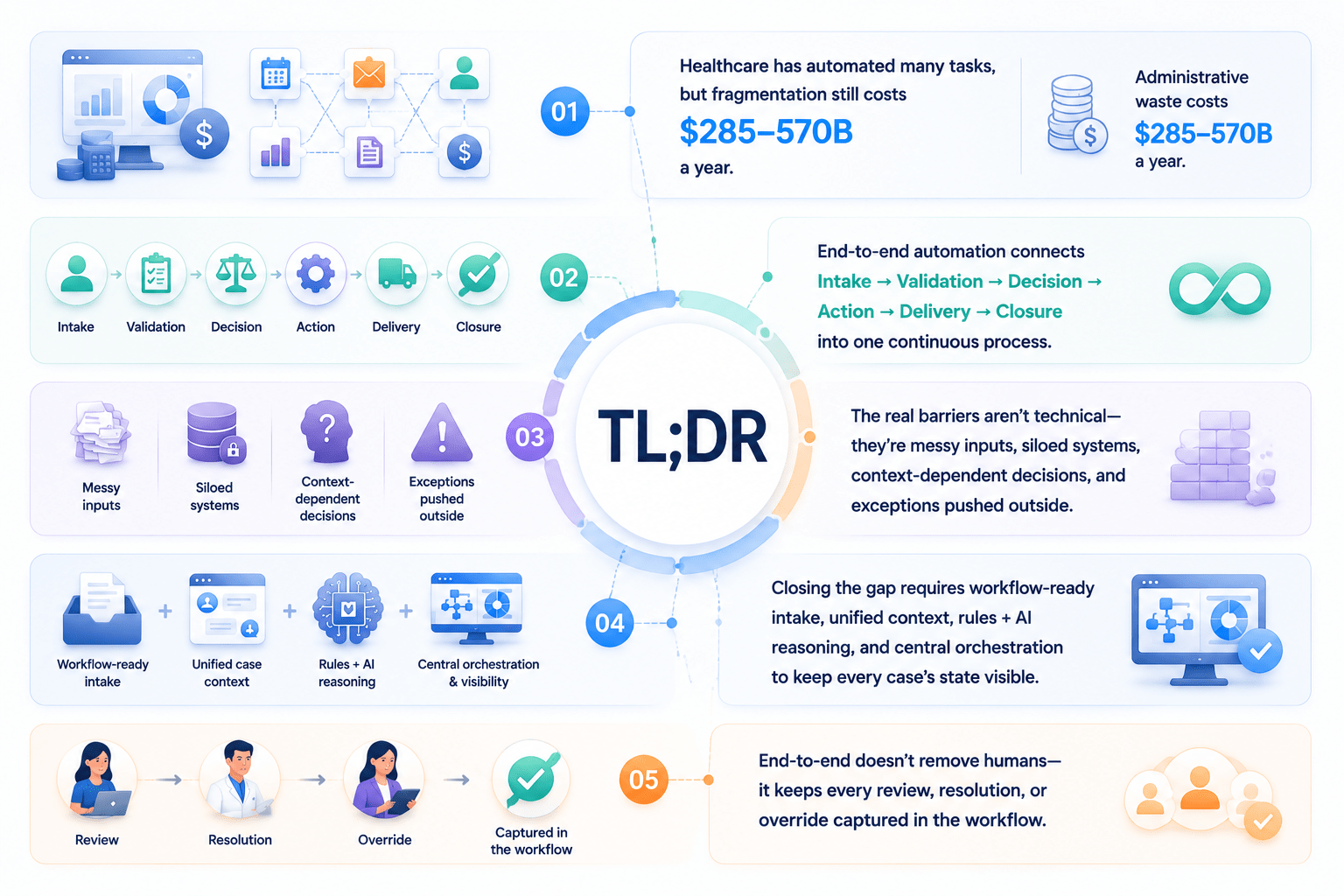
- Healthcare has automated plenty of individual tasks, but administrative fragmentation still costs $285–570B a year because those tools don’t talk to each other.
- End-to-end automation means connecting Intake → Validation → Decision → Action → Delivery → Closure into one continuous process, not six separate ones.
- The real barriers aren’t technical limits, they’re messy inputs, siloed systems, context-dependent decisions, and exceptions that get pushed outside the workflow.
- Closing the gap requires workflow-ready intake, a unified case context, a mix of rules and AI reasoning, and central orchestration that keeps every case’s state visible.
- End-to-end doesn’t mean removing humans. It means every review, resolution, or override
Introduction: Why Healthcare Automation Still Feels Fragmented
Healthcare has already automated a long list of individual tasks. Extracting data from patient records. Verifying insurance eligibility. Sending automated appointment reminders. Flagging duplicate lab orders.
Yet the numbers tell a different story once you zoom out to the full process. According to the 2025 CAQH Index, U.S. healthcare avoided $258 billion in administrative costs in 2024 through electronic transactions, yet a Health Affairs research brief estimates that administrative spending still makes up 15% to 30% of all U.S. healthcare spending, with at least $285 billion to $570 billion a year contributing nothing to patient outcomes. That gap doesn’t exist because organizations lack automation tools. It exists because the tools they already have don’t talk to each other across the full workflow.
This is the core thesis of this article: the biggest challenge in healthcare automation isn’t automating any single task. It’s maintaining continuity across the entire workflow, from the moment a request comes in to the moment it’s fully resolved. It’s also the problem SmartDev’s Healthcare & Medical Services practice is built around: connecting the systems healthcare organizations already run, rather than adding another disconnected tool on top.
What Does End-to-End Automation Mean in Healthcare?
From task automation to workflow automation
Automating a task means handling one step in isolation. A system scans a document and extracts the fields on it. A script sends a confirmation email once someone submits a form. A bot checks an insurance ID against a database. Each of these solutions delivers real value on its own, and most healthcare organizations already run several of them today.
Automating a workflow creates a different kind of challenge. Instead of making one step faster, workflow automation connects multiple tasks so the entire chain runs smoothly from one end to the other, without requiring people to manually stitch the steps together. The system does not simply scan a document and leave extracted text sitting in a folder. It sends the extracted information directly into a validation step, which then triggers a decision step and an action, with each stage automatically continuing from where the previous one ends.
SmartDev’s breakdown of where document processing hands off to workflow automation examines this exact transition and explains why most unrealized ROI in automation projects comes from improving this handoff rather than optimizing either technology individually. This distinction matters most in practice: an organization can build a dozen well-designed task-level automations and still operate a slow, error-prone overall process because no system manages the handoffs between them.
What makes a workflow truly end-to-end?
A truly end-to-end workflow connects these stages without interruption:
Intake → Validation → Decision → Action → Delivery → Closure
Each arrow in that chain represents a handoff, and it’s usually the handoffs, not the individual stages, that determine whether a workflow actually behaves as one continuous process. A workflow can have excellent intake, a strong validation model, and a well-designed decision engine, and still fail to be end-to-end if the output of validation doesn’t flow automatically into the decision step, or if a completed action never makes its way back to close the case.
That’s what “no step is left hanging” really means in practice. It’s not enough for each individual stage to work well on its own. Every stage also needs to know what comes next, be able to pass along everything the next stage needs, and trigger that next stage without waiting for a person to notice it’s time to move forward. SmartDev’s guide to AI workflow automation describes this as workflow orchestration: bringing separate automated processes together into one unified flow that can be managed as a single system rather than a set of disconnected tools. No gap in that chain should need a person to fill it in by hand, because every one of those gaps is exactly where a workflow that looks automated on paper quietly turns back into a manual process in practice.
The key characteristics of an end-to-end workflow
An end-to-end workflow usually shares these traits:
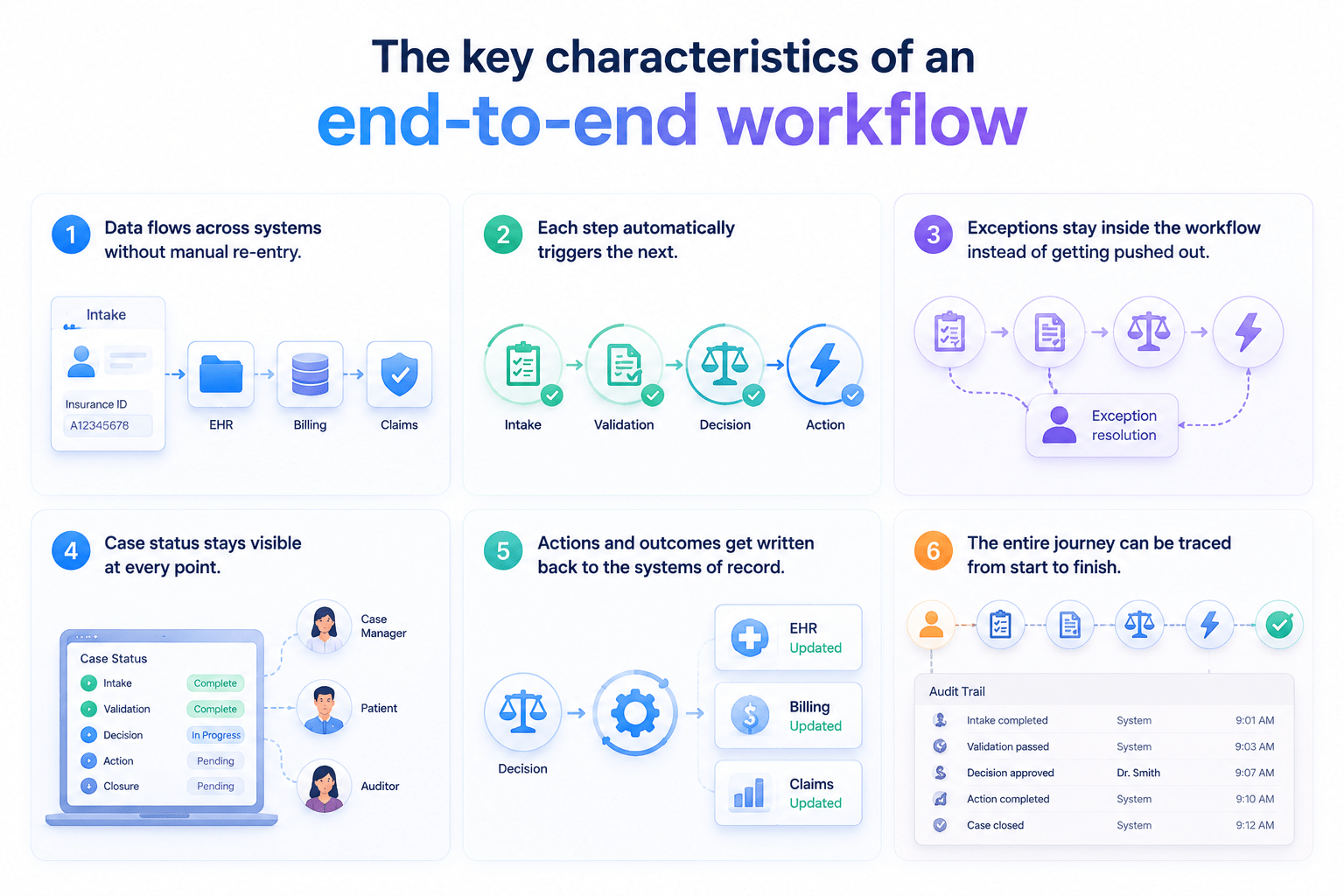
Data flows across systems without manual re-entry. Once a system captures a piece of information anywhere in the process, no one should need to type it in again. For example, when a staff member enters a patient’s insurance ID during intake, the billing system should read it directly instead of asking someone to copy it over later.
Each step automatically triggers the next. Completing one stage should automatically start the following stage without requiring anyone to notice that validation has finished and manually initiate the decision step.
Exceptions stay inside the workflow instead of getting pushed out. When something doesn’t fit the standard path, the system routes it through a defined resolution process rather than sending it to an inbox or storing it in an external spreadsheet. The case remains visible and continues moving, just through a different lane.
Case status stays visible at every point. Anyone who needs to check a case’s progress – including case managers, patients, and auditors – can view its current state without calling others or piecing information together from separate systems.
Systems of record capture every action and outcome. A decision doesn’t become complete when someone makes it. It becomes complete when the EHR, billing platform, or another system responsible for that data updates its records to reflect the decision.
The entire journey remains traceable from start to finish. Teams can reconstruct every step a case takes, every decision someone makes, and every person or system involved without relying on anyone’s memory of what happened.
Why Healthcare Workflows Are Hard to Automate End-to-End
Unstructured and incomplete inputs
Healthcare data rarely arrives in one clean format. A single case might start with a PDF referral letter, a scanned insurance card, a clinical note typed in free text, and a form filled out by hand at the front desk.
Each of these formats requires a different extraction approach, and none of them is guaranteed to be complete. A referral might be missing a diagnosis code. A scanned form might have a signature but no date. When intake systems are built to handle only the “clean” cases, every messy one falls back to a human, and that’s usually where the workflow first breaks. SmartDev’s AI Automation: Document & Data Processing playbook goes deeper into the extraction accuracy benchmarks and payback timelines organizations can expect when they fix this layer first.
Fragmented systems and data silos
A single patient case can touch five or six systems before it’s resolved: the EHR for clinical history, a payer portal for eligibility, a scheduling system for appointments, a billing platform for claims, and often at least one legacy system that predates all of them.
Each system was typically bought, built, or upgraded at a different time, for a different purpose, by a different team, which is exactly the kind of integration problem custom solution architecture is meant to solve. They rarely share a common data model. Even something as basic as a provider’s address or specialty can be recorded differently across systems. A 2023 JAMA study cited by HiLabs found inconsistent directory entries for 81% of physicians across five large national insurers. When the underlying data doesn’t agree across systems, no amount of task-level automation can produce a coherent end-to-end process.
Context-dependent decision making
Many healthcare decisions cannot be reduced to a single, simple if-then rule. Approving a prior authorization might depend on the patient’s diagnosis, the specific payer’s policy for that diagnosis, the provider’s specialty, prior treatment history, and sometimes clinical notes that only make sense when read together.
This is different from a purely rules-based domain like tax calculation, where the same inputs always produce the same output. In healthcare, two cases that look almost identical on paper can require different decisions once the full context is considered. That’s exactly the kind of judgment that plain automation struggles with, and where AI-assisted reasoning has to be layered carefully on top of rules, not used as a replacement for them.
Exceptions are part of the normal workflow
Missing documents. Records that don’t match. Denials. Requests for clarification. In most operational processes, these would be considered edge cases. In healthcare, they are the norm rather than the exception.
Denial management is a good illustration of the scale of this problem. Providers spend an estimated $20 billion annually managing denied claims, and the average cost to rework a single denied claim rose from $43.84 in 2022 to $57.23 in 2023, according to industry data compiled in Nirmitee’s healthcare automation guide. When a workflow treats every exception as a reason to exit into a disconnected manual queue, it doesn’t just slow down one case. It quietly builds an entire shadow process that runs alongside the “automated” one, and that shadow process is where most of the hidden cost lives. SmartDev’s breakdown of document automation compliance requirements covers this in more detail, including where human review should stay mandatory even in a highly automated claims workflow.
The gap between AI decisions and operational execution
Generating a recommendation is not the same as acting on it. A model can correctly flag that a claim needs a specific modifier code, or that a prior authorization request qualifies for expedited review. But if that output lands in a dashboard that a human still has to read, copy, and re-enter into another system, the workflow hasn’t actually closed the loop.
This gap is one of the most underestimated parts of healthcare automation projects. Teams often invest heavily in the intelligence layer, building strong extraction and classification models, while leaving the “last mile” of turning a decision into a system update as a manual step. The result is a process that looks automated in a demo but still depends on a person clicking through several screens in production.
Fragmented workflow state and traceability
When five systems each hold a partial view of the same case, none of them holds the full truth. One system might mark a case as “approved” while another still shows it as “pending review,” simply because the update never propagated across the integration.
This isn’t just an operational inconvenience. In a regulated industry, it becomes a compliance and audit problem. If a payer or auditor asks for a complete timeline of a case, including who approved what and when, a fragmented workflow state means someone has to manually reconstruct that timeline from multiple systems, which defeats much of the point of automating the process in the first place.
How to Close the Gap: Designing for Workflow Continuity
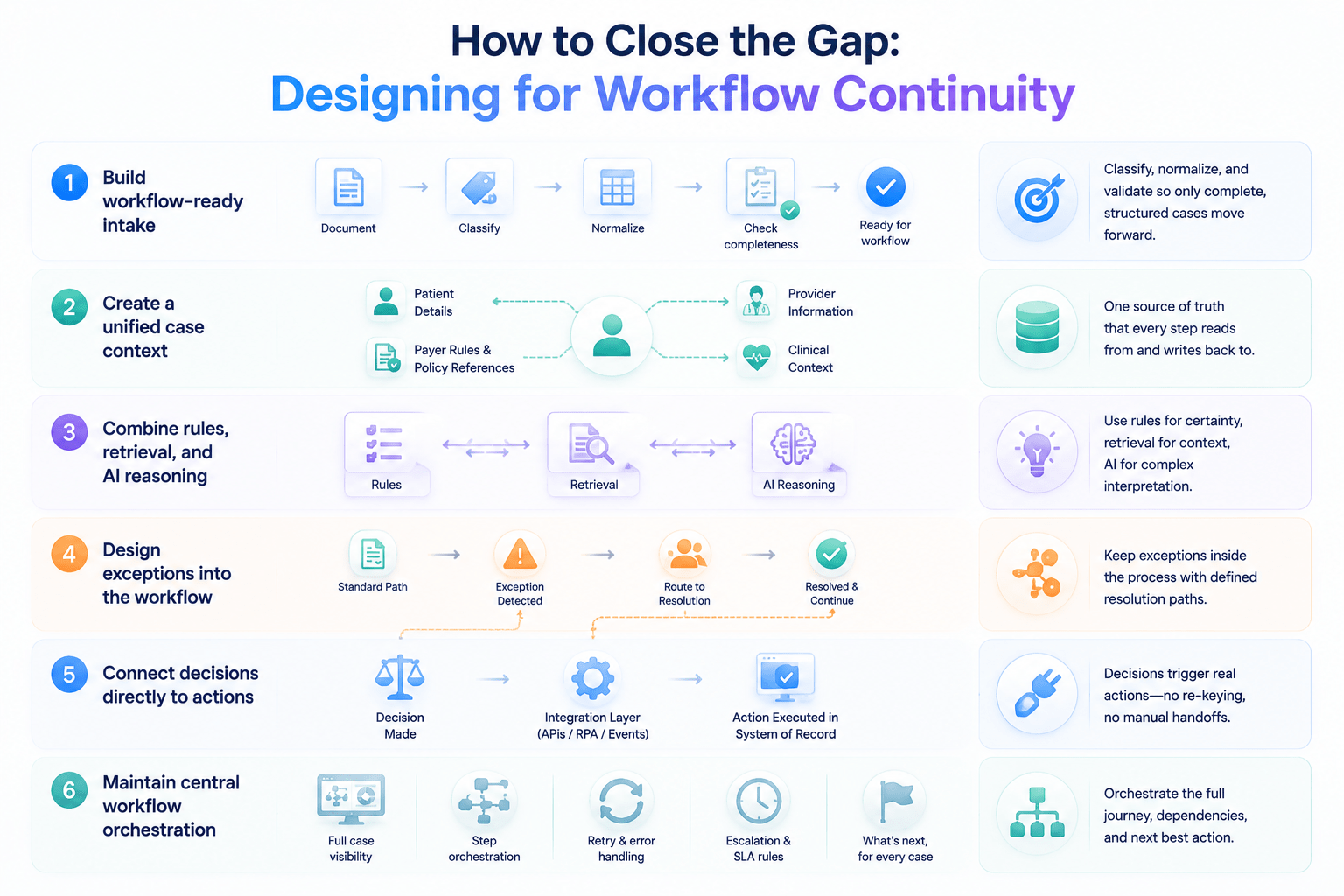
Build workflow-ready intake
Move beyond simple data extraction. A workflow-ready intake layer should also classify the type of request, normalize the data into a consistent internal format, and run a completeness check before the case is allowed to progress.
In practice, this means a document isn’t considered “processed” just because the text was extracted from it. It’s processed when the system knows what kind of request it is, has mapped every relevant field to a standard schema, and can clearly state which fields, if any, are still missing.
Create a unified case context
Every case should have one place where all relevant information lives: patient details, provider information, clinical context, payer rules, and policy references. This unified context becomes the single source of truth that every downstream step reads from and writes back to.
Without this, teams often end up rebuilding partial context at each step of the process, which is slow and prone to inconsistency. A unified case context also makes it far easier to bring AI into the workflow safely, because the model is reasoning over one coherent view of the case rather than piecing information together from multiple disconnected queries. SmartDev’s case study on improving the accuracy and speed of insurance document processing is a concrete example of what this looks like once intake and case context are handled properly.
Combine rules, retrieval, and AI reasoning
Deterministic rules should still carry as much of the decision-making weight as possible. They’re predictable, auditable, and fast. AI should be reserved for the parts of the process that genuinely require contextual interpretation, such as reading a clinical note to determine medical necessity, or reconciling ambiguous information across documents.
Retrieval sits between the two. It’s what allows a rule or a model to pull in the right policy document, the correct payer guideline, or a prior case that resembles the current one, before a decision is finalized. Getting this combination right, rather than defaulting everything to a single large model, is usually what separates a reliable production workflow from a promising prototype. SmartDev’s take on agentic AI in healthcare looks at where agent-based reasoning genuinely adds value in clinical and administrative workflows, and where it doesn’t.
Design exceptions into the workflow
An exception should be treated as a defined state inside the workflow, not an off-ramp into a disconnected manual process. That means every exception type needs its own resolution path: who gets notified, what information they need to see, and what happens automatically once the exception is resolved.
Designing for this upfront also makes it possible to measure exception patterns over time. If a particular type of exception keeps recurring, that’s a signal to fix the root cause upstream, rather than continuing to route the same problem to a human every time it happens.
Connect decisions directly to actions
A decision only creates value once it results in a real action inside a system: an authorization gets recorded, an appointment gets booked, an order gets submitted. APIs, workflow engines, event triggers, and RPA are the connective tissue that make this possible, especially when dealing with legacy systems that don’t expose modern integration points.
The goal here is to eliminate the “read the output, then type it somewhere else” pattern entirely. If a human still has to manually transcribe a decision into another system, the automation has stopped one step too early. SmartDev’s AI-powered invoice processing case study shows this principle applied to a billing workflow, where extracted data writes directly into downstream systems instead of landing in a queue for someone to re-key.
Maintain central workflow orchestration
Somewhere in the architecture, something needs to own the full picture: the current state of every case, the dependencies between steps, retry logic when a downstream call fails, escalation rules when a case sits too long, and the overall sequence the workflow should follow.
This orchestration layer doesn’t need to do the work itself. It needs to know what work has been done, what’s still pending, and what should happen next, regardless of which system or model actually performs each step. Without this central view, teams tend to rebuild coordination logic informally, often as tribal knowledge that lives in one person’s head rather than in the system itself.
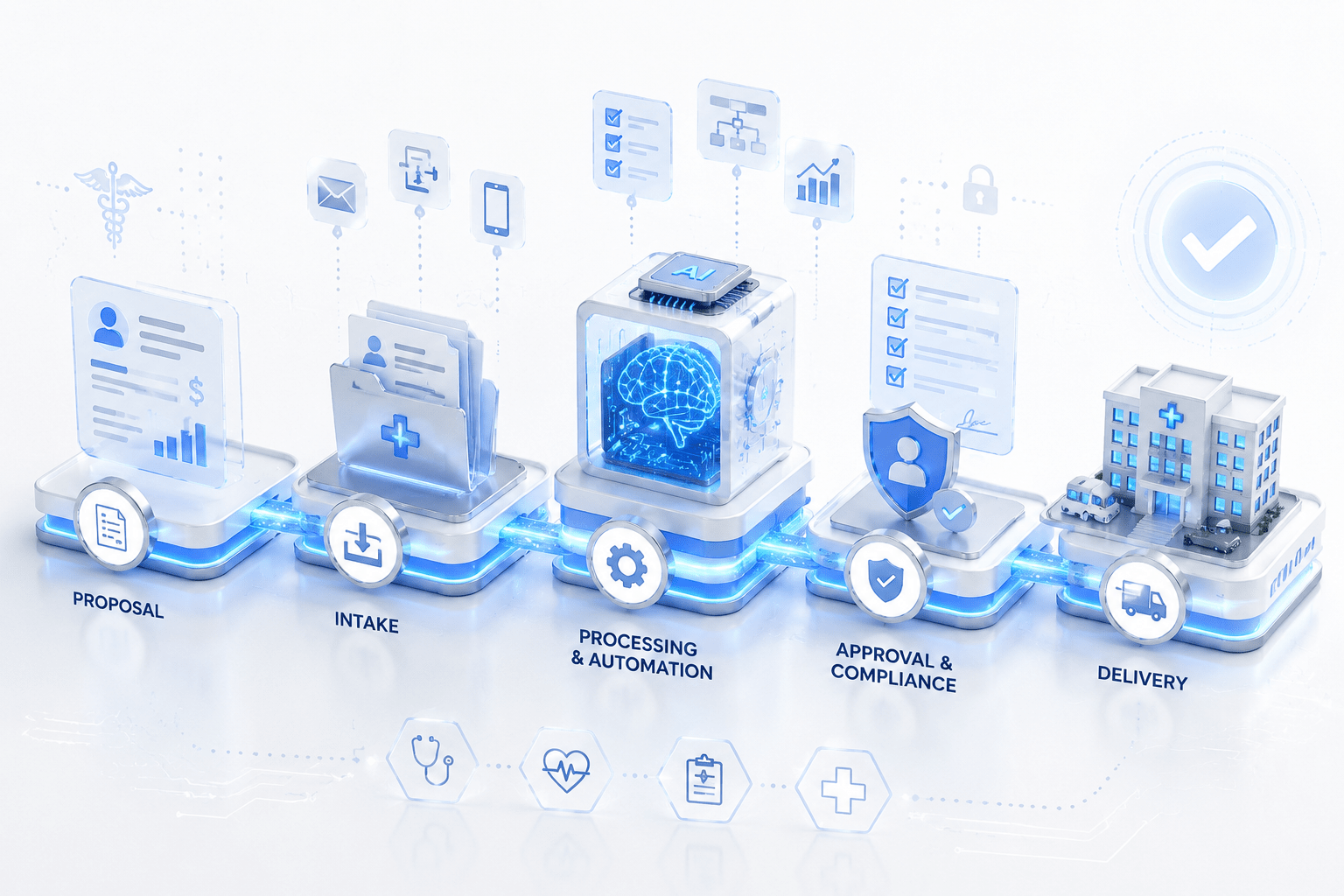
The Journey: From Proposal to Delivery
Here’s a representative healthcare workflow, walked through from the initial request to final delivery.
Proposal/request → Intake → Validation → Decision → Exception/Approval → Execution → Delivery → Write-back → Closure
Step 1: Proposal or request intake
The case starts the moment a request comes in, whether that means someone uploads a document through a portal, a front desk staff member fills out a form, someone attaches a file to an email, or another system sends an API call. The intake step isn’t just about receiving the file. It structures the information immediately, classifies the request type, and gives the case an identity in the workflow before anything else happens. If the team skips this step or handles it loosely, every following step inherits the ambiguity.
Step 2: Validation and context enrichment
Once the workflow creates a case structure, the system checks the information against existing data. Does the patient ID match an existing record? Is the provider still active in the network? At the same time, the workflow connects with external systems and retrieves the additional context required for decision-making, such as eligibility status, prior authorizations, or relevant history. The workflow should not move a case to the decision stage until the system gathers as much relevant context as reasonably possible.
Step 3: Decision and approval
With a validated and enriched case, the workflow applies the appropriate combination of rules, policies, and AI-assisted reasoning to determine the next action. The system may approve the request, deny it with a documented reason, or request additional information. The important part isn’t only reaching a decision. The workflow must also produce an explainable decision because someone will eventually ask why the system reached that conclusion.
Step 4: Exception resolution
Not every case will clear step 3 smoothly. Some cases will miss required documents, trigger policies that require human judgment, or appear unusual enough to need further review. The workflow routes these cases through a defined resolution path instead of allowing them to fall outside the system. Once the team resolves the issue, the workflow brings the case back to the point where it paused rather than forcing the team to restart the entire process.
Step 5: Execution and fulfillment
A decision only creates value when the workflow executes the required actions. This step triggers the downstream activities that the decision requires: issuing an authorization, booking an appointment, placing an order, or provisioning a service. The workflow performs these actions directly in the systems that manage those functions instead of creating a note for someone else to handle later.
Step 6: Delivery, write-back, and closure
The workflow does not complete a case simply because someone takes action. The team must confirm the outcome, update every relevant system with the final result, and formally close the case with a complete record. This record allows teams to trace the entire journey later, whether they need it for internal reviews, patient inquiries, or regulatory audits.
The Architecture Behind End-to-End Healthcare Automation
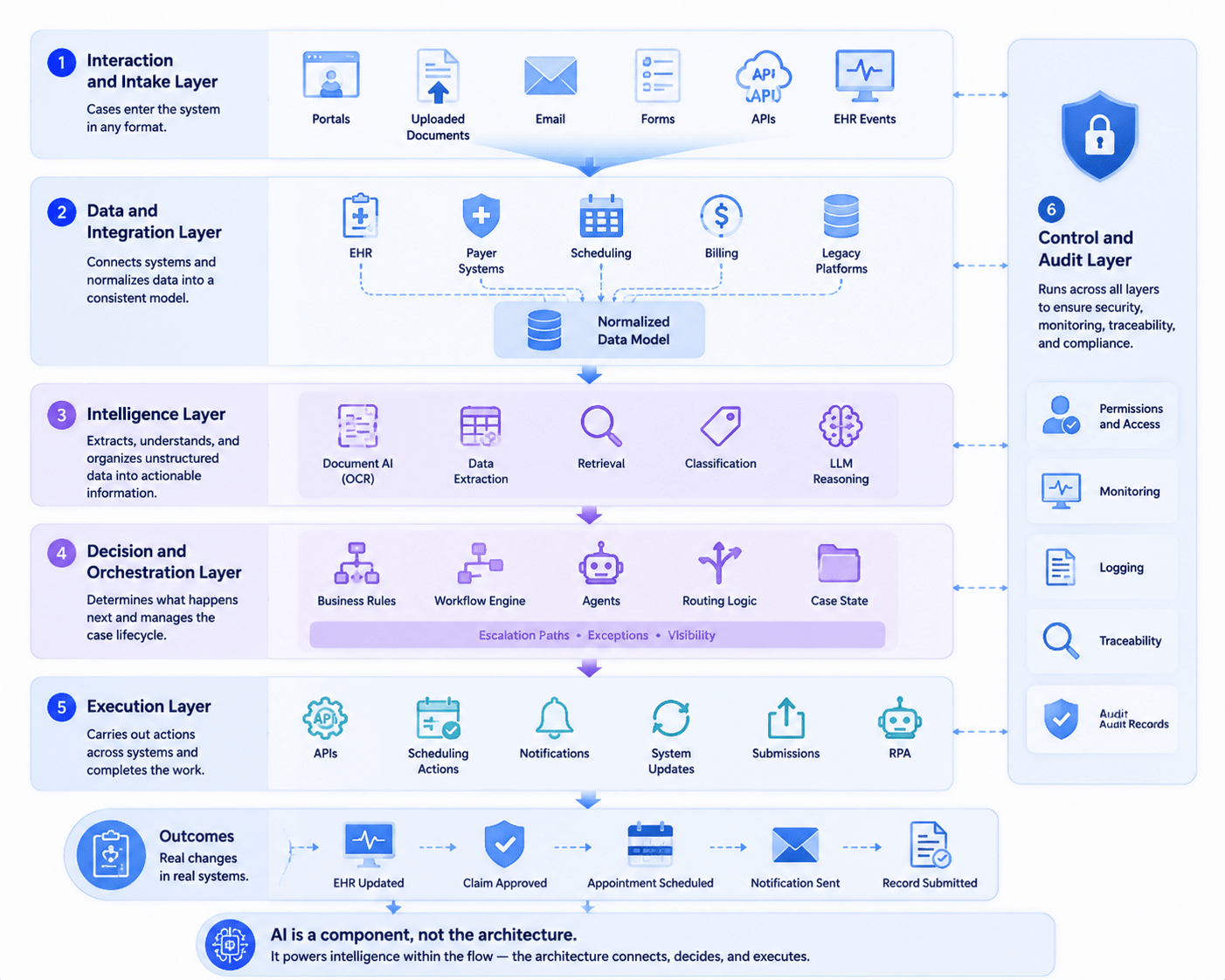
Every layer described here maps directly onto the workflow stages from Section 5. A case moves through these layers as it moves through the journey, and a weakness in any single layer becomes a weakness in the whole workflow, no matter how well the other layers are built.
Interaction and intake layer
This is where a case enters the system through portals, uploaded documents, email, forms, APIs, or events that an EHR sends. The design goal here is to let the request arrive in whatever format it naturally takes, rather than forcing the sender to adapt to the system. A referring physician shouldn’t need to learn a new portal just to submit a request, and a patient shouldn’t need to reformat a scanned document before the system accepts it. The intake layer absorbs that variability and hands off structured information to the next layer.
Data and integration layer
This layer connects EHRs, payer systems, scheduling platforms, billing systems, and legacy platforms while normalizing the data between them into a consistent internal model that the rest of the architecture can rely on. Teams often overlook this layer, but it creates some of the most expensive challenges when they design it incorrectly. Organizations typically combine direct API integrations for modern systems, middleware for platforms that do not expose clean APIs, and sometimes RPA for legacy systems that only support screen-based interfaces.
The normalization step matters as much as the connections themselves: two systems can both claim to have an integration while still storing different definitions for a provider’s specialty or a policy status. These inconsistencies quietly undermine everything that teams build on top of them.
Intelligence layer
This layer handles document AI, extraction, retrieval, classification, and LLM reasoning. It transforms unstructured inputs into structured, actionable information and supports context-dependent judgment calls. SmartDev’s AI & Machine Learning and Generative AI Development Services offerings sit primarily in this layer.
It’s worth noting that this layer does not make final decisions independently. Instead, it produces structured facts, extracted fields, classifications, and retrieved policy snippets that the decision layer combines with rules to determine an outcome.
Decision and orchestration layer
This layer manages business rules, workflow engines, agents, routing logic, case states, and escalation paths. It decides what happens next for each case and tracks the current status of every case throughout the workflow.
This layer also enforces the six characteristics from Section 2.3 in practice. It ensures that each step triggers the next, routes exceptions instead of losing them, and keeps case status visible rather than allowing information to become fragmented across systems.
Execution layer
This layer manages APIs, scheduling actions, notifications, system updates, submissions, and RPA. It turns decisions into actual changes inside operational systems instead of leaving them as recommendations on a screen.
The execution layer closes the gap described in Section 3.5: it creates the difference between a model that says “this claim should be approved” and a system where the payer platform actually marks the claim as approved.
Control and audit layer
This layer manages permissions, monitoring, logging, traceability, and audit records. It operates across all other layers instead of sitting at a single point in the workflow. It ensures teams can review every action, verify every access authorization, and explain every outcome after the fact.
In regulated environments like healthcare, teams cannot treat this layer as optional polish that they add at the end. They must design it alongside the other five layers from the beginning because adding audit trails later to a workflow that does not generate them creates far greater complexity than building them into the architecture from day one.
One point is worth repeating: AI is one component inside this architecture. It does not define the architecture itself, and organizations often cause automation projects to stall after the initial pilot when they treat AI as the entire solution.
End-to-End Does Not Mean 100% Automation
It’s tempting to treat “end-to-end” as a synonym for “fully autonomous,” but that’s not what the term means, and chasing full autonomy is usually where healthcare automation projects run into trouble. Humans still play a clear role in a well-designed end-to-end workflow. The difference between an end-to-end workflow and a fragmented one isn’t whether humans participate. It’s whether the system captures their involvement or whether their actions happen somewhere the system cannot see.
That role typically appears in three ways. The first is review: humans approve, reject, or validate system recommendations wherever they need to apply judgment, particularly for decisions with clinical or financial consequences, such as a high-value claim or a treatment authorization. The second is resolution: humans step in when exceptions arise, when cases become ambiguous, or when incomplete information requires additional investigation before the workflow can continue. The third is override: authorized users can change an automated decision whenever they have a valid reason, whether they provide new information that the system did not have or apply judgment to situations that the predefined rules cannot handle.
What connects these three roles, and what ultimately determines whether a workflow remains end-to-end, is how the system records human involvement. When a reviewer approves a case, resolves an exception, or overrides a decision, the workflow needs to capture and track that action and automatically trigger the next step, just as it would for any automated action. The process should not rely on someone remembering to update a spreadsheet or send a follow-up email to keep the case moving.
This is the key distinction worth remembering: a human touchpoint does not break end-to-end automation. A disconnected human handoff does. A workflow where a nurse reviews a flagged case inside the same system that logged the flag, generated the recommendation, and executes the next step after approval remains end-to-end. A workflow where the nurse completes the same review through email and someone manually enters the outcome into the system two days later does not, even if every other step runs automatically.
FAQ: End-to-End Automation in Healthcare
- Is end-to-end automation the same as full autonomy?
No. End-to-end refers to workflow continuity, not eliminating humans from the process.
- Can legacy healthcare systems support end-to-end automation?
Yes. Through APIs, middleware, orchestration layers, and RPA, wherever direct integration isn’t possible.
- Where does AI fit in the workflow?
Mainly in understanding data, retrieval, classification, and contextual reasoning, layered on top of deterministic rules rather than replacing them.
- What happens when an exception occurs?
The workflow should route it through a predefined resolution path, then resume automatically once it’s handled.
- Does end-to-end automation require replacing existing systems?
Usually not. Orchestration can sit on top of the systems that are already in place.
- How do you know a workflow is truly end-to-end?
Look at indicators like these: Straight-through processing rate; Manual handoffs per case; Exception recovery rate; End-to-end cycle time
Conclusion: From Automated Tasks to Continuous Workflows
Healthcare’s main challenge isn’t a lack of automation tools. As the numbers in this article show, the fragmentation between the tools already in place creates the real challenge, and that fragmentation creates a measurable cost every year.
End-to-end automation connects data, decisions, people, and system actions into one continuous process, rather than leaving them separated across a chain of isolated improvements that never quite deliver a smoother patient or provider experience. Individual task automation does not create the real value. Maintaining continuity across the entire journey creates that value, from the initial request through to final delivery.
If your organization faces fragmented workflows, disconnected systems, or automation pilots that never quite scale into production, end-to-end design solves exactly this type of challenge. SmartDev builds this kind of connected, AI-powered automation for healthcare organizations through its dedicated Healthcare & Medical Services practice. Our AI Consulting Services team helps organizations identify and map the highest-value workflow gaps before any build begins. Get in touch with our team to discuss what an end-to-end workflow could look like for your organization.