

TL;DR
- A no-code AI platform combines visual building, pre-built AI models, data connections, and deployment in one system — different from a plain app builder (no built-in AI) or a standalone AI tool (not built for workflows).
- Platform choice should follow the business process, not the other way around: define the use case, the data it needs, and the required level of control before comparing vendors.
- No-code AI platforms split into five categories by job-to-be-done, and a platform’s label doesn’t guarantee its actual capabilities.
- No-code, low-code, and full-code are complementary tiers, not competitors, chosen by customization needs, integration depth, regulatory exposure, and team capability.
- The strongest first use cases are bounded and repeatable, with accessible data, a measurable success metric, and a clear escalation path.
- Governance – data permissions, human accountability, testing, monitoring, and escalation – needs to be planned before launch, not added after a workflow goes live.
- Moving from no-code to low-code or custom development isn’t a failure signal – it’s the expected next step once a use case outgrows what the platform was built to provide.
Introduction
What Is a No-Code AI Platform?
According to Gartner’s research note, “Quick Answer: What Is the Difference Between No-Code and Low-Code Development Tools?” “no-code” is fundamentally a marketing term – there is always code running somewhere, it’s just hidden from the user, and even some visual tools still require understanding programming-like concepts.
Applied to AI, a no-code AI platform lets non-technical users assemble AI-powered apps, workflows, and agents through a visual interface – pre-built models, data connections, and deployment controls in one system – without writing code themselves.
What makes it different from a no-code app builder or a standalone AI tool
“No-code” and “AI” both get used loosely. Not every no-code tool includes AI. Not every AI tool is no-code, or built for workflows. The table below separates the three.
| Term | What it is | Example |
|---|---|---|
| No-code AI platform | A visual system that combines workflow building, pre-built AI models, data connections, and deployment in one place | Build an app or automation that scores a lead, drafts a reply, or extracts data from a form – no code required |
| No-code app builder | A visual tool for building software interfaces and logic, usually without built-in AI | Build a form, database, or internal tool; AI has to be added separately, if at all |
| Standalone AI tool | A single-purpose product built around one generative AI capability | A chat interface that generates text or images, not designed to plug into a broader workflow |
A no-code AI platform sits at the intersection of the first two rows. It has the visual, drag-and-drop foundation of an app builder. It adds AI as a native capability, not a bolt-on integration.
What no-code AI enables for non-technical teams
No-code AI removes two traditional barriers to building with AI: coding skill and access to a data science team. The person who understands a business problem best is rarely the person who can write a model training script. No-code AI closes that gap.
With a no-code platform, a non-technical team can:
- Prototype an AI-powered app or internal tool without waiting on engineering – a first step that overlaps with what an AI Proof of Concept is meant to validate
- Automate a multi-step process that used to require manual handoffs
- Test an idea in days, not sprint cycles, and drop it quickly if it doesn’t work
- Hand a validated solution to IT for hardening, instead of starting from a blank request
Technical teams don’t disappear from this picture. Their role shifts. Instead of building every request from scratch, they review, secure, and scale what business teams have already tested. For systems that need deeper engineering support, AI software development services typically pick up where the no-code prototype leaves off.
Common capabilities: AI apps, workflows, assistants, and predictive models
No-code AI platforms now produce four broad categories of output. The right platform depends on which one a team actually needs.
| Capability | What it is | Typical use case |
|---|---|---|
| AI apps | A standalone application with an AI feature built in | A form that auto-fills, or a tool that scores incoming input |
| Workflows and automations | Multi-step processes that move data or trigger actions across connected apps | Lead routing, invoice approval, onboarding sequences |
| AI assistants and agents | Conversational or autonomous agents that take actions, not just answer questions | A support agent that verifies an order, updates a record, and confirms a resolution |
| Predictive models | Models trained on historical data to forecast an outcome or classify new input | Churn scoring, demand forecasting, lead qualification |
The third row has changed the most in recent years. A chatbot that answers a question is not the same as an agent that completes a task. An agent can look something up, take an action, and close the loop — without a person driving each step. That distinction, responding versus acting, is now one of the main ways platforms differentiate themselves. It also raises the integration bar: an agent that takes real actions needs reliable connections into the systems it acts on, which is where AI integration services become relevant even for a “no-code” build.
No-code AI vs. traditional AI development
Traditional AI development needs people who can code, usually in Python, with a working knowledge of machine learning and data science. That combination is expensive to hire and slow to staff. It has kept AI development inside specialized teams for years.
No-code AI platforms remove that requirement. They replace custom code with visual, pre-configured building blocks. The tradeoff is flexibility: a no-code platform gets a team to a working solution faster, but it won’t match a custom-built system on a genuinely novel or highly specialized problem.
| No-code | Low-code | Full-code | |
|---|---|---|---|
| Who builds it | Business users, ops, marketing | Developers with some coding | Experienced software or ML engineers |
| How it’s built | Visual builder, no scripting | Visual builder plus custom code for specific logic | Custom code, written from scratch |
| Speed to first version | Fastest | Moderate | Slowest |
| Customization ceiling | Limited to what the platform supports | Higher — extend beyond built-in components | Unlimited, bounded only by engineering effort |
| Best fit | Rapid prototyping, standard workflows | Growing complexity that still needs speed | Novel, large-scale, or regulated systems |
Most organizations end up using more than one tier. No-code covers fast internal tools and prototypes. Low-code fills in where a workflow needs custom logic a template doesn’t cover. Full-code takes over where performance, scale, or compliance requirements leave no room for a platform’s built-in limits.
How No-Code AI Platforms Work
A no-code AI platform hides the usual complexity of data preparation, model logic, and deployment behind an interface a non-technical user can operate. The underlying steps don’t disappear. The platform automates or templates most of them.
The core building blocks of a no-code AI solution
Nearly every no-code AI platform is built from the same three layers, regardless of what it produces – a simplified version of the same layers covered in a full AI tech stack.
Visual interfaces and workflow builders. This is the layer users interact with directly. It’s typically a canvas where components get dragged, dropped, and connected to define what happens and in what order. Many modern builders also accept a plain-language description of a workflow and generate a draft, which the user then adjusts visually. Real-time feedback lets a non-technical user see what a workflow does before it goes live.
Pre-built models, templates, and AI services. Rather than training a model from zero, most platforms ship a library of ready-to-use AI capabilities: sentiment analysis, document classification, summarization, image recognition. Templates cover common workflows in sales, support, and operations. Increasingly, this layer also gives direct access to foundation models and LLMs, so a workflow step can call a language model without the user needing to know which model is running underneath.
Data sources, connectors, APIs, and integrations. An AI workflow is only as useful as the data it can reach and the systems it can act on. This layer covers how the platform pulls data in – databases, spreadsheets, CRMs, forms – and pushes actions out, like updating a record or sending a notification. Pre-built connectors to common business software are usually what separates a platform that stays a prototype from one that reaches production. Where a connector doesn’t exist, dedicated API integration services close that gap.
How model training, testing, and deployment work without code
A no-code AI platform still runs the same underlying pipeline a data science team would build manually. The user manages the decisions; the platform manages the mechanics. The lifecycle moves through seven stages:
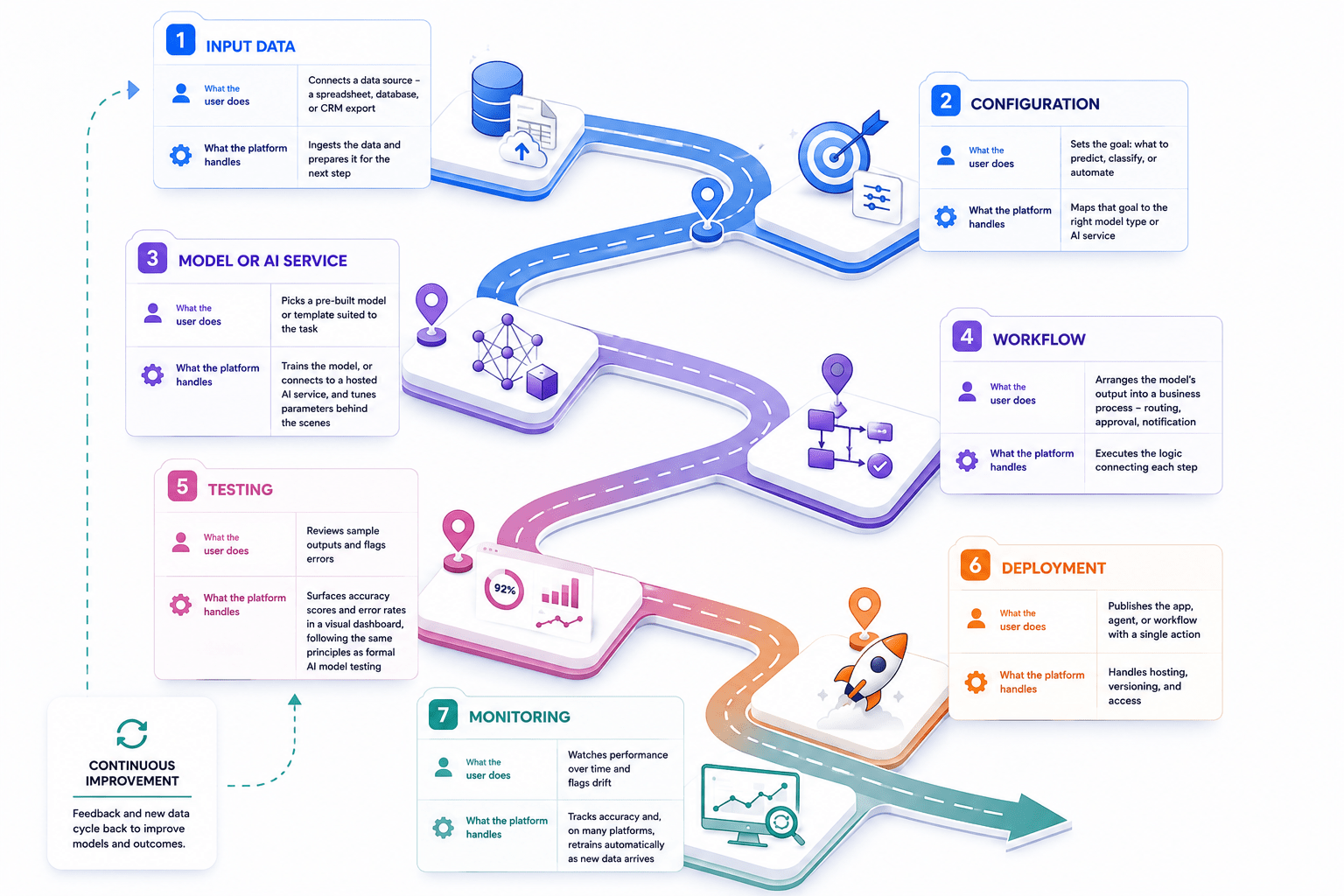
| Stage | What the user does | What the platform handles |
|---|---|---|
| 1. Input data | Connects a data source – a spreadsheet, database, or CRM export | Ingests the data and prepares it for the next step |
| 2.Configuration | Sets the goal: what to predict, classify, or automate | Maps that goal to the right model type or AI service |
| 3. Model or AI service | Picks a pre-built model or template suited to the task | Trains the model, or connects to a hosted AI service, and tunes parameters behind the scenes |
| 4. Workflow | Arranges the model’s output into a business process – routing, approval, notification | Executes the logic connecting each step |
| 5. Testing | Reviews sample outputs and flags errors | Surfaces accuracy scores and error rates in a visual dashboard, following the same principles as formal AI model testing |
| 6. Deployment | Publishes the app, agent, or workflow with a single action | Handles hosting, versioning, and access |
| 7. Monitoring | Watches performance over time and flags drift | Tracks accuracy and, on many platforms, retrains automatically as new data arrives |
Where data quality or volume outgrows what the platform’s built-in tools can handle, that’s usually a sign the input stage needs dedicated data engineering support, rather than something the no-code layer alone can fix.
Where human review and business rules fit into the workflow
No-code AI platforms are good at pattern recognition and repetitive execution. They aren’t decision-makers on their own. Two mechanisms usually sit alongside the AI itself, and both are part of using no-code AI responsibly, not an afterthought.
Business rules define what the AI’s output means for the process. Does a lead score clear the threshold for sales? Does an extracted invoice amount fall within approval limits? Does a flagged case need escalation? In a no-code builder, these usually take the form of conditional branches: if the output meets a condition, the workflow continues automatically; if not, it gets rerouted.
Human review is where that rerouting lands. Most production-grade no-code AI workflows include a review step for low-confidence outputs. High-stakes actions – a payment, a customer commitment, a compliance decision – usually get the same treatment. This isn’t a limitation to design around. It’s part of the same responsible-AI discipline covered in our guide to AI bias and fairness – it’s what makes a no-code AI workflow trustworthy enough to run in production, not just in a demo.
Business rules and human review are what turn a no-code AI component into part of a working process. They decide not just what the AI outputs, but what happens next because of it.
No-Code vs. Low-Code vs. Full-Code AI
No-code, low-code, and full-code are three levels of control over how an AI solution gets built. No-code favors speed and accessibility. Low-code adds extensibility for teams that need custom logic. Full-code offers maximum control for bespoke, high-stakes requirements.
A practical comparison of control, speed, cost, and technical requirements
| Dimension | No-code | Low-code | Full-code |
|---|---|---|---|
| Who builds it | Business users, ops, marketing | Developers, often with business input | Experienced software or ML engineers |
| Technical skill required | None | Basic to moderate coding knowledge | Full software and ML engineering expertise |
| Typical speed to a first version | Often the fastest, for standard workflows | Usually slower to start, faster to extend | Often the slowest to start |
| Upfront cost | Typically lowest – subscription-based | Moderate – some developer time | Typically highest – dedicated engineering |
| Customization ceiling | Bounded by what the platform supports | Extendable with custom code | Bounded only by engineering time and budget |
| Governance and control | Limited – governed by the vendor’s platform | Shared – team extends within vendor guardrails | Full – the team defines its own governance |
| Technical debt risk | Low individually, but can accumulate across many disconnected workflows | Moderate – depends on how custom code is maintained | Depends entirely on engineering discipline |
| Best fit | Standard, well-defined processes | Processes with some non-standard logic | Novel, large-scale, or tightly regulated systems |
These patterns hold in most cases, not all of them. A no-code platform can be slower than a competent developer working from a mature internal library. A full-code build isn’t automatically the safer choice for every enterprise. A poorly governed custom system can carry more risk than a well-configured no-code one.
A decision matrix: which factors point where
Five factors do most of the work in deciding which tier fits a given project. Each one pulls toward a different point on the spectrum.
| Factor | Points toward no-code | Points toward low-code | Points toward full-code |
|---|---|---|---|
| Required customization | Low – a template covers the need | Moderate – some custom logic needed | High – the logic itself is the differentiator |
| Integration depth | Shallow – standard connectors are enough | Moderate – some custom API work | Deep – proprietary or legacy system integration |
| Regulatory exposure | Low – standard, well-understood process | Moderate – some compliance nuance | High – strict governance and audit requirements |
| Performance needs | Standard volume and latency | Growing volume, still within platform limits | High throughput, low latency, or heavy scale |
| Team capability | No dedicated developers available | Some in-house development capacity | Full engineering team available |
A project can score toward no-code on most factors and still hit one hard “full-code” requirement. In that case, it usually needs a hybrid approach rather than a single tier applied everywhere.
When no-code is the right choice
No-code tends to fit when most of the five factors above land on the left-hand column at once. In practice, that usually looks like:
- A workflow that follows a common, well-understood pattern – lead routing, document intake, ticket triage
- A team that wants to validate an idea before committing engineering budget to it
- No dedicated development resources available, or none that should be tied up on this
- A process that doesn’t need deep, custom integration with a proprietary or legacy system
- Regulatory and governance requirements that a standard platform’s controls already satisfy
When low-code or custom development is the better fit
Low-code becomes the better fit once a workflow needs logic a template doesn’t cover. A full custom build usually isn’t justified yet at that point. It’s the middle ground for teams that need more flexibility than no-code offers, without the timeline of building everything from scratch.
Full-code development tends to be worth the investment when several of these apply at once:
- The AI itself is the product’s core differentiator, not a supporting feature
- Regulatory, security, or governance requirements exceed what a vendor platform’s built-in controls cover
- The system needs to operate at a scale or speed a no-code platform’s architecture wasn’t built for
- The use case is genuinely novel, with no existing template or pre-built model close enough to adapt
- The system needs to integrate tightly with proprietary infrastructure that off-the-shelf connectors don’t reach
Most organizations end up using a mix of tiers, not one exclusively. No-code covers fast internal tools and standard workflows. Low-code fills in where custom logic is needed but speed still matters. Custom software development takes over where governance, scale, or a genuinely novel requirement rule out a platform’s built-in limits.
A dedicated development team or AI consulting engagement can help map a specific project against the five factors above. Doing that early avoids rebuilding a workflow later, once its true requirements become clear.
Why Businesses Use No-Code AI
No-code AI offers four potential sources of business value: faster experimentation, broader participation, automation that reduces delivery friction, and lower operational overhead. Whether an organization actually realizes any of them depends on process design, data quality, and governance. The platform alone doesn’t determine the outcome.
Benefit-to-condition overview
| Potential benefit | Materializes when… | Realistic outcome category |
|---|---|---|
| Faster experimentation | The process is well-understood enough to prototype without heavy custom logic | Shorter time-to-first-version, not necessarily shorter time-to-scale |
| Broader participation (citizen development) | Business teams have the context and the platform has adequate guardrails | More initiatives get attempted; not all of them reach production |
| Workflow automation and efficiency | The underlying process is well-defined and the data feeding it is clean | Reduced manual handoffs on the specific workflow automated, not automatic productivity gains organization-wide |
| Lower delivery friction | IT and business teams have agreed on where no-code ends and engineering begins | Fewer stalled requests waiting on a development queue |
Faster experimentation and time to value
No-code AI shortens the distance between an idea and a testable version of it. A team can often go from concept to prototype in days rather than a full development sprint. That’s typically true when the workflow doesn’t require custom logic the platform can’t express out of the box.
That speed changes how organizations experiment. A team can test an idea cheaply instead of committing weeks of development time to it. It can drop the idea fast if it doesn’t work.
The time saved narrows as a workflow grows, though. Savings show up earliest at the prototype stage. They shrink once a workflow needs the governance, integration, or performance work covered in the decision matrix above.
Broader participation from business teams and subject-matter experts
The person who understands a business problem best is rarely the one who can code a solution for it. No-code AI narrows that gap. The person with the context can build a first version directly, instead of writing a requirements document for someone else to interpret.
This pattern is often called citizen development. Non-developers build working software themselves, inside guardrails a platform or IT team sets.
That participation is only as valuable as the guardrails around it. A support lead who builds a workflow still needs a way to hand it off for review before it touches customer data or a compliance-sensitive process. Broader participation expands who can build. It doesn’t remove the need for oversight on what gets shipped.
Cost, operational efficiency, and workflow automation
No-code AI can lower cost on two fronts. It reduces the need to hire specialized AI developers for every request. Most platforms also run on subscription pricing rather than large upfront investment.
Whether that translates into overall savings depends on two things: how many workflows reach production, and how much maintenance they need over time. A platform subscription plus ongoing rework isn’t automatically cheaper than a one-time build.
The efficiency gains are most reliable when they replace a manual handoff with a defined, repeatable rule – routing a lead, flagging a document for review, updating a status. The underlying process needs to be consistent enough for a rule to apply cleanly.
The gains are least reliable when the underlying process is inconsistent to begin with. Automating an inconsistent process usually just moves the inconsistency downstream. Our guide on business process automation covers what that shift looks like in practice.
Scalability considerations and realistic expectations
Most no-code platforms let a team start with a simple workflow and add features incrementally. That approach avoids a full rebuild every time a requirement grows. For a large share of business processes, that’s enough headroom to never need anything more.
That headroom isn’t unlimited. A platform’s scalability is bounded by what its vendor built it to handle. Data volume, request throughput, and integration depth all hit a ceiling eventually.
Moving to a new platform later is rarely simple. It gets harder once a workflow is embedded in daily operations. Migrating out is rarely a straightforward export-and-import job.
The realistic expectation is narrower than “no-code scales with your business.” It scales within the range most standard workflows actually need. It’s worth knowing where that range ends before building a critical process entirely on top of it.
Working through that ceiling is usually a question for a broader AI strategy conversation. It isn’t a sign that the no-code phase itself was a mistake. It’s often part of a wider digital transformation effort, not a single platform decision.
Types of No-Code AI Platforms
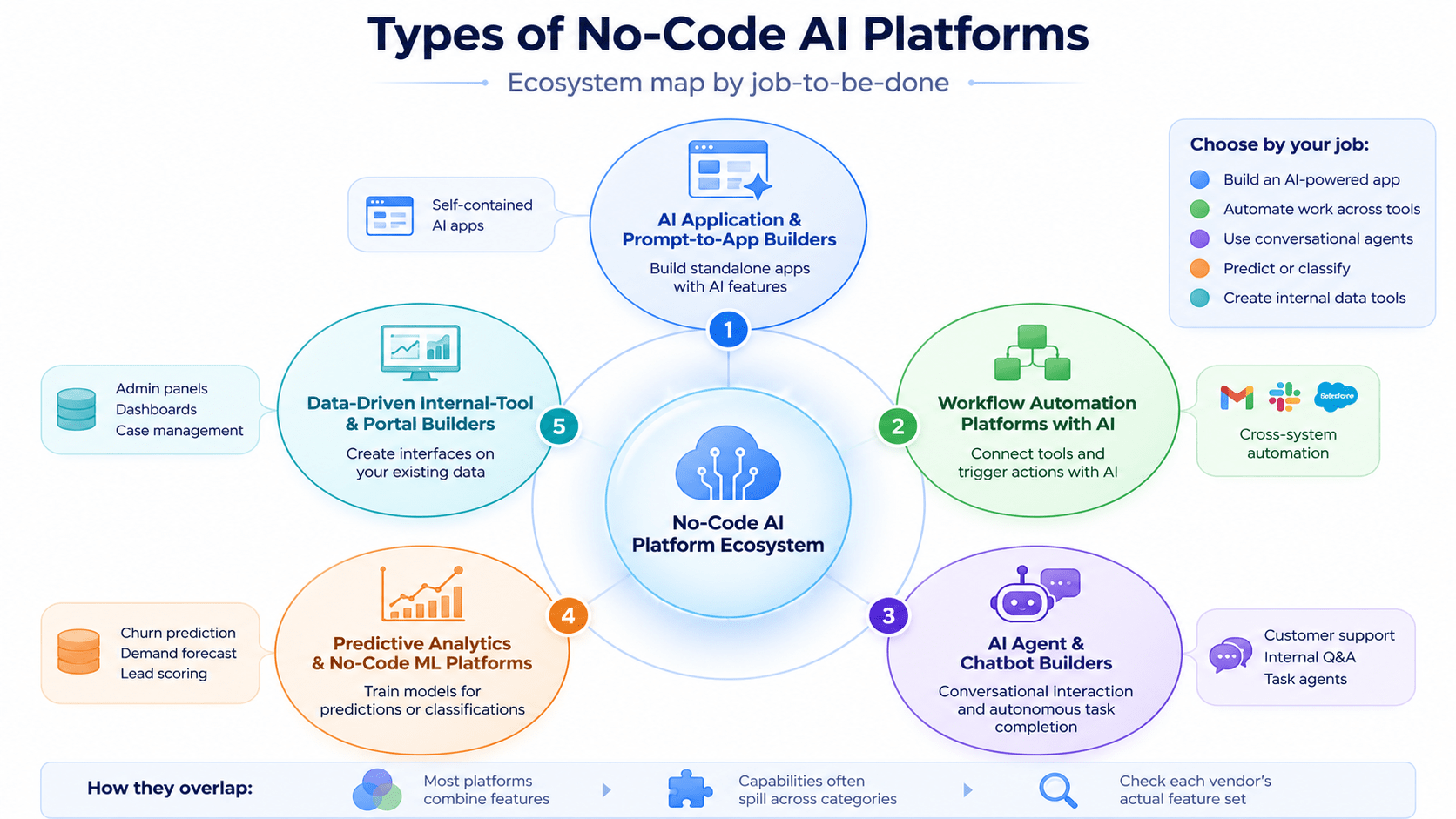
No-code AI platforms aren’t one category. They split by the job they’re built to do. Grouping them by job-to-be-done, rather than by brand or popularity, makes it easier to shortlist the right tool before comparing specific vendors.
Five categories cover most of what’s on the market today: AI app builders, workflow automation platforms, agent and chatbot builders, predictive analytics and no-code ML tools, and data-driven internal-tool builders.
AI application and prompt-to-app builders
An AI app builder lets someone assemble a standalone application with an AI feature built into it – a form that scores its own input, a tool that classifies a submission automatically. Many now accept a plain-language prompt as the starting point, generating a first draft of the app that the user then refines visually.
This category fits best when the deliverable is a self-contained app, not a process that spans multiple systems. Platforms in this space typically emphasize UI design and app logic first, with AI as one component among several.
Workflow automation platforms with AI capabilities
A workflow automation platform connects steps across different tools and triggers actions between them. The AI capability sits on top of that automation layer – summarizing an input, classifying a record, or drafting a response as one step in a longer sequence.
This category fits best when the core problem is coordination: moving data or triggering an action across systems that don’t otherwise talk to each other. The AI is usually a step in the workflow, not the workflow’s central purpose.
AI agent and chatbot builders
An agent or chatbot builder is built around conversation and autonomous action, rather than a fixed sequence of steps. The distinction that matters here is the same one covered earlier in this guide: a chatbot that answers questions is not the same as an agent that completes a task end to end, verifying, updating, and confirming without a person driving each step. Our breakdown of AI models versus AI agents covers that distinction in more depth.
This category fits best for customer-facing support, internal Q&A, or any process where the interface itself needs to be conversational. Reliability and guardrails matter more here than in most other categories, since an agent that acts autonomously can also act incorrectly, at speed.
Predictive analytics and no-code machine-learning platforms
A no-code ML platform is built to train a model on historical data and generate a prediction or classification – a churn score, a demand forecast, a lead-quality rating. Unlike the other categories, the output usually isn’t an app or an action; it’s a number or a label that feeds into a decision made elsewhere.
This category fits best when the core need is forecasting or classification, and when a business already has the historical data required to train on. It fits poorly when the underlying data is sparse, inconsistent, or not yet collected in a usable form.
Data-driven internal-tool and portal builders
An internal-tool builder connects to an existing data source – a spreadsheet, a database – and generates an interface for viewing, editing, or acting on that data. The AI features here typically enhance the interface itself: auto-generated views, natural-language search over the underlying data, or smart defaults based on past entries.
This category fits best for internal operations tools: admin panels, inventory dashboards, case-management portals. It’s usually the fastest path to a usable internal tool when the underlying data already exists in a structured source.
How these platform categories overlap
These five categories describe a platform’s primary job, not a hard boundary. Most vendors build features that spill into more than one category at once. A workflow automation platform might add a chatbot interface. An app builder might add predictive scoring as a plugin.
That overlap means a platform’s marketing label doesn’t tell you what it can actually do. Two products both calling themselves “AI workflow platforms” can differ sharply in how deep their agent capabilities go, or whether they support real model training versus calling a third-party API. The category is a starting point for a shortlist, not a substitute for checking a specific platform’s actual feature set against the job at hand – feature sets change quickly enough that anything checked here should be reverified against current vendor documentation before a decision gets made.
How to Choose a No-Code AI Platform
Choosing a no-code AI platform works better as a repeatable evaluation than a one-off gut call. The same four checkpoints apply regardless of which category from Section 5 a team is evaluating: the business problem, the technical requirements, the governance requirements, and the operational requirements.
Start with the business problem and user workflow
The starting point isn’t the platform. It’s the process the platform needs to support. A clear description of the current workflow – who does what, in what order, and where it currently breaks down – does more to narrow the shortlist than any feature comparison.
That description also defines what “success” means before evaluating any vendor. Without it, a platform demo tends to set the bar instead of the business need, which is how teams end up buying more platform than they need, or one that’s missing the one capability that mattered most.
Evaluate data, integrations, customization, and ownership requirements
Every platform choice depends on where the data lives and what needs to connect to it. A short technical audit before evaluating vendors should answer a few questions: What data does the workflow need, and where does it currently sit? Which existing systems does the output need to reach? How much customization does the process require, beyond what a standard template offers?
No-Code AI Platform Comparison Framework
Comparing no-code AI platforms by popularity alone tends to produce a plausible-sounding but unreliable shortlist. A widely used platform for one job-to-be-done can be a poor fit for a different one. This framework compares platforms by use-case fit instead, using the same five criteria across every option.
Compare platforms by use case rather than popularity alone
A platform’s popularity reflects how many teams adopted it, not whether it fits a specific process. The two questions are related, but they aren’t the same question. A workflow automation platform can dominate its category and still be the wrong choice for a team that actually needs a predictive model, not an integration layer.
Use-case fit should narrow the shortlist first. Popularity, reviews, and community size are reasonable tie-breakers after that – not the starting filter.
Comparison criteria: capabilities, integrations, flexibility, governance, and cost model
Five criteria hold up across every platform category, regardless of what the platform is built to do:
| Criterion | What it covers |
|---|---|
| Capabilities | What the platform can actually build or automate – the specific job-to-be-done from Section 5 |
| Integrations | Which systems it connects to natively, and what requires custom API work |
| Flexibility | How far a workflow can be customized before hitting the platform’s ceiling |
| Governance | Access controls, audit trails, and how much oversight the platform supports over what gets built and shipped |
| Cost model | How pricing scales – per user, per workflow, per API call – and what happens to cost as usage grows |
These criteria aren’t arbitrary – they track closely with what Gartner itself uses to separate enterprise-ready platforms from the rest. Gartner’s “Magic Quadrant for Enterprise Low-Code Application Platforms” (2025/2026 evaluation cycle) repeatedly highlights role-based access control, audit logs, and environment isolation as decisive factors for enterprise buyers, alongside integration depth and total cost over a multi-year horizon rather than list price alone.
These criteria matter in combination, not in isolation. A platform can score well on capabilities and poorly on governance, which makes it a fine prototyping tool and a risky production one.
Platform categories and best-fit scenarios
The table below maps five common use cases to the platform category most likely to fit, and the criterion that tends to matter most for each. It’s a starting filter, not a final answer — the categories from Section 5 describe tendencies, and specific platforms vary within each one.
| Use case | Category most likely to fit | Criterion that matters most |
|---|---|---|
| Building customer-facing AI applications | AI app/ prompt-to-app builders | Flexibility – customer-facing apps usually need visual and functional customization beyond a default template |
| Automating internal business workflows | Workflow automation platforms | Integrations – the value comes from connecting existing systems reliably |
| Creating AI assistants and conversational experiences | Agent and chatbot builders | Governance – autonomous action raises the stakes of getting oversight right |
| Analyzing data and making predictions | Predictive analytics/ no-code ML platforms | Capabilities – the model quality and supported prediction types drive the outcome |
| Building lightweight tools from existing business data | Data-driven internal-tool builders | Cost model – these tools tend to multiply quickly, so per-seat or per-app pricing adds up fast |
Building customer-facing AI applications
This use case puts the most weight on flexibility, since a customer-facing app usually needs to match a specific brand experience and handle edge cases a generic template won’t anticipate. Integration needs are typically narrower than for internal workflow tools – the app mainly needs to connect to a backend, not to a dozen internal systems.
Automating internal business workflows
This use case puts the most weight on integrations. The workflow’s entire value depends on how reliably it connects the systems already in use – a CRM, a ticketing tool, an ERP – not on how visually polished the builder is.
Creating AI assistants and conversational experiences
This use case puts the most weight on governance, because an assistant that can take action autonomously can also take the wrong action, at speed, before anyone notices. That risk isn’t hypothetical: according to McKinsey research cited in a 2026 analysis, “Beyond ISO 27001: Governing Autonomous AI Agents,” 80% of organizations report having already encountered risky agent behavior, including improper data exposure or unauthorized system access. Confidence thresholds, escalation paths, and audit logging matter more here than in most other categories.
Analyzing data and making predictions
This use case puts the most weight on capabilities – specifically, which prediction types the platform actually supports, and how it handles the data quality issues covered earlier in this guide. A platform with weak governance is a manageable risk here; one that can’t handle the required prediction type isn’t.
Building lightweight tools from existing business data
This use case puts the most weight on cost model. These tools are cheap and fast to build individually, which is exactly what leads teams to build many of them – and per-seat or per-app pricing that looked negligible at one tool can add up fast at ten.
How to validate current platform features before purchase
Every claim in a vendor’s marketing material needs to be checked against something more current and more specific before it factors into a decision. Feature sets, integrations, and pricing structures change often enough that a comparison written months ago may already be out of date by the time it’s read.
A short validation checklist before signing anything:
- Confirm current capabilities directly in the product, not from a features page – request a trial or a live demo against the actual workflow being evaluated, not a generic one
- Verify integrations against the specific systems involved, not a general “integrates with X” claim – confirm what data actually flows, in which direction, and how
- Read the current terms of service and data handling policy, not a summary of them – pricing tiers, data ownership, and export rights are usually defined there in more detail than on the marketing site
- Check security and compliance documentation directly with the vendor, especially for any workflow touching regulated or sensitive data, and confirm it with an internal or external compliance reviewer rather than taking a vendor’s badge or claim at face value
- Re-confirm pricing at the volume the workflow will actually run at, not the entry-level tier shown on the pricing page – many platforms price attractively at low volume and very differently at production scale
None of this replaces the frameworks earlier in this guide — the decision matrix from Section 3, the taxonomy from Section 5, and the scorecard from Section 6 all still apply. This validation step is what confirms that a platform which looks right on paper still looks right once its actual, current feature set gets checked. An AI product development engagement can run this validation as part of a structured build process, and where a workflow needs custom API integration or dedicated cloud services beyond what a no-code platform natively supports, that gap is usually clearer after this step than before it.
High-Value No-Code AI Use Cases
No-code AI use cases cluster around five operating outcomes: better support, more efficient marketing and sales, less manual back-office work, better forecasting, and industry-specific applications. The strongest early candidates share a few traits regardless of category. The process is bounded and repeatable. The data already exists somewhere accessible. The outcome is measurable. Getting it wrong occasionally has manageable consequences, not severe ones.
Customer service, knowledge assistants, and employee support
This category covers tools that answer questions, route requests, or help someone find information faster than searching for it manually. It spans both customer-facing support and internal employee support – an internal knowledge assistant follows largely the same pattern as a customer chatbot, just pointed at internal documentation instead of a product catalog.
A common starting pattern looks like this: a small business fields the same handful of customer inquiries on repeat, and a no-code conversational AI assistant handles those directly – freeing staff to focus on the more complex requests that actually need a person, rather than repeating the same answer all day. This is an illustrative pattern rather than a specific verified case; the exact deflection rate and response-time improvement vary by business and query mix. SmartDev has documented a real example of this pattern in production, where a PR platform used an AI-powered virtual assistant to handle a portion of its support volume – the full case study covers what that implementation involved.
Marketing, sales, and revenue operations automation
This category covers lead scoring, campaign content drafting, CRM data entry, client reporting, and follow-up sequencing. The common thread is repetitive work that currently sits between raw data and a decision – either a rep deciding which lead to call, or an account manager deciding what to tell a client.
A representative scenario covers two common patterns. In the first, incoming leads get scored automatically based on firmographic and behavioral data, and only leads above a defined threshold route to a rep – instead of a rep manually reviewing every inbound lead regardless of quality. In the second, a marketing team’s client reporting – normally a manual pull of campaign metrics into a deck or spreadsheet every week – gets automated instead, freeing the team to spend that time on strategy and creative work rather than compiling numbers. Both are illustrative patterns, not specific vendor claims; the actual scoring logic and reporting scope vary by business.
Document, data, and back-office process automation
This category covers extracting data from documents, reconciling records across systems, and routing exceptions for review – the same territory covered by intelligent document processing and workflow automation more broadly. No-code AI platforms bring a lighter-weight version of that capability within reach of teams that don’t have a dedicated automation engineering function.
A representative scenario: an operations team currently retypes data from incoming invoices into a finance system by hand, and a no-code workflow extracts that data automatically, flags anything below a confidence threshold for review, and updates the system directly for everything else. Our guide on AI automation covers this pattern, and the governance considerations around it, in more depth.
Analytics, forecasting, and decision support
This category covers models that predict an outcome or classify an input – a demand forecast, a churn score, a risk rating – to support a decision a person still makes. That distinction matters: this category produces decision support, not autonomous decisions, in the vast majority of real deployments, and that distinction matters most in higher-stakes fields like healthcare or finance.
A representative retail scenario: a team currently reorders inventory based on gut feel and last month’s numbers, and a no-code forecasting model instead flags which SKUs are likely to run low in the next two weeks, leaving the reorder decision itself with a person. A representative pattern in healthcare operations looks different but follows the same shape: a model trained on historical patient and operational data flags patients at elevated risk of a scheduling no-show or a care gap, and a case manager – not the model – decides what to do about it. Illustrations like these describe a pattern, not a specific vendor or verified deployment; any model touching patient data also needs to clear the governance and compliance bar covered in Section 6 before it goes anywhere near production. Our data analytics guide covers what feeds a model like this and how accuracy typically gets validated before it’s trusted.
Industry applications
The four categories above show up differently depending on the industry, but the underlying pattern rarely changes. Each industry mostly reshuffles which category matters most and what the specific data and compliance constraints look like.
| Industry | Where no-code AI tends to add value first |
|---|---|
| Healthcare | Appointment scheduling assistants, intake form processing, insurance eligibility checks – usually with strict data-handling requirements attached |
| Finance | Document and KYC processing, lead qualification, basic forecasting – usually under close regulatory scrutiny |
| Retail | Customer support assistants, inventory and demand forecasting, personalized marketing workflows |
| Manufacturing | Purchase order and invoice reconciliation, maintenance-request routing, basic quality-flagging workflows |
| Education | Student support assistants, enrollment document processing, administrative workflow automation |
| Real estate | Lead qualification and follow-up, listing document processing, appointment and showing scheduling |
Selecting a low-risk first use case
A first no-code AI project should be chosen deliberately, not by whichever idea got the most enthusiasm in a meeting. Five factors reliably separate a good first candidate from a risky one.
| Factor | What a strong first candidate looks like |
|---|---|
| Process clarity | The current process is well understood, documented, and doesn’t change constantly |
| Data readiness | The data the process needs already exists, in a reasonably clean and accessible form |
| Measurable impact | Success can be defined in a specific, checkable metric before the project starts |
| Human escalation | There’s a clear, easy path for a low-confidence or unusual case to reach a person |
| Governance requirements | The process doesn’t touch highly sensitive data or high-stakes decisions on day one |
A process that scores well on most of these factors is a strong candidate for a first build, regardless of which of the five use-case categories it falls under. A process that scores poorly on several of them – unclear, messy data, no way to measure success, no escalation path – is usually better addressed after a team has a working no-code project or two behind it.
Build Your First No-Code AI Application: A Practical Process
Building a first no-code AI application works best as a sequence of gated steps, not a single continuous build. Each step below ends with a specific output, and four of them end at a decision gate – a checkpoint where the project should formally continue, pause, or stop before more effort goes into it.
Step 1: Define the use case, success metric, and process owner
Start by writing down three things: the specific process being automated, the metric that will define success, and the person accountable for the outcome. A vague goal like “use AI to help support” doesn’t survive contact with an actual build. A specific one – “cut average first-response time on tier-1 tickets by using an assistant to draft the initial reply” – does.
The process owner matters as much as the metric. Someone needs to be responsible for deciding whether the pilot succeeded, not just for building it. Without a named owner, a no-code pilot tends to quietly stall once the person who built it moves on to something else.
Decision gate: pilot approval. Before any building starts, the use case, success metric, and process owner should be confirmed and signed off. If any of the three is still unclear, that’s a sign to keep refining the scope rather than start building against a moving target.
Step 2: Select the platform and prepare the data
With the use case defined, match it against the taxonomy in Section 5 and the comparison framework in Section 7 to identify which category of platform fits, then shortlist two or three specific options using the scorecard from Section 6. Run the feature-validation checklist from Section 7 against the actual shortlist before committing.
Data preparation happens in parallel, not after. Confirm where the required data lives, who owns access to it, and whether it’s clean enough to use as-is. A pilot that stalls in week three is more often a data-access problem than a platform problem.
Step 3: Design the workflow, model, or assistant experience
Design follows the shape of what’s being built: a workflow gets mapped step by step, including every branch and exception path; a predictive model gets matched to a specific, well-defined prediction target; an assistant gets a defined scope of what it should and shouldn’t attempt to answer.
Every design, regardless of type, needs an explicit answer to one question: what happens when the AI component isn’t confident, or the input doesn’t fit the expected pattern? A design that only covers the happy path isn’t finished yet.
Step 4: Test outputs, edge cases, privacy controls, and human handoffs
Testing a no-code AI build covers more than “does it produce a reasonable output.” It should check the same output against a representative sample of real inputs, not a handful of easy examples chosen because they demonstrate the feature well. It should also deliberately test edge cases: malformed input, missing data, requests outside the intended scope.
Privacy and handoff testing deserve their own pass, separate from output quality. Confirm that sensitive data is only visible to people who should see it, and confirm that the handoff to a human – for low-confidence cases, exceptions, or anything high-stakes – actually works as designed, not just in theory.
Decision gate: validation. Before deployment, outputs should meet the acceptance criteria defined against the Step 1 success metric, on a representative test set – not just on the examples used during design. If they don’t, the fix is usually in the workflow design or the data, not in pushing ahead regardless.
Step 5: Deploy, monitor, and improve the solution
Deployment for a no-code AI application is usually a platform action, not a separate engineering project. What matters more than the mechanics of publishing is what’s in place before real users touch it: monitoring for output quality and error rate, and a defined process for someone to review flagged cases.
Decision gate: launch. Before opening the solution to its full intended user base, confirm monitoring is actually live and that whoever owns the process is watching it – not just that the platform’s “deploy” button was clicked.
Improvement after launch should follow the same monitoring data, not intuition about what might be wrong. A workflow that starts producing more exceptions than expected usually points to a change somewhere upstream – new document formats, a shifted customer request pattern – worth investigating before adjusting the workflow itself.
Step 6: Decide whether to scale, redesign, or move to low-code/custom development
After a pilot runs long enough to generate real monitoring data, it faces a genuine decision, not a default continuation. Three outcomes are all legitimate: scale the solution to more users or a larger scope, redesign a specific part that isn’t performing well, or graduate the use case to low-code or full-code development because it’s outgrown what a no-code platform can support.
Decision gate: scale. The comparison between “scale as-is” and “move to low-code or custom development” should run back through the decision matrix in Section 3. If the pilot’s success revealed a need for deeper customization, tighter governance, or integration depth beyond what the no-code platform supports, that’s the signal to graduate the project rather than keep stretching the original platform past its intended fit.
None of these six steps require a dedicated engineering team to execute – that’s the point of a no-code build. Where a pilot does reveal a need for deeper support, an AI implementation services engagement can take over from Step 2 onward, and a structured MVP development process can formalize Steps 1 through 5 for a use case that’s already shown it’s worth the investment. For anything handling sensitive data or a high-stakes process, looping in QA and testing services at Step 4 adds a level of validation rigor beyond what a single process owner can cover alone.
Limitations, Risks, and Governance Requirements
No-code AI has real limitations, and most of them are manageable if a team plans for them before launch rather than after. The constraints cluster into four areas: customization, data and compliance, accuracy and accountability, and scale and vendor dependency. None of them are reasons to avoid no-code AI outright. They’re reasons to govern it deliberately.
Customization and technical constraints
Every no-code platform trades some customization for speed, as covered in the comparison in Section 3. That ceiling is a design constraint, not a flaw – it’s what makes the platform fast to build on in the first place.
The risk shows up when a team doesn’t recognize the ceiling until they hit it mid-project. A workflow that needs one piece of logic the platform can’t express often can’t be partially solved; it usually needs to move to low-code or custom development, as covered in Section 3’s decision criteria.
Data privacy, security, and compliance considerations
No-code AI platforms process real data, which means they inherit whatever privacy and security obligations already apply to that data. A platform being easy to use says nothing about whether it meets a specific regulatory requirement – that has to be verified separately, for the specific data and jurisdiction involved.
This is an area where the specifics vary too much to generalize safely. Frameworks like GDPR, HIPAA, and ISO/IEC 27001 are commonly referenced starting points, but which ones actually apply – and what compliance requires in practice – depends on the industry, the data, and the jurisdiction. This guide can flag the checkpoint; it isn’t a substitute for review by a qualified compliance, legal, or cybersecurity specialist, particularly in regulated industries like healthcare or finance.
Accuracy, explainability, and human accountability
A no-code AI model or agent can be wrong, and it won’t always be obvious when it is. Explainability – understanding why a model produced a specific output – is often weaker in pre-built, no-code components than in a custom-built model where a team controls every part of the pipeline.
That gap is exactly why human accountability matters as a design requirement, not an afterthought. Someone needs to own the outcome of an AI-driven decision, and a low-confidence or high-stakes output needs a defined path to that person, echoing the human-review principle covered in Section 2.
Scaling, integration complexity, and vendor dependency
A platform that performs well in a pilot doesn’t automatically perform well at production volume, as Section 6 covers. Integration complexity tends to grow the same way: connectors that work cleanly for a simple workflow can behave differently once multiple workflows depend on the same data source at once.
Vendor dependency compounds both risks. A no-code platform becomes harder to leave the longer a critical process runs on it, and not every vendor makes data or workflow logic easy to export. That risk is worth pricing in at the start of a project, not discovering at the point a team wants to switch.
A pre-launch governance checklist
The risks above point to the same underlying discipline: define governance before a workflow goes live, not after something goes wrong. Seven checkpoints cover most of what that governance needs to include.
| Checkpoint | What to confirm before launch |
|---|---|
| Data permissions | Who can access the data this workflow touches, both inside the platform and in any exports – mapped against a documented data governance policy, not decided ad hoc |
| Human accountability | A named owner for the outcome, and a clear path for a low-confidence or high-stakes case to reach them |
| Testing | Outputs validated against a representative sample of real inputs, including edge cases – not just the examples used during design |
| Security review | Data handling, access controls, and vendor security posture reviewed by someone qualified to assess them, not assumed from the vendor’s marketing |
| Monitoring | A defined way to track output quality and error rate after launch, not just at the point of deployment |
| Documentation | The workflow’s logic, data sources, and escalation path recorded somewhere durable – not only inside one person’s head or one platform’s configuration screen |
| Escalation | A working, tested path for exceptions and disputes to reach a person, not just a theoretical one described in a design document |
Running a workflow through this checklist before launch is usually faster than fixing the same gaps after a process is already handling real cases. Where a team needs outside support to complete it, compliance consulting or managed services can cover the checkpoints a team doesn’t have the in-house capacity to own directly.
The Future of No-Code AI
No-code AI is moving toward more natural interfaces and more autonomous components, but it isn’t on a path to replace software development – it’s on a path to change which parts of development need a developer. That distinction matters more than any specific prediction about market size or adoption timelines, both of which are genuinely hard to forecast with any precision.
Generative AI, agents, and natural-language application building
The building interface itself keeps getting more conversational. Section 1 already covered how many platforms now accept a plain-language description of a workflow and generate a draft from it – that trend is extending further into how models get configured and how agents get scoped, not just how the first draft of an app gets built.
The agents covered in Section 5 keep gaining more autonomy within their defined scope, which raises the stakes on the governance covered in Section 10 rather than lowering them. A more capable agent still needs the same guardrails – confidence thresholds, escalation paths, human accountability – just applied to a wider range of actions than a simpler chatbot would take.
The evolving role of citizen developers and technical teams
Citizen development, introduced in Section 4, keeps expanding what non-technical teams can build directly. That doesn’t shrink the role of technical teams so much as move it: less time spent building every request from scratch, more time spent on architecture, governance, and the systems no-code platforms were never meant to handle.
That division of labor is already visible in how organizations use the tiers from Section 3 together. Business teams increasingly own the no-code layer directly; technical teams increasingly own the decision of when a project needs to graduate to low-code or full-code, and the governance framework that no-code teams operate within.
Why no-code, low-code, and full-code development will coexist
No-code AI is not on a trajectory to replace low-code or full-code development, because the three solve different problems, not the same problem at different speeds. A more capable no-code platform raises the ceiling of what no-code can handle; it doesn’t remove the ceiling entirely, and it doesn’t remove the cases – deep customization, strict governance, novel systems – where full control still matters more than speed.
The realistic direction is a shifting boundary, not a disappearing one. As no-code and low-code platforms absorb more of what used to require custom code, full-code development concentrates on a narrower, more demanding set of problems – which is a change in where the boundary sits, not evidence that the boundary is going away. Where that shift lands for a specific organization is usually a question for a broader AI strategy conversation, informed by generative AI services capability where the frontier itself is moving, and grounded in the same software engineering discipline that full-code systems have always required.
Frequently Asked Questions
What is the difference between a no-code AI platform and a no-code app builder?
A no-code AI platform combines visual building, pre-built AI models, data connections, and deployment in one system. A no-code app builder is a visual tool for building software interfaces and logic, usually without built-in AI – AI has to be added separately, if it’s available at all. The practical test: if a platform can’t classify, generate, or predict anything on its own, it’s an app builder, not an AI platform.
Can a no-code AI platform support a production-ready application?
Yes, conditionally. It works well when the process is well-defined, the data is accessible and reasonably clean, and the platform’s governance and integration capabilities match what the use case actually requires. It works poorly when the process needs deep customization, strict regulatory controls beyond the platform’s built-in features, or integration depth the platform wasn’t built to support. The validation checklist in Section 7 and the governance checklist in Section 10 are both worth running before calling any no-code build production-ready.
Which types of AI projects are suitable for no-code tools?
The strongest candidates share five traits: a clear, well-documented process; data that’s already accessible and reasonably clean; a measurable success metric defined up front; an easy escalation path for cases the AI can’t handle; and governance requirements the platform’s built-in controls already satisfy. A project missing most of these – vague scope, messy data, no way to measure success – is usually better addressed after a team has a working no-code project or two behind it.
How should a business evaluate data privacy and security risks?
Start by mapping what data the workflow touches and who can access it, inside the platform and in any exports. Confirm which regulatory frameworks actually apply to that data and jurisdiction, rather than assuming a platform’s general security claims cover it. Have a qualified compliance, legal, or security reviewer confirm the specifics before anything handling sensitive data goes into production – this is one area where general guidance should stop short of specific legal or compliance advice.
When should a team move from no-code to low-code or custom development?
The clearest signals: the workflow needs custom logic no template covers, integration with proprietary or legacy systems that off-the-shelf connectors can’t reach, performance or scale beyond what the platform’s architecture supports, or regulatory requirements stricter than the platform’s built-in controls. One hard requirement in any of these areas is often enough to justify the move, even if everything else about the project still fits no-code well. Section 3’s decision matrix and custom software development services are both worth revisiting at that point.
Conclusion: Making a Confident No-Code AI Decision
The right no-code AI decision isn’t about finding the most powerful platform. It follows from four things: the specific business problem, the operating constraints around it, the data it depends on, and how much control the process actually requires. Get those four clear first, and the platform choice tends to follow – the category map in Section 5, the scorecard in Section 6, and the decision matrix in Section 3 are all built to answer that question once the problem itself is defined.
The same discipline carries through implementation. A well-scoped pilot, run through the six-step process in Section 9 and checked against the governance checklist in Section 10, tells a team far more than a broad, unstructured experiment with a platform’s full feature set. It produces a specific answer – this works, this doesn’t, this needs to graduate to low-code or custom development – instead of a general impression that’s hard to act on.
That’s the core judgment this guide has built toward: a small, measurable, governed pilot is worth more than an unbounded tooling experiment. It’s slower to feel exciting and faster to produce a decision worth trusting.
Next Steps: Explore the Right AI Delivery Approach for Your Business
| Section | Key takeaway |
|---|---|
| What Is a No-Code AI Platform | Combines visual tools, pre-built AI, data connections, and deployment in one system – distinct from a plain app builder or a standalone AI tool |
| How No-Code AI Platforms Work | Runs the same lifecycle as coded AI, just templated; human review and business rules are part of responsible use, not optional |
| No-Code vs. Low-Code vs. Full-Code | The right tier depends on customization, integration depth, regulation, performance, and team capability – not on which is “best” |
| Why Businesses Use No-Code AI | Speed, participation, and cost benefits are real but conditional on process design, data quality, and governance |
| Types of No-Code AI Platforms | Five categories by job-to-be-done; a platform’s label doesn’t replace checking its actual features |
| How to Choose a No-Code AI Platform | A repeatable scorecard beats a one-off gut call |
| Comparison Framework | Compare by use-case fit first, then validate current features before purchase |
| High-Value Use Cases | Pick a first use case with clear process, ready data, measurable impact, and an escalation path |
| Build Your First No-Code AI Application | A six-step, gated pilot beats an open-ended experiment |
| Limitations, Risks, and Governance | Plan governance – data, accountability, testing, monitoring – before launch, not after |
| The Future of No-Code AI | No-code, low-code, and full-code will keep coexisting, not replace one another |
Where to go next depends on where a project stands today. Still narrowing the use case or platform? Start with AI consulting. Ready to pilot? AI development services or workflow automation can support the build. Already past what a no-code platform can handle? That’s a custom software development conversation.